VLAN struggles on vmbr0

kernull

Member
Apr 11, 2022
46
4
13
I am currently quite stumped, and hoping someone can school me here... I spent an embarrassing number of hours to narrow the problem down to this simpler scenario...
the following works on one pve host but not on the one in quesiton.

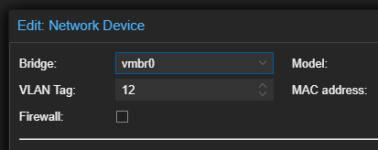
my pve host's nic is set to be vlan aware and I have one vm on the host whos nic has vlan tag 12,
vm: 192.168.12.99/24
upstream gateway: 192.168.12.1/24 (vlan 12)

if I ping from the vm to the gateway, the vm receives no replies.

I mirrored the port my pve host is plugged into on the switch and connected that mirrored port to a usb nic on the pve host- a tcpdump on that usb nic shows the replies coming though as expected.

if i tcpdump on the vmbr0 bridge, the replies are missing....

what the heck am I doing wrong here? I have what I perceive as an identical setup on another pve host in this cluster and it is working as expected with no issues.... (edit: i also swapped the ports both pve hosts were connected to my switch with and observed no changes so I am confident this is not something in my switch or upstream hw)

thanks for reading.
 
Last edited:
Hey there,
showing your config for proxmox host under /etc/network/interfaces might help. :)
Your machine has more than one NIC? Or did you mean a "virtual" NIC when saying
and I have one vm on the host whos nic has vlan tag 12
?
I have a similar setting here: proxmox using 1 physical NIC, this one connected to a switch carrying a trunk (all VLANs over one cable). The NIC is set as vlan aware bridge as well. In my VMs I just enter my wanted VLAN ID tag, it gets its address as expected. I never entered any gateway when creating a VM...still, I can ping the default gateway here as well (which is 172.16.100.1 VM with .5/24).
Any firewall settings on your side?
 
Hey there,
showing your config for proxmox host under /etc/network/interfaces might help. :)
Your machine has more than one NIC? Or did you mean a "virtual" NIC when saying

?
I have a similar setting here: proxmox using 1 physical NIC, this one connected to a switch carrying a trunk (all VLANs over one cable). The NIC is set as vlan aware bridge as well. In my VMs I just enter my wanted VLAN ID tag, it gets its address as expected. I never entered any gateway when creating a VM...still, I can ping the default gateway here as well (which is 172.16.100.1 VM with .5/24).
Any firewall settings on your side?

this pve host only has one physical nic other than the usb one i hooked up to tcpdump the output of the mirrored port from my switch...

when i said "and I have one vm on the host whos nic has vlan tag 12" i meant it has this config in the guest hardware webui (so yes to your quesiton if i understand it correctly):
1764610791917.png

all firewalls are either off or empty. I have also tested this setup on more than one guest os...

cat /etc/network/interfaces:
Code:
auto lo
iface lo inet loopback

iface enp1s0 inet manual

iface wlp2s0 inet manual

iface enx00e024da64ef inet manual

auto vmbr0
iface vmbr0 inet static
        address 10.0.0.98/24
        gateway 10.0.0.1
        bridge-ports enp1s0
        bridge-stp off
        bridge-fd 0
        bridge-vlan-aware yes
        bridge-vids 2-4094

source /etc/network/interfaces.d/*
(interfaces.d is empty)
this interfaces file appears the same as another pve host that i am not observing this issue on...

thanks for the the help
 
hey there,
I am just a beginner, seems wy less experienced and a wy smaller setting (just one node here, small homelab). Still: my config looks a bit different on my proxmox host:
Code:
auto lo
iface lo inet loopback

iface enp1s0 inet manual
#10Gbit Karte

iface enp4s0 inet manual
#on board 1 Gbit

auto vmbr0
iface vmbr0 inet manual
        bridge-ports enp1s0
        bridge-stp off
        bridge-fd 0
        bridge-vlan-aware yes
        bridge-vids 2-4094

auto vmbr0.30
iface vmbr0.30 inet static
        address 172.16.130.10/24
        gateway 172.16.130.1

source /etc/network/interfaces.d/*

EDIT: the part with auto lo and following stating all interfaces are in my config as well, of course...sorry for confusion.

So my proxmox host is reachable under its .10 in VLAN30. vmbr0.30 is for managing log in. For VMs and such I use different VLANs, thos (as you already said) configured in the process of creating a new VM...
Only difference I see here is between .../interfaces...so what happens, if you try it like that?
 
Last edited:
hey there,
I am just a beginner, seems wy less experienced and a wy smaller setting (just one node here, small homelab). Still: my config looks a bit different on my proxmox host:
Code:
auto vmbr0
iface vmbr0 inet manual
        bridge-ports enp1s0
        bridge-stp off
        bridge-fd 0
        bridge-vlan-aware yes
        bridge-vids 2-4094

auto vmbr0.30
iface vmbr0.30 inet static
        address 172.16.130.10/24
        gateway 172.16.130.1

source /etc/network/interfaces.d/*

So my proxmox host is reachable under its .10 in VLAN30. vmbr0.30 is for managing log in. For VMs and such I use different VLANs, thos (as you already said) configured in the process of creating a new VM...
Only difference I see here is between .../interfaces...so what happens, if you try it like that?
I am tempted to make those edits but also hesitant because this is working on a node that has the same exact interfaces file content...

what version of pve are you running?

I consider myself a beginner too when it comes to implementing vlans in this sort of situation, but I was under the impression that the pve host doesnt need an address on the vlan because the bridge is being used is just functioning like an L2 switch...
 
Hey there,
Well, I got my config as it is recommended here: https://pve.proxmox.com/wiki/Network_Configuration#sysadmin_network_vlan
In order to have access to proxmox host itself, it needs to know, in which vlan and which IP it should use. Everything else is then done by tagging your lxc or vm even with gui. But afaik you'll need to configure a vmbr.X in order to make it work as designed...but as mentioned, just a homelab user.

lookin at the statements made in the doc you linked (thanks!) still makes me think something is wrong (even eithout those edits). part of the reason I dont think I need to add an interface for the vlan on the pve host is because the pve host itself doesnt need to be available at all on vlan 12, I only want it to support communication between vms specified to have their nic on vlan 12 and the external gateway which has an interface on vlan 12. Also, it works fine on two other nodes wihtout any configuration... im beginning to think this may be a scenario where a networking restart might fix things... the ol' turn it on n off again....

another way of framing what i my observed problem is:
two pve hosts of my three are able to see ping requests and replies (using tcpdump on vmbr0) between a guest vm on vlan 12 and the gateway address on vlan 12, however the one pve host only sees the requests coming from the guest vm and no replies from the gateway (even though tcpdump on the gateway shows them going out)...

thanks for reading

EDIT: welp, i just tried restarting networking on one of the working nodes to make sure the working setup persisted... and it did not... I have some things to learn here lol
EDIT2: after restarting the vm on the working host i restarting the hetworking on it works again... I guess that was expected...

EDIT3: after sharing a link to this page with chatgpt it led me here: https://forum.proxmox.com/threads/bridge_vlan_aware-requires-reboot-to-take-effect.67159/ will report back...
 
Last edited:
EDIT: although doing what i show below did fix vlan 12 it broke every other vlan used on the box and I had to reboot the host anyway... so maybe just lead with that...

Code:
https://forum.proxmox.com/threads/bridge_vlan_aware-requires-reboot-to-take-effect.67159/
1- I removed the NIC on all vms that I had setup for the vlan at hand (12)
2- I removed the link and bridge associated:
Code:
ip link del enp1s0.12
ifconfig vmbr0v12 down
brctl delbr vmbr0v12
3- I added new nic to vms on vlan 12
 
Last edited: