

TLDR: Route your VMs and containers through Cloudflare's network for better international connectivity.
Why ?
Does your ISP provide a terrible international route? Do
This router sends your outbound traffic through Cloudflare's network instead, which can often turn those KB/s into MB/s.
Quick start:
IMPORTANT: Your BRIDGE (default: vmbr0) must have VLAN aware enabled.
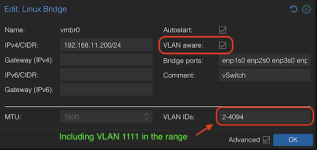
To connect a VM or container to this CF WARP router:
1. Make sure its NIC is connected to the same VLAN-aware bridge (default: vmbr0).
2. Edit the NIC and set the VLAN Tag to 1111.
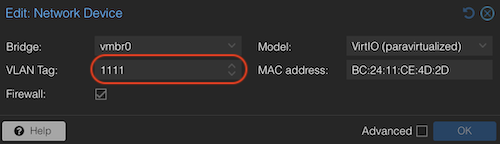
For source code, see: https://github.com/LongQT-sea/cf-warp-router
Why ?
Does your ISP provide a terrible international route? Do
apt/dnf upgrade or git clone crawl along at KB/s? Do GitHub Actions artifacts or SourceForge downloads take hours?This router sends your outbound traffic through Cloudflare's network instead, which can often turn those KB/s into MB/s.
Quick start:
IMPORTANT: Your BRIDGE (default: vmbr0) must have VLAN aware enabled.
Code:
# Pull the cf-warp-router OCI image:
skopeo copy docker://ghcr.io/longqt-sea/cf-warp-router:latest oci-archive:/var/lib/vz/template/cache/cf-warp-router_latest.tar

# Configure the container
BRIDGE=             # Default: vmbr0
VLAN_ID=            # VLAN ID for upstream internet connection, leave empty if unsure
STORAGE=            # Default: local-lvm
VMID=               # Default: 1111
ROOT_PASSWORD=''    # Default: 123456
NAME=''             # Default: warp-router
DISK_SIZE_GB=       # Default: 4
CPU_CORE=           # Default: 2
RAM_MB=             # Default: 512

# Create the container
pct create "${VMID:=1111}" local:vztmpl/cf-warp-router_latest.tar \
  --arch amd64 --ostype debian \
  --hostname "${NAME:-warp-router}" \
  --password "${ROOT_PASSWORD:-123456}" \
  --cores "${CPU_CORE:-2}" --memory "${RAM_MB:-512}" \
  --rootfs "${STORAGE:-local-lvm}:${DISK_SIZE_GB:-4}" \
  --unprivileged 1 \
  --features nesting=1 \
  --dev0 /dev/net/tun \
  --net0 name=eth0,bridge="${BRIDGE:=vmbr0}",firewall=0,host-managed=0,"${VLAN_ID:+tag=$VLAN_ID,}"ip=dhcp,ip6=dhcp,type=veth \
  --net1 name=eth1,bridge="$BRIDGE",firewall=0,host-managed=0,type=veth \
  -onboot 1

# Finally, start the container
pct start $VMID1. Make sure its NIC is connected to the same VLAN-aware bridge (default: vmbr0).
2. Edit the NIC and set the VLAN Tag to 1111.
For source code, see: https://github.com/LongQT-sea/cf-warp-router
Last edited: