Virtual machine freezes with IO error

uzisuicida

New Member
Apr 13, 2026
5
0
1
Hello everyone,

I'm having problems with only one virtual machine. After several days, it displays the error: Status: io-error. I've checked the disk and there's no problem there. It only happens with this machine. After shutting it down and turning it back on, it continues to function normally.
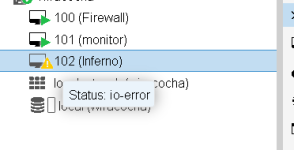
1.png

I have no idea what to check.

Thanks!
 

Attachments

  • 1.png
    1.png
    16 KB · Views: 8
Hello d.oshi,

No errors were observed with journalctl or dmesg.
I also don't see any errors with the commands you sent me, unless I don't know how to interpret them; I've attached a file with the output of each command.

Thanks!
 

Attachments

Your VM is on the local-lvm which is not really suitable for VM storage.

If the error re-occurs look for storage related messages:

Code:
dmesg -T | egrep -i "error|fail|reset|nvme|sd"

The log indicates slow writes:

Code:
wr_operations: 802447
wr_total_time_ns: 1731275382833

That‘s around 2ms per write. And this:

Code:
account_failed: 1
account_invalid: 1

comes directly from the QEMU block-layer and means that there was an IO error.

How does did you setup your storage for local-lvm? NVME? SSD?
 
Jepp, typo. Storage is local, not local-lvm.

@uzisuicida: your VM has

Code:
cache.direct=true
no-flush=false

But dmesg shows:

Code:
sd 0:0:0:0: [sda] Write cache: enabled, read cache: enabled, doesn't support DPO or FUA
sd 1:0:0:0: [sdb] Write cache: enabled, read cache: enabled, doesn't support DPO or FUA

FUA is Force Unit Access = write blocks directly on the storage.

qcow2 (used by your VM) relies heavily on metadata updates and requires reliable flush operations to keep the filesystem consistent.
If the underlying storage does not support FUA, flush requests may be acknowledged before data is actually written to disk.
This creates a mismatch where the VM assumes data is safely stored, while it may still reside in volatile cache.
Under load or failure conditions, this can lead to data corruption or I/O errors, potentially crashing the VM.
 
This creates a mismatch where the VM assumes data is safely stored, while it may still reside in volatile cache. Under load or failure conditions, this can lead to data corruption or I/O errors, potentially crashing the VM.

How would it lead to data corruption or I/O errors under load? When data is requested to be read again, if it's in the cache (and hasn't YET been written to disk), then the cached data would be given back to the requestor.

Where you run into issues is if there's a crash and cached data can't be flushed to disk
 
Jepp, typo. Storage is local, not local-lvm.

@uzisuicida: your VM has

Code:
cache.direct=true
no-flush=false

But dmesg shows:

Code:
sd 0:0:0:0: [sda] Write cache: enabled, read cache: enabled, doesn't support DPO or FUA
sd 1:0:0:0: [sdb] Write cache: enabled, read cache: enabled, doesn't support DPO or FUA

FUA is Force Unit Access = write blocks directly on the storage.

qcow2 (used by your VM) relies heavily on metadata updates and requires reliable flush operations to keep the filesystem consistent.
If the underlying storage does not support FUA, flush requests may be acknowledged before data is actually written to disk.
This creates a mismatch where the VM assumes data is safely stored, while it may still reside in volatile cache.
Under load or failure conditions, this can lead to data corruption or I/O errors, potentially crashing the VM.
Hello,

I have other servers with Proxmox, and I ran the same command, it shows the same thing, but I don't have this problem of a virtual machine freezing and having to turn it off and on.

Thanks.