[Virtual Machine Config] Windows 11 Pro Memory Integrity: Does it require nested virtualization?

I can report a bit of a progress on my side. By using the following cpu flag: +hv-passthrough cpu utilization drops from 11% to about 3%. WIth VBS enabled and running. Also VM feels way faster. Keep in mind that +hv-passthrough cannot be set with GUI.

In the meantime I have upgraded qemu to 10.2 and I am using kernel 7.0-rc6 both from pve-test repo.

I noticed that snapshotting functionality does not work if VM is on. I am testing on my home/lab setup. I need to verify this on Xeon hardware ...

Thanks to @lordprotector
 
Nice. hv-passthrough is the QEMU/KVM flag that makes the hypervisor transparently pass through all Hyper-V enlightenments supported by the host KVM directly to the guest VM - no manual enumeration needed.

It's not a magic bullet on its own, but if your previous configuration wasn't optimal, you'll likely see gains. Either way, it's certainly easier than spelling out all those flags by hand.
 
This is what I personally use:
Code:
affinity: 0-11
agent: 1
args: -cpu Skylake-Client-v4,vmx,hv-passthrough,pdpe1gb
bios: ovmf
boot: order=scsi0;net0
cores: 12
efidisk0: local-zfs:vm-104-disk-0,efitype=4m,ms-cert=2023w,pre-enrolled-keys=1,size=1M
hostpci0: 0000:03:00.2,pcie=1
hugepages: 1024
machine: pc-q35-10.0+pve1
memory: 32768
meta: creation-qemu=10.0.2,ctime=1761910818
name: windows-work
net0: virtio=BC:24:11:A0:3D:FA,bridge=vmbr0,tag=100
numa: 1
ostype: win11
protection: 1
scsi0: local-zfs:vm-104-disk-1,discard=on,iothread=1,size=256G,ssd=1
scsihw: virtio-scsi-single
sockets: 1
tablet: 1
tpmstate0: local-zfs:vm-104-disk-2,size=4M,version=v2.0

But it's still way slower than usual setup without vmx enabled.
 
UPDATE1:

I can confirm that basically the same behavior can be observed when using Intel Xeon 3rd Generation - released in 2Q 2021. So far I found the most significant implication of using(hv-passthrough flag) is not being able to use Live Migration. This might be possible to fix, if I could define ALL hv-* flags needed, but there are so many ... not sure how to approach this.

As VBS has several modules, I noticed that several VBS Available Security Properties are not available under Qemu/KVM/Proxmox. For instance, DMA Protection, SMM Security Mitigations 1.0 and Mode Based Execution Control while I can see them available while using the same CPU type under VMware ESXi.

Original post:

I have quite recent CPU: Intel(R) Core(TM) Ultra 9 285K(test lab) and slightly older Intel Xeon(3rd gen) for the production.

I tried cpu types: host,Skylake-client and some others. It is quite simple, vmx is needed to get VBS running, while hv-passthrough fixes performances back to "normal".

I made a few geekbench6 cpu tests:

Cpu settingsvbs statussingle core scoremultiple cores scorecomment/subjective impression
host, vmx, +hv-passenabled20009700OK(decent)
host, vmxenabled17007500laggy
x86-64-v2disabled12006300OK(fast)
skylake-client, vmxenabled16007500laggy
skylake-client,vmx,+hv-passenabled19009600OK(decent)
host,-vmxdisabled210010600OK(very fast)


I reported before that snapshot feature does not work. I managed to get it working if NUMA is disabled, but without ram.

So my answer to the original question would be, yes, nested virtualization(vmx for Intel) is required for memory Integrity(VBS) in Windows. But it is not enough, the performance is quite bad. By using hv-passthrough, the performance hit is mitigated, but I guess it has a few side effects, like snapshotting with ram does not work, maybe something else.

I need to redo those test on Intel Xeon, where I am considering running multiple Virtual Desktops(VDI) VMs.


This is my setting:

Code:
args: -cpu host,vmx,+hv-passthrough
agent: 1
balloon: 0
bios: ovmf
boot: order=scsi0;ide2;ide0;net0
cores: 8
efidisk0: data15_nvme:vm-147-disk-3,efitype=4m,ms-cert=2023k,pre-enrolled-keys=1,size=4M
ide0: none,media=cdrom
ide2: none,media=cdrom
machine: pc-q35-10.2
memory: 8192
meta: creation-qemu=10.0.2,ctime=1762108470
name: Win11H24
net0: virtio=BC:24:11:70:9B:D9,bridge=vmbr0
numa: 0
ostype: win11
scsi0: data15_nvme:vm-147-disk-1,backup=0,discard=on,size=100G,ssd=1
scsi1: data15_nvme:vm-147-disk-2,backup=0,discard=on,size=500G,ssd=1
scsihw: virtio-scsi-single
smbios1: uuid=1dbe7836-52e6-4682-937d-ae582b812643
sockets: 1
tpmstate0: data15_nvme:vm-147-disk-4,size=4M,version=v2.0
 
Last edited:
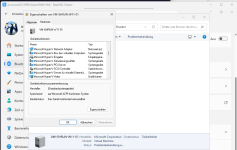
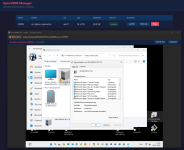
it works. Windows can run on top of kvm/openvmm - openvmm provides hyper-v devices directly.
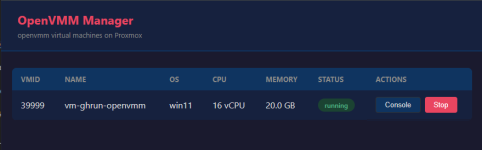
I also created a small web panel running on proxmox. performance on my old cpu is basically the same as with qemu/cpu=host
no virtio drivers needed.

Its more of a concept with some cheavats - but everything is working fine. i did not want to patch proxmox gui itself, so integration is limited - but it can be a starting point experimenting with openvmm on proxmox. it would be possible to get it somehow accaptable, but at the moment no snapshots, no HA, only ZFS snapshots (no pbs backup), no status display in the proxmox gui, no proper shutdown (can be done via ssh - grpc not working) etc.
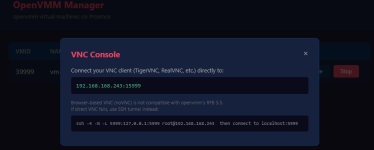
the browser embedded noVNC viewer is also not working (limitation of the openvmm vnc server), so You need an external VNC Viewer to connect to the machine (or RDP, or any other remote access tool)

hyper-v guests also working fine on that VM.

you can find all the code on : https://github.com/bitranox/proxmox_openvmm

I hope that one day proxmox will support it out of the box.

1775413326858.png

1775413357445.png
1775413839341.png
 
Last edited:
good progress on the openvmm integration into proxmox :

- vnc server extended on Microsoft OpenVMM, so it supports noVNC now : https://github.com/microsoft/openvmm/pull/3197
- PID option added, a precondition to make VM status visible in the proxmox Gui : https://github.com/microsoft/openvmm/pull/3224

still a lot to do to make it production worthy, but good pace.

I wonder if anyone is interested in this, should be really good to move VM´s from Azure to Proxmox Servers.
 
good progress on the openvmm integration into proxmox :

- vnc server extended on Microsoft OpenVMM, so it supports noVNC now : https://github.com/microsoft/openvmm/pull/3197
- PID option added, a precondition to make VM status visible in the proxmox Gui : https://github.com/microsoft/openvmm/pull/3224

still a lot to do to make it production worthy, but good pace.

I wonder if anyone is interested in this, should be really good to move VM´s from Azure to Proxmox Servers.
Did you notice any improvements performance wise?
 
I unfortunately got stuck with migration of VDI platform, so I have no time testing, maybe next weekend. I would be also interested in performance and VBS available features.
 
its too early for performance comparisons, because a lot of KVM Features are not used by openvmm now.