

Hi,Hi everyone,
I'm experiencing a significant performance issue after migrating a Microsoft SQL Server database from an older bare-metal Windows Server to a new Windows
My questions
- Could Proxmox or ZFS RAIDZ1 still be responsible for the poor application performance even though SQL Server reports approximately 0.1 ms average disk latency?
- Could the ZFS configuration, synchronous writes, caching, or virtualization overhead cause this kind of slowdown?
- Is a 64K ZFS volblocksize appropriate for a SQL Server database workload on RAIDZ1?
- Are there any known performance issues or recommended optimizations for Windows Server 2025 and SQL Server 2025 running under Proxmox?
- What would be the best way to identify whether the bottleneck is at the Proxmox/ZFS layer or inside SQL Server?
We were in the same troubles and tried everything that we thought could be the cause, without luck. Until this afternoon where we eventually found the root cause and solution (in our setup at least). And thus I think we should share it.
Our VM is Windows Server 2022 with SQL Server 2022 up to date, both. 2 sockets and 8 vCPU each, SCSI vmdisk on ZFS RAIDZ partition, hosted on SSD normal drives (5 disks). Physical host is a Dell R760 or similar with no hardware RAID, Gold 56 core and a lot of RAM (bought a long time ago when it didn't cost you an arm and a leg).
During heavy SQL writes (+70'000 tables being reformatted and restructured, by reading a full table and writing all records to another table in new format), we experienced very low performance, then we discovered that Disk queue (in Performance monitor) was always high (above 2). By low performance we mean it took more than 25 hours to complete the migration.
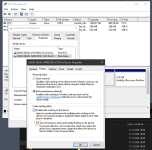
Then, today, came the revelation : in Windows Server 2022, we discovered that "policies" -under "disk properties" then "hardware"- had a checkbox for "turn off Windows write-cache buffer flushing".
We checked that box (so we disabled the write-cache buffer flushing, talk about obvious way to ask questions) and performances reached the ceiling.
We used HammerDB to benchmark the raw SQL performance in Transactions Per Minutes and figures went from 25'000-33'000 right up to 550'000.
Just for this single check box. It is live, no reboot and improvement is instantaneous. Disk queue in perf mon is constantly below 0.3 now, even under full load.
It surely isn't the miracle way for all situations -and sometimes it must not be safe to check that box- but in our context, for this setup, that was it. And we tried a lot of other things.
Maybe it will help you too.
edit: added the screen capture of the magic setting
IT-Awareness
Fabian Lucchi
Attachments
Last edited:
