Various errors during installation or use

Darkrys

New Member
Apr 3, 2024
7
0
1
Hello,

I'm having trouble installing Proxmox.
I'm getting random errors, both during the installation and once it's finished.
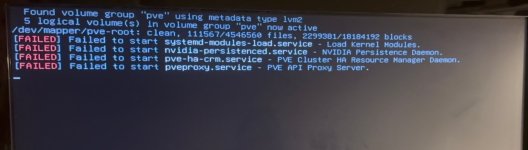
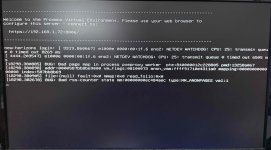
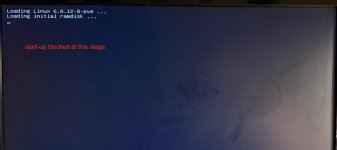
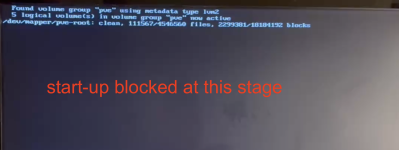
I have attached some screenshots of the different errors I've encountered so far.

Here is my configuration:
Processor
Intel® Core™ i9-14900 vPro® 14th generation processor (E-cores up to 4.30 GHz, P-cores up to 5.40 GHz) selected upgrade

Memory
96GB DDR5-5200MHz (SODIMM) - (2 x 48GB) selected upgrade

Graphics Card
NVIDIA® T400 4GB GDDR6

RAID Settings
Without RAID

Storage
1TB SSD M.2 2280 PCIe Gen4 Performance TLC Opal

Second Hard Drive
256GB SSD M.2 2280 PCIe Gen4 TLC Opal selected upgrade

Wireless Network
Intel® Wi-Fi 6E AX211 2x2 AX vPro® and Bluetooth® 5.1 or higher selected upgrade

Power Supply
300W 90% power adapter selected upgrade

For the moment my server has started, I have access to the local shell and ssh .

Can you help me?
Thank you.
 

Attachments

  • IMG_6759.png
    IMG_6759.png
    45.8 KB · Views: 6
  • IMG_6755.jpg
    IMG_6755.jpg
    80.8 KB · Views: 6
  • IMG_6756.jpeg
    IMG_6756.jpeg
    567.9 KB · Views: 6
  • IMG_6758.jpeg
    IMG_6758.jpeg
    582.3 KB · Views: 6
  • IMG_6757.png
    IMG_6757.png
    356.6 KB · Views: 6
Last edited:
Hello,

I'm having trouble installing Proxmox.
I'm getting random errors, both during the installation and once it's finished.
I have attached some screenshots of the different errors I've encountered so far.

Here is my configuration:
Processor
Intel® Core™ i9-14900 vPro® 14th generation processor (E-cores up to 4.30 GHz, P-cores up to 5.40 GHz) selected upgrade

Memory
96GB DDR5-5200MHz (SODIMM) - (2 x 48GB) selected upgrade

Graphics Card
NVIDIA® T400 4GB GDDR6

RAID Settings
Without RAID

Storage
1TB SSD M.2 2280 PCIe Gen4 Performance TLC Opal

Second Hard Drive
256GB SSD M.2 2280 PCIe Gen4 TLC Opal selected upgrade

Wireless Network
Intel® Wi-Fi 6E AX211 2x2 AX vPro® and Bluetooth® 5.1 or higher selected upgrade

Power Supply
300W 90% power adapter selected upgrade

For the moment my server has started, I have access to the local shell and ssh .

Can you help me?
Thank you.
Your system is encountering multiple installation and post-installation errors. Based on the screenshots and system specifications, here are some key troubleshooting steps:

1. Check for Hardware Compatibility Issues

  • DDR5 RAM Issues:Proxmox is based on Debian, and some DDR5 configurations may cause instability.
    • Try using only one stick of RAM to test stability.
    • Check if there are BIOS updates available to improve DDR5 compatibility.
  • NVIDIA GPU:The NVIDIA T400 may cause issues during installation.
    • Try booting with nomodeset in the kernel parameters.
    • Run:
      Bash:
      nano /etc/default/grub

      Add nomodeset to GRUB_CMDLINE_LINUX_DEFAULT, then update GRUB:
      Bash:
      update-grub
      reboot
  • Wi-Fi Module Interference:
    • Disable Wi-Fi and Bluetooth in BIOS before installation.

2. Fix Boot and Startup Errors

If you get stuck at "Loading initial ramdisk" or volume group errors:

  • Boot into recovery mode and check disk integrity:
    Bash:
    fsck -y /dev/mapper/pve-root

  • Check available storage space:
    Bash:
    df -h

  • Ensure LVM is properly detected:
    Bash:
    lvs

3. Proxmox Services Not Starting (pveproxy, pve-guests)

If pveproxy.service and pve-guests.service fail to start:

  • Restart services manually:
    Bash:
    systemctl restart pveproxy pve-guests

  • If they fail, check logs:
    Bash:
    journalctl -xe | grep pveproxy

4. Reinstall Proxmox with Alternative Kernel

If issues persist, try installing Proxmox with an older kernel:

  • During boot, select Advanced Options and boot with a previous kernel.
  • If using the latest Proxmox version, try installing with proxmox-boot-tool:
    Bash:
    proxmox-boot-tool refresh

Final Steps

  • Ensure all firmware is up to date.
  • If issues persist, install Debian 12 first and then manually install Proxmox.
 
Last edited:
Could be a BIOS setting, a kernel issue, or even SSD compatibility. Have you tried a different ISO or tweaking boot options?