

Utilizing PMG with Office 365

john-tapestry

New Member
Jun 26, 2026
7
0
1
Hello,

I am attempting to use PMG as a mail gateway for our 365 instance, but when analyzing the tracking center, I receive an error message as follows for any inbound email:


2026-06-26T01:28:36.567425+00:00 proxmox-mail-gateway postfix/smtpd[304985]: connect from mx3.[hidden].com[X.X.X.X]
2026-06-26T01:28:36.862400+00:00 proxmox-mail-gateway postfix/smtpd[304985]: NOQUEUE: reject: RCPT from mx3.[hidden].com[X.X.X.X]: 454 4.7.1 <[hidden]@[hidden]>: Relay access denied; from=<[hidden]@[hidden].com> to=<[hidden]@[hidden].com> proto=ESMTP helo=<[hidden].com>
2026-06-26T01:28:36.889562+00:00 proxmox-mail-gateway postfix/smtpd[304985]: disconnect from mx3.[hidden].com[X.X.X.X] ehlo=2 starttls=1 mail=1 rcpt=0/1 quit=1 commands=5/6

I've checked my DNS records to ensure that the MX server's IP address is listed properly but still nothing. I'm not sure what I'm missing here.
 
Hello,

I am attempting to use PMG as a mail gateway for our 365 instance, but when analyzing the tracking center, I receive an error message as follows for any inbound email:


2026-06-26T01:28:36.567425+00:00 proxmox-mail-gateway postfix/smtpd[304985]: connect from mx3.[hidden].com[X.X.X.X]
2026-06-26T01:28:36.862400+00:00 proxmox-mail-gateway postfix/smtpd[304985]: NOQUEUE: reject: RCPT from mx3.[hidden].com[X.X.X.X]: 454 4.7.1 <[hidden]@[hidden]>: Relay access denied; from=<[hidden]@[hidden].com> to=<[hidden]@[hidden].com> proto=ESMTP helo=<[hidden].com>
2026-06-26T01:28:36.889562+00:00 proxmox-mail-gateway postfix/smtpd[304985]: disconnect from mx3.[hidden].com[X.X.X.X] ehlo=2 starttls=1 mail=1 rcpt=0/1 quit=1 commands=5/6

I've checked my DNS records to ensure that the MX server's IP address is listed properly but still nothing. I'm not sure what I'm missing here.
Mail DNS hosted in O365?

If so, make sure your reverse DNS/IP is pointing to the PMG location as well. Also, check that you have the IP range from PMG on the scope of entra for trust, MS is picky about mail connections from a lan at your org.
 
Mail DNS hosted in O365?

If so, make sure your reverse DNS/IP is pointing to the PMG location as well. Also, check that you have the IP range from PMG on the scope of entra for trust, MS is picky about mail connections from a lan at your org.
I double checked the connecter and the public IP for our PMG instance is listed there. I've also confirmed with an nslookup that DNS is pointing correctly. Any other tips?
 
I double checked the connecter and the public IP for our PMG instance is listed there. I've also confirmed with an nslookup that DNS is pointing correctly. Any other tips?
The “Relay access denied” error basically means PMG isn’t recognizing the recipient’s domain as something it’s allowed to accept and forward. Even though you added the domain to Relay Domains, something still isn’t clicking.

Try any of the following:​

  1. Relay Domains: Go to Configuration → Mail Proxy → Relay Domains and make sure your exact domain (like yourcompany.com) is listed — no extra subdomains or typos.

  2. Transports: (this one gets most of us) You probably also need an entry here so PMG knows where to send the mail after scanning it.
    • Go to Mail Proxy → Transports → Create
    • Domain: yourcompany.com
    • Host: your O365 MX (something like yourcompany-com.mail.protection.outlook.com)
    • Port: 25
    • Protocol: smtp
    • Usually uncheck “Use MX”
  3. Microsoft Connector + rDNS: Make sure your inbound connector in O365 is correctly set up to trust your PMG’s public IP. Microsoft can be picky. Also confirm the reverse DNS on your PMG’s public IP points back correctly.

  4. Quick restart after changes: systemctl restart postfix


Builder of Proximo - The Proxmox MCP you can hand the keys — VE + Backup Server + Mail Gateway + Datacenter Manager on one audited trust core (plan · prove · undo · diagnose). MCP + A2A

 
Please also verify the correct use of the internal and external port.
The 454 4.7.1 error might indicate that the e-mail was delivered through the wrong channel and was identified by PMG as outgoing e-mail and since MS e-mail servers are not in your trusted networks the access was denied.
See [1] for details:
  • external port is for incoming public email servers
  • internal port is for internal mail servers and clients sending email through PMG
Best regards
Jonas

[1] https://pmg.proxmox.com/pmg-docs/pmg-admin-guide.html#pmgconfig_mailproxy_ports
 
The “Relay access denied” error basically means PMG isn’t recognizing the recipient’s domain as something it’s allowed to accept and forward. Even though you added the domain to Relay Domains, something still isn’t clicking.

Try any of the following:​

  1. Relay Domains: Go to Configuration → Mail Proxy → Relay Domains and make sure your exact domain (like yourcompany.com) is listed — no extra subdomains or typos.

  2. Transports:(this one gets most of us) You probably also need an entry here so PMG knows where to send the mail after scanning it.
    • Go to Mail Proxy → Transports → Create
    • Domain: yourcompany.com
    • Host: your O365 MX (something like yourcompany-com.mail.protection.outlook.com)
    • Port: 25
    • Protocol: smtp
    • Usually uncheck “Use MX”
  3. Microsoft Connector + rDNS: Make sure your inbound connector in O365 is correctly set up to trust your PMG’s public IP. Microsoft can be picky. Also confirm the reverse DNS on your PMG’s public IP points back correctly.

  4. Quick restart after changes: systemctl restart postfix

Builder of Proximo - The Proxmox MCP you can hand the keys — VE + Backup Server + Mail Gateway + Datacenter Manager on one audited trust core (plan · prove · undo · diagnose). MCP + A2A

I had the port sent to 587. I set it to 25 and restarted it, but I won't be able to test until after work hours. I'll update when done.
 
Please also verify the correct use of the internal and external port.
The 454 4.7.1 error might indicate that the e-mail was delivered through the wrong channel and was identified by PMG as outgoing e-mail and since MS e-mail servers are not in your trusted networks the access was denied.
See [1] for details:
  • external port is for incoming public email servers
  • internal port is for internal mail servers and clients sending email through PMG
Best regards
Jonas

[1] https://pmg.proxmox.com/pmg-docs/pmg-admin-guide.html#pmgconfig_mailproxy_ports
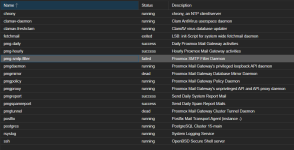
I confirmed both external and internal ports were set properly. However, I did notice this:

1783593746635.png

The SMTP-filter is failing, among other things in that list. Here's what logs read:

Jul 09 10:30:23 proxmox-mail-gateway pmg-smtp-filter[6552]: Filter daemon (re)started (max. 40 processes)
Jul 09 10:30:23 proxmox-mail-gateway systemd[1]: Started pmg-smtp-filter.service - Proxmox SMTP Filter Daemon.
Jul 09 10:30:23 proxmox-mail-gateway pmg-smtp-filter[6552]: WARNING: config: registryboundaries: no tlds defined, need to run sa-update
Jul 09 10:30:23 proxmox-mail-gateway systemd[1]: pmg-smtp-filter.service: Main process exited, code=exited, status=255/EXCEPTION
Jul 09 10:30:23 proxmox-mail-gateway systemd[1]: pmg-smtp-filter.service: Failed with result 'exit-code'.
Jul 09 10:43:10 proxmox-mail-gateway systemd[1]: Starting pmg-smtp-filter.service - Proxmox SMTP Filter Daemon...
Jul 09 10:43:11 proxmox-mail-gateway pmg-smtp-filter[7888]: using pre-fork workers with min=2, max=40, min_spare=1, max_spare=4, max_requests=20
Jul 09 10:43:11 proxmox-mail-gateway pmg-smtp-filter[7912]: Process Backgrounded
Jul 09 10:43:11 proxmox-mail-gateway pmg-smtp-filter[7912]: 2026/07/09-10:43:11 main (type Net::Server::PreFork) starting! pid(7912)
Jul 09 10:43:11 proxmox-mail-gateway pmg-smtp-filter[7912]: Binding to TCP port 10023 on host 127.0.0.1 with IPv4
Jul 09 10:43:11 proxmox-mail-gateway pmg-smtp-filter[7912]: Binding to TCP port 10024 on host 127.0.0.1 with IPv4
Jul 09 10:43:11 proxmox-mail-gateway pmg-smtp-filter[7912]: Group Not Defined. Defaulting to EGID '0'
Jul 09 10:43:11 proxmox-mail-gateway pmg-smtp-filter[7912]: User Not Defined. Defaulting to EUID '0'
Jul 09 10:43:11 proxmox-mail-gateway pmg-smtp-filter[7912]: Setting up serialization via flock
Jul 09 10:43:11 proxmox-mail-gateway pmg-smtp-filter[7912]: Filter daemon (re)started (max. 40 processes)
Jul 09 10:43:11 proxmox-mail-gateway systemd[1]: Started pmg-smtp-filter.service - Proxmox SMTP Filter Daemon.
Jul 09 10:43:11 proxmox-mail-gateway pmg-smtp-filter[7912]: WARNING: config: registryboundaries: no tlds defined, need to run sa-update
Jul 09 10:43:11 proxmox-mail-gateway systemd[1]: pmg-smtp-filter.service: Main process exited, code=exited, status=255/EXCEPTION
Jul 09 10:43:11 proxmox-mail-gateway systemd[1]: pmg-smtp-filter.service: Failed with result 'exit-code'.

I do have a community subscription so I'm also going to run updates again as well as the sa-update command to see if I get any different results. I'll keep this post updated with findings.
 
sa-update && systemctl restart pmg-smtp-filter

If you receive a GPG signature verification error, you can bypass it by adding the --no-gpg flag:

sa-update --no-gpg && systemctl restart pmg-smtp-filter

SpamAssasin rules errors prior or out of memory?


Builder of Proximo - The Proxmox MCP you can hand the keys — VE + Backup Server + Mail Gateway + Datacenter Manager on one audited trust core (plan · prove · undo · diagnose). MCP + A2A

 
sa-update && systemctl restart pmg-smtp-filter

If you receive a GPG signature verification error, you can bypass it by adding the --no-gpg flag:

sa-update --no-gpg && systemctl restart pmg-smtp-filter

SpamAssasin rules errors prior or out of memory?


Builder of Proximo - The Proxmox MCP you can hand the keys — VE + Backup Server + Mail Gateway + Datacenter Manager on one audited trust core (plan · prove · undo · diagnose). MCP + A2A

Finally had another moment to work on this.

running SA update leads to this error.

Timeout::_run: check: no loaded plugin implements 'check_main': cannot scan!
Check that the necessary '.pre' files are in the config directory.
At a minimum, v320.pre loads the Check plugin which is required.

Checking spamassassin, there is not a 320 plugin, but there is a 330 plugin which is enabled. Yet the system isn't using it. I feel that may be the issue. Why is it trying to find 320 and how do I fix that? From there, I think I'll be able to run sa-update.