[SOLVED] Use the extra space available due to zfs compression

Gareth Blades

New Member
Oct 23, 2024
8
1
3
I have zfs setup as raid-5 using 4 960GB SSD drives.
zpool list shows 3.48TB of total drives and zfs list shows Avail+Used as 2.61 which is what I would expect after you loose one drive for parity and then a little space for metadata etc...

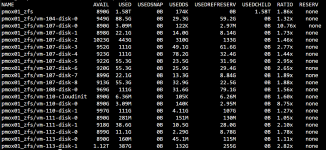
The question I have is that if you look at vm-104 for example it has a 80GB disk allocated and 8GB of memory so a total disk usage of 88GB. However compression is enabled so the actual disk usage is less than 88GB but it appears that ZFS is allocating the full 88GB and reserving the remaining space.
So it would appear that although we are using disk compression we are not able to use the disk space saved because it is being kept as reserved space anyway?

So eventually 'zfs list' will show no remaining space and we won't be able to create new vm's although 'zpool list' will show there is plenty of free space.

I'm sure there is one step I am misunderstanding here.

# zpool list
NAME SIZE ALLOC FREE CKPOINT EXPANDSZ FRAG CAP DEDUP HEALTH ALTROOT
pmox01_zfs 3.48T 1.02T 2.47T - - 13% 29% 1.00x ONLINE -


Screenshot 2026-07-29 122503.png
 
  • Like
Reactions: FrankList80
The link doesn't help. It doesn't mention compression or reserved space at all.

Let me rephrase the primary question.

If a 100GB proxmox disk is created and due to compression it gets compressed down to 40GB then 'zfs list' shows the 40GB data, 60GB reserved and the total space used as 100GB.
So disk compression doesn't give you any additional space. The space gained is reserved and cannot be used anyway?
 
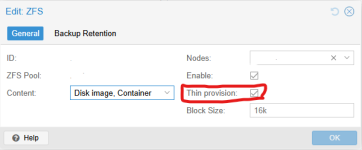
You need to enable 'Thin provision' for your Storage in in Proxmox. This only applies to new virtual disks but you can fix this for existing ZFS manually. See this thread for example:
EDIT: See also the manual: https://pve.proxmox.com/pve-docs/pve-admin-guide.html#sysadmin_zfs_raid_size_space_usage_redundancy
 
  • Like
Reactions: UdoB and Onslow
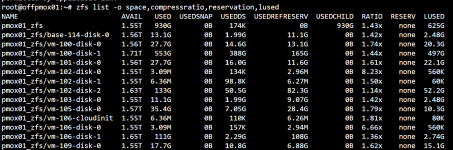
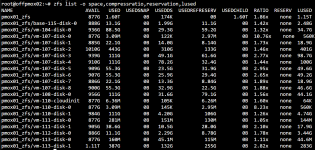
Updated 'zfs list' showing more detail. RESERV is set to none so thin provisioning is enabled.
Most of these machine apart from 110 are have been migrated from vmware.

I understand about thin provisioning and some of these migrated machines although having thin provisioning enabled it wasn't enabled in vmware.

My zfs configuration
zfspool: pmox01_zfs
pool pmox01_zfs
content rootdir,images
mountpoint /pmox01_zfs
nodes offpmox01,offpmox02
sparse 0

Screenshot 2026-07-30 100946.png


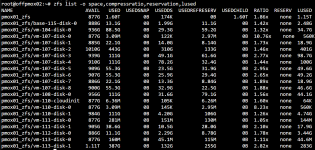
Here is another example from the other proxmox node in the cluster.
vm-100 is a ubuntu 24 machine installed from scratch within proxmox. Maybe some machines could do with a TRIM being done within the vm but vm-100 is new so shouldn't be required.

Also look at vm-107-disk-4 from earlier. This disk is full anyway so thin/thick provisioning isn't really an issue here. It has compressed 100GB down to 78.2GB but there is 32.4GB reserved still. Do even though the data is compressed I am not getting any benefit from compression as I can't use the space.

Screenshot 2026-07-30 103213.png
 

Attachments

  • Screenshot 2026-07-30 100946.png
    Screenshot 2026-07-30 100946.png
    130 KB · Views: 1
Do even though the data is compressed I am not getting any benefit from compression as I can't use the space.
you're going to need to adjust your focus.

you cant use the space IN THE GUEST, because the reservation is for used space, not on-disk. If you need more space, expand the disk.
you can use the space IN THE POOL since the pool isnt concerned with what is consuming blocks.
 
RESERV is set to none so thin provisioning is enabled
No. This is about refreservation. Reservation != Refreservation. It's exactly why it's in my command that you ignored/altered and why USEDREFRESERV is > 0. This is also perfectly explained by sparse 0. If you ask for help, be willing to accept it. Read the link. Maybe this as well. Also set this in Datacenter > Storage.
1785433705232.png
 
Last edited:
  • Like
Reactions: Gareth Blades
No. This is about refreservation. Reservation != Refreservation. It's exactly why it's in my command that you ignored/altered and why USEDREFRESERV is > 0. This is also perfectly explained by sparse 0. If you ask for help, be willing to accept it. Read the link. Maybe this as well. Also set this in Datacenter > Storage.
View attachment 99188
Thank you!

Sorry I just misread refreservation in your earlier post and already had reservation added to my command line. I didn't read the post you linked fully as in my mind it was setting something which I already had set!

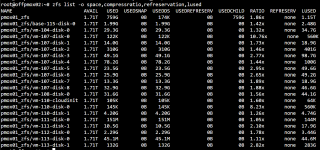
Anyway turning on thin provisioning on zfs and using the script from the other thread it is much better now thanks.

Screenshot 2026-07-30 193122.png