USB Vendor/Device ID SIM-Sized Smart Card Reader problem

sgrygowski

New Member
Jun 25, 2025
3
0
1
I'm having trouble uploading a SIM-sized smart card reader ACR40T to a virtual machine. Proxmox 8.4.19, Windows 11 virtual machine, latest stable Virtio drivers (.285). The ACR40T device appears in Device Manager with an exclamation point. Installing the latest drivers for this device fails with error code 01. The DELL EdgePrecision T440 production server has been tested on both USB 2.0 and USB 3.0 ports, with the same result. I recreated the same environment on an HP DL380G9 server and managed to install the device in a Windows 11 virtual machine. What's the problem?

 
Hi @sgrygowski

thanks for posting in the forum!

Can you please share the output of the following command on both systems upon connecting the USB device:
Code:
dmesg | grep usb
and also
Code:
pveversion -v

Also please check the Windows Event Viewer --> System for Warnings and Errors concerning the USB device.

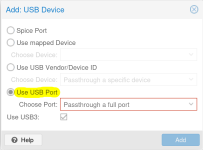
Although this technically shouldn't make a difference, can you please try to pass through the whole USB port instead of the USB device to the VM.
1780389146846.png
You might need to physically reconnect the device for this to work.

Yours sincerely,
Jonas

P.S. A small notice concerning the VirtIO drivers: There are currently known issues with 0.1.285, but none concerning USB (see here) so just to keep in mind.
 
  • Like
Reactions: mfederanko