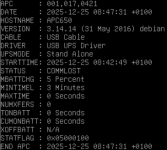
Ich habe eine USV von APC per USB an meinem MiniPC (HomeLab) hängen welche ich gerne per USB passthrough in meinem LXC nutzen möchte.
Ein lsusb gibt mir folgendes zurück:
Bus 001 Device 001: ID 1d6b:0002 Linux Foundation 2.0 root hub
Bus 001 Device 002: ID 1a40:0101 Terminus Technology Inc. Hub
Bus 001 Device 004: ID 3274:8012 MicroarrayTechnology MAFP General Device
Bus 001 Device 005: ID 8087:0029 Intel Corp. AX200 Bluetooth
Bus 001 Device 095: ID 051d:0002 American Power Conversion Uninterruptible Power Supply
Bus 002 Device 001: ID 1d6b:0003 Linux Foundation 3.0 root hub
Bus 003 Device 001: ID 1d6b:0002 Linux Foundation 2.0 root hub
Bus 004 Device 001: ID 1d6b:0003 Linux Foundation 3.0 root hub
Bus 005 Device 001: ID 1d6b:0002 Linux Foundation 2.0 root hub
Bus 006 Device 001: ID 1d6b:0003 Linux Foundation 3.0 root hub
Bus 007 Device 001: ID 1d6b:0002 Linux Foundation 2.0 root hub
Bus 008 Device 001: ID 1d6b:0003 Linux Foundation 3.0 root hub
Das Device 095 (oben fett) ist als dran. Mit ls -la /dev/serial/by-id/ bekomme ich allerdings nur das hier zurück:
ls: cannot access '/dev/serial/by-id/': No such file or directory
Wenn ich danach suche finde ich immer nur Anleitungen und Problemlösung zu dem bekannten Bug in deb11 (https://www.youtube.com/watch?v=2Jsedi4IueE)
Ich nutze jedoch deb13 (apt policy udev):
Installed: 257.9-1~deb13u1
Candidate: 257.9-1~deb13u1
Version table:
*** 257.9-1~deb13u1 500
500 http://deb.debian.org/debian trixie/main amd64 Packages
500 http://download.proxmox.com/debian/pve trixie/pve-no-subscription amd64 Packages
100 /var/lib/dpkg/status
● systemd-udevd.service - Rule-based Manager for Device Events and Files
Loaded: loaded (/usr/lib/systemd/system/systemd-udevd.service; static)
Drop-In: /usr/lib/systemd/system/systemd-udevd.service.d
└─syscall-architecture.conf
Active: active (running) since Wed 2025-12-24 07:48:49 CET; 24h ago
Invocation: ba66230e95024ea4be4dadec6091050f
TriggeredBy: ● systemd-udevd-kernel.socket
● systemd-udevd-control.socket
Docs: man:systemd-udevd.service(8)
man:udev(7)
Main PID: 444 (systemd-udevd)
Status: "Processing with 48 children at max"
Tasks: 1
Memory: 80M (peak: 122.7M)
CPU: 18.790s
CGroup: /system.slice/systemd-udevd.service
└─udev
└─444 /usr/lib/systemd/systemd-udevd
Bei mir gibt es unter /dev auch keinen ttyUSB Ordner. Ich wollte die Weiterleitung entsprechend dieser Anleitung umsetzen:
https://www.youtube.com/watch?v=FlMuxDABXEI
Aber wie gesagt, bei dem Befehl ls -la /dev/serial/by-id/ bekomme ich keine IDs angezeigt. Muss ich noch irgend etwas installieren oder einen Dienst starten damit das geht?
Wenn ich ein usb-devices abschicke bekomme ich auch alle Geräte/ Ports angezeigt. Exemplarisch hier mal nur die APC USV um die es geht:
T: Bus=01 Lev=01 Prnt=04 Port=03 Cnt=01 Dev#= 77 Spd=12 MxCh= 0
D: Ver= 2.00 Cls=00(>ifc ) Sub=00 Prot=00 MxPS=64 #Cfgs= 1
P: Vendor=051d ProdID=0002 Rev=01.06
S: Manufacturer=American Power Conversion
S: Product=Back-UPS BE650G2 FW:497200G -497300G
S: SerialNumber=XXXXXXXXXXXX
C: #Ifs= 1 Cfg#= 1 Atr=a0 MxPwr=100mA
I: If#= 0 Alt= 0 #EPs= 1 Cls=03(HID ) Sub=00 Prot=00 Driver=usbfs
E: Ad=81(I) Atr=03(Int.) MxPS= 6 Ivl=10ms
Habt ihr mir Tipps?
Ein lsusb gibt mir folgendes zurück:
Bus 001 Device 001: ID 1d6b:0002 Linux Foundation 2.0 root hub
Bus 001 Device 002: ID 1a40:0101 Terminus Technology Inc. Hub
Bus 001 Device 004: ID 3274:8012 MicroarrayTechnology MAFP General Device
Bus 001 Device 005: ID 8087:0029 Intel Corp. AX200 Bluetooth
Bus 001 Device 095: ID 051d:0002 American Power Conversion Uninterruptible Power Supply
Bus 002 Device 001: ID 1d6b:0003 Linux Foundation 3.0 root hub
Bus 003 Device 001: ID 1d6b:0002 Linux Foundation 2.0 root hub
Bus 004 Device 001: ID 1d6b:0003 Linux Foundation 3.0 root hub
Bus 005 Device 001: ID 1d6b:0002 Linux Foundation 2.0 root hub
Bus 006 Device 001: ID 1d6b:0003 Linux Foundation 3.0 root hub
Bus 007 Device 001: ID 1d6b:0002 Linux Foundation 2.0 root hub
Bus 008 Device 001: ID 1d6b:0003 Linux Foundation 3.0 root hub
Das Device 095 (oben fett) ist als dran. Mit ls -la /dev/serial/by-id/ bekomme ich allerdings nur das hier zurück:
ls: cannot access '/dev/serial/by-id/': No such file or directory
Wenn ich danach suche finde ich immer nur Anleitungen und Problemlösung zu dem bekannten Bug in deb11 (https://www.youtube.com/watch?v=2Jsedi4IueE)
Ich nutze jedoch deb13 (apt policy udev):
Installed: 257.9-1~deb13u1
Candidate: 257.9-1~deb13u1
Version table:
*** 257.9-1~deb13u1 500
500 http://deb.debian.org/debian trixie/main amd64 Packages
500 http://download.proxmox.com/debian/pve trixie/pve-no-subscription amd64 Packages
100 /var/lib/dpkg/status
● systemd-udevd.service - Rule-based Manager for Device Events and Files
Loaded: loaded (/usr/lib/systemd/system/systemd-udevd.service; static)
Drop-In: /usr/lib/systemd/system/systemd-udevd.service.d
└─syscall-architecture.conf
Active: active (running) since Wed 2025-12-24 07:48:49 CET; 24h ago
Invocation: ba66230e95024ea4be4dadec6091050f
TriggeredBy: ● systemd-udevd-kernel.socket
● systemd-udevd-control.socket
Docs: man:systemd-udevd.service(8)
man:udev(7)
Main PID: 444 (systemd-udevd)
Status: "Processing with 48 children at max"
Tasks: 1
Memory: 80M (peak: 122.7M)
CPU: 18.790s
CGroup: /system.slice/systemd-udevd.service
└─udev
└─444 /usr/lib/systemd/systemd-udevd
Bei mir gibt es unter /dev auch keinen ttyUSB Ordner. Ich wollte die Weiterleitung entsprechend dieser Anleitung umsetzen:
https://www.youtube.com/watch?v=FlMuxDABXEI
Aber wie gesagt, bei dem Befehl ls -la /dev/serial/by-id/ bekomme ich keine IDs angezeigt. Muss ich noch irgend etwas installieren oder einen Dienst starten damit das geht?
Wenn ich ein usb-devices abschicke bekomme ich auch alle Geräte/ Ports angezeigt. Exemplarisch hier mal nur die APC USV um die es geht:
T: Bus=01 Lev=01 Prnt=04 Port=03 Cnt=01 Dev#= 77 Spd=12 MxCh= 0
D: Ver= 2.00 Cls=00(>ifc ) Sub=00 Prot=00 MxPS=64 #Cfgs= 1
P: Vendor=051d ProdID=0002 Rev=01.06
S: Manufacturer=American Power Conversion
S: Product=Back-UPS BE650G2 FW:497200G -497300G
S: SerialNumber=XXXXXXXXXXXX
C: #Ifs= 1 Cfg#= 1 Atr=a0 MxPwr=100mA
I: If#= 0 Alt= 0 #EPs= 1 Cls=03(HID ) Sub=00 Prot=00 Driver=usbfs
E: Ad=81(I) Atr=03(Int.) MxPS= 6 Ivl=10ms
Habt ihr mir Tipps?