Hi all. It appears to have gone wrong...
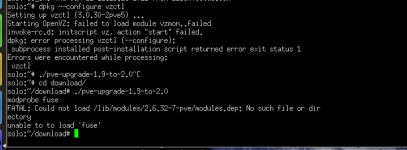
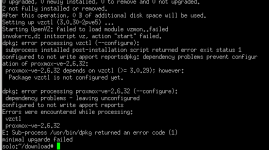
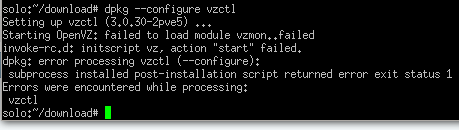
I have just included the last few lines from the log. It all seemed to be going ok until this point...
Can help be provided?
Thanks
Stephen
==============================
I have just included the last few lines from the log. It all seemed to be going ok until this point...
Can help be provided?
Thanks
Stephen
==============================
Configuration file `/etc/vz/vz.conf' ==> Modified (by you or by a script) since installation. ==> Package distributor has shipped an updated version. What would you like to do about it ? Your options are: Y or I : install the package maintainer's version N or O : keep your currently-installed version D : show the differences between the versions Z : start a shell to examine the situation The default action is to keep your current version. *** vz.conf (Y/I/N/O/D/Z) [default=N] ? dpkg: error processing vzctl (--configure): EOF on stdin at conffile prompt configured to not write apport reports dpkg: dependency problems prevent configuration of proxmox-ve-2.6.32: proxmox-ve-2.6.32 depends on vzctl (>= 3.0.29); however: Package vzctl is not configured yet. dpkg: error processing proxmox-ve-2.6.32 (--configure): dependency problems - leaving unconfigured configured to not write apport reports Setting up pve-kernel-2.6.32-11-pve (2.6.32-66) ... update-initramfs: Generating /boot/initrd.img-2.6.32-11-pve Generating grub.cfg ... Found linux image: /boot/vmlinuz-2.6.32-12-pve Found initrd image: /boot/initrd.img-2.6.32-12-pve Found linux image: /boot/vmlinuz-2.6.32-11-pve Found initrd image: /boot/initrd.img-2.6.32-11-pve Found linux image: /boot/vmlinuz-2.6.32-7-pve Found initrd image: /boot/initrd.img-2.6.32-7-pve Found linux image: /boot/vmlinuz-2.6.32-4-pve Found initrd image: /boot/initrd.img-2.6.32-4-pve Found memtest86+ image: /memtest86+.bin Found memtest86+ multiboot image: /memtest86+_multiboot.bin done Setting up xfonts-encodings (1:1.0.3-1) ... Setting up xfonts-utils (1:7.5+2) ... Setting up x-ttcidfont-conf (32) ... Updating font configuration of x-ttcidfont-conf... Cleaning up category cmap.. Cleaning up category cid.. Cleaning up category truetype.. Updating category truetype.. Updating category cid.. Updating category cmap.. Processing triggers for python-central ... Setting up fence-agents-pve (3.1.7-2) ... Setting up pve-manager (2.1-1) ... Installing new version of config file /etc/init.d/pvedaemon ... Installing new version of config file /etc/init.d/pvenetcommit ... Installing new version of config file /etc/cron.daily/pve ... Installing new version of config file /etc/apache2/sites-available/pve.conf ... insserv: warning: current stop runlevel(s) (0 1 6) of script `pvebanner' overwrites defaults (empty). Restarting PVE Daemon: pvedaemon. Restarting PVE Status Daemon: pvestatd. Restarting web server: apache2 ... waiting . Processing triggers for python-support ... Errors were encountered while processing: vzctl proxmox-ve-2.6.32 E: Sub-process /usr/bin/dpkg returned an error code (1) apt-get install proxmox-ve-2.6.32 Reading package lists... Building dependency tree... Reading state information... proxmox-ve-2.6.32 is already the newest version. The following packages were automatically installed and are no longer required: libsensors3 libglib1.2ldbl radiusclient1 libradius1 tcl8.4 apcupsd-doc pve-kernel-2.6.32-7-pve Use 'apt-get autoremove' to remove them. 0 upgraded, 0 newly installed, 0 to remove and 0 not upgraded. 2 not fully installed or removed. After this operation, 0 B of additional disk space will be used. Do you want to continue [Y/n]? Abort. insserv -d STARTING ./pve-upgrade-1.9-to-2.0 (Thu Jun 21 23:17:40 2012) modprobe fuse FATAL: Could not load /lib/modules/2.6.32-7-pve/modules.dep: No such file or directory STARTING ./pve-upgrade-1.9-to-2.0 (Thu Jun 21 23:25:03 2012) modprobe fuse FATAL: Could not load /lib/modules/2.6.32-7-pve/modules.dep: No such file or directory