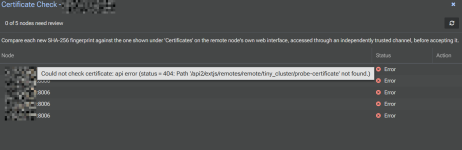
Just updated my lab to 1.0 version from the 0.9.4 version. I get the following error message when I try to access the remotes:
api error (status = 400: Could not establish a TLS connection. Check whether the fingerprint matches or the certificate is valid. OpenSSL Error: error:0A000086:SSL routines:tls_post_process_server_certificate:certificate verify failed:../ssl/statem/statem_clnt.c:2123
Tried to re-add the remotes but seems to get the same result.
I haven't tried just removing and re-adding yet as I'd like to see if there is a way to get around this issue without having to resort to removing and re-adding
Thanks for your help
-S
Update....I did just remove and re-add and all is good. I figured there could be lots of changes between the beta and stable
api error (status = 400: Could not establish a TLS connection. Check whether the fingerprint matches or the certificate is valid. OpenSSL Error: error:0A000086:SSL routines:tls_post_process_server_certificate:certificate verify failed:../ssl/statem/statem_clnt.c:2123
Tried to re-add the remotes but seems to get the same result.
I haven't tried just removing and re-adding yet as I'd like to see if there is a way to get around this issue without having to resort to removing and re-adding
Thanks for your help
-S
Update....I did just remove and re-add and all is good. I figured there could be lots of changes between the beta and stable
Last edited: