

Update Windows 10 VM to Windows 11
- Thread starter Afox
- Start date
You are using an out of date browser. It may not display this or other websites correctly.
You should upgrade or use an alternative browser.
You should upgrade or use an alternative browser.
Just a heads up for anyone who thinks about it:
This was my starting point: https://answers.microsoft.com/en-us...ndows-11/fba31ff3-3d77-40db-9726-b1be540fb3b3
You first need to download the PC Health Check App
and then Windows 11 Installation Assistant
For being able to install Windows 11 following requirements need to be fulfilled:
This was my starting point: https://answers.microsoft.com/en-us...ndows-11/fba31ff3-3d77-40db-9726-b1be540fb3b3
You first need to download the PC Health Check App
and then Windows 11 Installation Assistant
For being able to install Windows 11 following requirements need to be fulfilled:
- Your CPU needs to be in the supported CPU list which means you need to set the CPU type to host for your guest
- Minimum two CPU cores
- Your system disk needs to be larger than 64GB
- Your guest must have more than 4GB RAM
- You need to add a TPM 2.0 state to your guest
- Your guest must support Secure Boot meaning you need to set OVMF (UEFI) as BIOS setting and add an EFI Disk with pre-enrolled keys
Last edited:

I did it recently!Hello,
did anyone successfully update a Windows 10 VM to Windows 11? Is it possible if you just set the OS type to Windows 11/Server 2022 and add a TPM device? Any other actions required?
Thanks and best regards
If you don't already have one, you need to also create an EFI disk. After I added the TPM and EFI disk, I ran health check to confirm it was recognized and then went through the Windows 11 upgrade process. I cloned my VM before the upgrade just in case. Be prepared to start over and rely on your clone/backup if you need to. I didn't document it, but I had some issues with getting it to boot in OVMF after the switch from SEABIOS.
I had some complications - this all started p2v (migrated a physical workstation to proxmox) and the workstation has migrated from Vista -> 7 -> 10 before it got to Proxmox, with all of the built up problems you can imagine. I got it working initially using the old SSD in SATA pass-through mode before using clonezilla to copy the disk over to my lvm. The first time I got it upgraded to 11 and re-launched, none of my old software would load (which was the only reason I kept this install around), so I wiped it and started over from my clone, which worked the second time around.
I still haven't been able to convert the disk over to SCSI from IDE which is a bummer performance wise but works fine for my purposes.
Last edited:
Note: To let windows 10 recignize your vTPM you need to provide sufficient memory. With 4096MB, the TPM module was not found in win 10. Increasing the memory to 6GB solved the problem.
I've upgraded Window 10 to 11 on several physical machines, and in even in Virtual Machine Manager successfully, but so far I haven't been able to accomplish it in Proxmox.
I have Windows 10 VM still on MBR. These commands convert MBR to GPT (which is needed for UEFI):
mbr2gpt shirks the partition to make room for a EFI partition of the same disk.
After shutdown, this new GPT partition won't boot until you enable the UEFI bios in Proxmox. Which automatically enables secure boot, but I have to reset the Secure Boot keys before I can boot.
Promox warns that I need to add an EFI partition when I enable UEFI, but mbr2gpt created an EFI partition when I converted MBR to GPT. So, it isn't clear to me whether I need to add another EFI in Proxmox or not. I've tried upgrading to Windows 11 with and without Promox-added-EFI.
Also, I upgraded the VM's ram from 4GB to 8GB, and switch machine-type to q95 and added TPM 2.0
I've tried every combination of doing these things above that I can think of, and each time the Window 11 upgrade fails with this error:
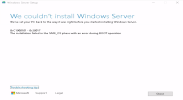
[ 0xC1900101 - 0x20017 The installation failed in the SAFE_OS phase with an error during BOOT operation ]
I can't think of a way around this.
UPDATE:
After that repeated failure, I had the idea of trying a different node in the same cluster, wondering whether the hardware had something to do with it. I can't say with certainty that the host was the only thing that I changed, but it wasn't until I moved this Windows 10 virtual machine to another node that the upgrade finally succeeded.
The node where the upgrade kept failing was a Dell PowerEdge R515. The node where it succeeded was a Dell PowerEdge T620. It could be that the R515's processor was too old to properly emulate something Windows 11 was needing. I'm not sure.
One way to discover the exact settings needed, when upgrading Window 10 to 11, is to do a clean installation of Windows 11 first (in a new VM) as a means of discovering the exact settings that work.
These were my final hardware setting for the successful upgrade:

Notice that I didn't have to add a separate EFI drive like Proxmox warns about when setting the bios to UEFI, because an EFI partition was already created (on the existing virtual hard drive) when I convert the existing drive from MBR to GPT (as shown earlier).
Anyway, I hope this helps someone.
One more thing, August 2026: Microsoft's 2011 Secure Boot certificates expired in June 2026, and Proxmox started warning about it in my backups. I'm no expert here, but it seems like these would need to be current for installing or upgrading to Windows 11.
I ran the following command with all my VMs and containers shut down, and rebooted the hosts afterwards (which may or may not have been necessary):
If the guest has BitLocker on any drive, suspend it from an elevated PowerShell inside Windows before you enroll, or you'll get asked for the recovery key on the next boot:
BitLocker turns itself back on after the next restart, so there's nothing to re-enable.
I have Windows 10 VM still on MBR. These commands convert MBR to GPT (which is needed for UEFI):
Code:
mbr2gpt /validate /disk:0 /allowfullos
mbr2gpt /convert /disk:0 /allowfullos
mbr2gpt shirks the partition to make room for a EFI partition of the same disk.
After shutdown, this new GPT partition won't boot until you enable the UEFI bios in Proxmox. Which automatically enables secure boot, but I have to reset the Secure Boot keys before I can boot.
Promox warns that I need to add an EFI partition when I enable UEFI, but mbr2gpt created an EFI partition when I converted MBR to GPT. So, it isn't clear to me whether I need to add another EFI in Proxmox or not. I've tried upgrading to Windows 11 with and without Promox-added-EFI.
Also, I upgraded the VM's ram from 4GB to 8GB, and switch machine-type to q95 and added TPM 2.0
I've tried every combination of doing these things above that I can think of, and each time the Window 11 upgrade fails with this error:
[ 0xC1900101 - 0x20017 The installation failed in the SAFE_OS phase with an error during BOOT operation ]
I can't think of a way around this.
UPDATE:
After that repeated failure, I had the idea of trying a different node in the same cluster, wondering whether the hardware had something to do with it. I can't say with certainty that the host was the only thing that I changed, but it wasn't until I moved this Windows 10 virtual machine to another node that the upgrade finally succeeded.
The node where the upgrade kept failing was a Dell PowerEdge R515. The node where it succeeded was a Dell PowerEdge T620. It could be that the R515's processor was too old to properly emulate something Windows 11 was needing. I'm not sure.
One way to discover the exact settings needed, when upgrading Window 10 to 11, is to do a clean installation of Windows 11 first (in a new VM) as a means of discovering the exact settings that work.
These were my final hardware setting for the successful upgrade:
Notice that I didn't have to add a separate EFI drive like Proxmox warns about when setting the bios to UEFI, because an EFI partition was already created (on the existing virtual hard drive) when I convert the existing drive from MBR to GPT (as shown earlier).
Anyway, I hope this helps someone.
One more thing, August 2026: Microsoft's 2011 Secure Boot certificates expired in June 2026, and Proxmox started warning about it in my backups. I'm no expert here, but it seems like these would need to be current for installing or upgrading to Windows 11.
I ran the following command with all my VMs and containers shut down, and rebooted the hosts afterwards (which may or may not have been necessary):
Code:
qm enroll-efi-keys <vmid>If the guest has BitLocker on any drive, suspend it from an elevated PowerShell inside Windows before you enroll, or you'll get asked for the recovery key on the next boot:
Code:
manage-bde -protectors -disable C:BitLocker turns itself back on after the next restart, so there's nothing to re-enable.
Last edited:
You didn't mention DirectX 12 and WDDM 2.0. PC Health Check misses that. I am using WhyNotWin11 (from GitHub) and it has not let me down yet.Just a heads up for anyone who thinks about it:
This was my starting point: https://answers.microsoft.com/en-us...ndows-11/fba31ff3-3d77-40db-9726-b1be540fb3b3
You first need to download the PC Health Check App
and then Windows 11 Installation Assistant
For being able to install Windows 11 following requirements need to be fulfilled:
- Your CPU needs to be in the supported CPU list which means you need to set the CPU type to host for your guest
- Minimum two CPU cores
- Your system disk needs to be larger than 64GB
- Your guest must have more than 4GB RAM
- You need to add a TPM 2.0 state to your guest
- Your guest must support Secure Boot meaning you need to set OVMF (UEFI) as BIOS setting and add an EFI Disk with pre-enrolled keys
I was having issues with TPM detection with proxmox and a win10 vm im updating to win 11.
it's on UEFI, secureboot enabled and TPM V2.0 added. When I launched the vm and check tpm.msc, it says no tpm detected. It took me a while but I learned that if you reboot the virtual machine from within Windows and not in proxmox console, it will be detected after the restart is complete.
it's on UEFI, secureboot enabled and TPM V2.0 added. When I launched the vm and check tpm.msc, it says no tpm detected. It took me a while but I learned that if you reboot the virtual machine from within Windows and not in proxmox console, it will be detected after the restart is complete.
Lonnie, what about performance. It takes hours to complete this, but I couldn't change the machine to pc-q35-9.0 yet. Mine is pc-440fx-11.0-pve1I've upgraded Window 10 to 11 on several physical machines, and in even in Virtual Machine Manager successfully, but so far I haven't been able to accomplish it in Proxmox.
I have Windows 10 VM still on MBR. These commands convert MBR to GPT (which is needed for UEFI):
Code:mbr2gpt /validate /disk:0 /allowfullos mbr2gpt /convert /disk:0 /allowfullos
mbr2gpt shirks the partition to make room for a EFI partition of the same disk.
After shutdown, this new GPT partition won't boot until you enable the UEFI bios in Proxmox. Which automatically enables secure boot, but I have to reset the Secure Boot keys before I can boot.
Promox warns that I need to add an EFI partition when I enable UEFI, but mbr2gpt created an EFI partition when I converted MBR to GPT. So, it isn't clear to me whether I need to add another EFI in Proxmox or not. I've tried upgrading to Windows 11 with and without Promox-added-EFI.
Also, I upgraded the VM's ram from 4GB to 8GB, and switch machine-type to q95 and added TPM 2.0
I've tried every combination of doing these things above that I can think of, and each time the Window 11 upgrade fails with this error:
View attachment 78838
[ 0xC1900101 - 0x20017 The installation failed in the SAFE_OS phase with an error during BOOT operation ]
I can't think of a way around this.
UPDATE:
I migrated this Windows 10 virtual machine to a newer node in my cluster and it upgraded fine. It could be that the particular node I was trying to upgrade this on had an processor too old to properly emulate something that Window 11 was needing. I'm not sure.
One way to discover the exact settings needed, when upgrading Window 10 to 11, is to do a clean installation of Windows 11 first (in a new VM) as a means of discovering the exact settings that work.
These were my final hardware setting for the successful upgrade:
View attachment 78892
Notice that I didn't have to add a separate EFI drive like Proxmox warns about when setting the bios to UEFI, because an EFI partition was already created (on the existing virtual hard drive) when I convert the existing drive from MBR to GPT (as shown earlier).
Anyway, I hope this helps someone.
Lonnie, what about performance. It takes hours to complete this, but I couldn't change the machine to pc-q35-9.0 yet. Mine is pc-440fx-11.0-pve1
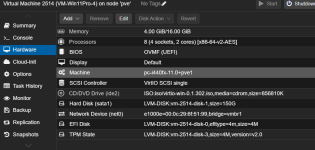
And took all night to start the upgrade, and it didn't finished yet. I have a PowerEdge R720 with 2 xeon-E-5-2640 with 24 Cores, 48 threads
Could be the Sata disk the reason of the slowness?View attachment 99625
And took all night to start the upgrade, and it didn't finished yet. I have a PowerEdge R720 with 2 xeon-E-5-2640 with 24 Cores, 48 threads
@calperin I updated my 2024 post to indicate the hardware involved, and I also added a section for addressing the Secure Boot certificates that expired in June of 2026.View attachment 99625
And took all night to start the upgrade, and it didn't finished yet. I have a PowerEdge R720 with 2 xeon-E-5-2640 with 24 Cores, 48 threads
Your disk is on
sata0, which is emulated and slow. A Windows 11 upgrade hammers the disk, so that's a likely culprit. Your SCSI Controller says VirtIO SCSI but the disk isn't using it, so that setting isn't doing anything.Don't change the bus mid-upgrade — Windows will blue-screen if the driver isn't already installed. Finish or roll back first, then sort the disk out separately: https://pve.proxmox.com/wiki/Windows_VirtIO_Drivers
Your E5-2640 is the same generation as my T620, so I doubt the CPU is your problem.
Last edited: