update freezes

avidesh

Member
Dec 28, 2023
51
2
8
I tried to update using Proxmox UI menu.
First I got the following error
Code:
Starting system upgrade: apt-get dist-upgrade
E: dpkg was interrupted, you must manually run 'dpkg --configure -a' to correct the problem.

System not fully up to date (found 10 new packages)

starting shell
and then when I tried to run dpkg --configure -a
the process hangs at
Code:
dpkg --configure -a
Setting up proxmox-kernel-6.14.11-2-pve-signed (6.14.11-2) ...
Examining /etc/kernel/postinst.d.
run-parts: executing /etc/kernel/postinst.d/initramfs-tools 6.14.11-2-pve /boot/vmlinuz-6.14.11-2-pve
update-initramfs: Generating /boot/initrd.img-6.14.11-2-pve

I end up having to restart the proxmox instance.
 
Hi,

Try to check for hanging processes.
Code:
ps aux | grep update-initramfs

Check disk usage.
Code:
df -h
 
Hi,

Try to check for hanging processes.
Code:
ps aux | grep update-initramfs

Check disk usage.
Code:
df -h
disks are free
Code:
Filesystem                 Size  Used Avail Use% Mounted on
udev                       7.7G     0  7.7G   0% /dev
tmpfs                      1.6G  1.6M  1.6G   1% /run
/dev/mapper/pve-root        94G  5.7G   84G   7% /
tmpfs                      7.7G   34M  7.7G   1% /dev/shm
efivarfs                   192K  109K   79K  59% /sys/firmware/efi/efivars
tmpfs                      5.0M     0  5.0M   0% /run/lock
tmpfs                      1.0M     0  1.0M   0% /run/credentials/systemd-journald.service
tmpfs                      7.7G     0  7.7G   0% /tmp
/dev/nvme0n1p2            1022M  8.8M 1014M   1% /boot/efi
/dev/fuse                  128M   20K  128M   1% /etc/pve
tmpfs                      1.0M     0  1.0M   0% /run/credentials/getty@tty1.service
//10.12.10.182/multimedia  3.6T  559G  3.1T  16% /mnt/pve/media
tmpfs                      1.6G  4.0K  1.6G   1% /run/user/0
//10.12.10.182/nvrshare    3.6T  559G  3.1T  16% /mnt/pve/nvrshare
//10.12.10.182/immichData  3.6T  559G  3.1T  16% /mnt/pve/immichData
 
How long did you wait? Is anything happening in top?
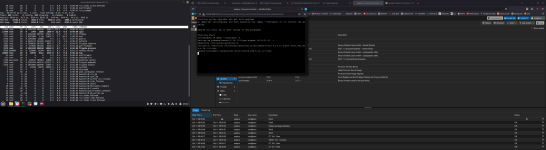
here is what is shown by top just after running dpkg --configure -a.
zstd is consuming very high cpu just prior to system freezing. nothing happens. ssh terminal is frozen as well. I waited for 20 min. then had to physically restart the server.
Screenshot from 2025-10-11 09-00-19.png
 
Last edited:
disks are free
Code:
Filesystem                 Size  Used Avail Use% Mounted on
udev                       7.7G     0  7.7G   0% /dev
tmpfs                      1.6G  1.6M  1.6G   1% /run
/dev/mapper/pve-root        94G  5.7G   84G   7% /
tmpfs                      7.7G   34M  7.7G   1% /dev/shm
efivarfs                   192K  109K   79K  59% /sys/firmware/efi/efivars
tmpfs                      5.0M     0  5.0M   0% /run/lock
tmpfs                      1.0M     0  1.0M   0% /run/credentials/systemd-journald.service
tmpfs                      7.7G     0  7.7G   0% /tmp
/dev/nvme0n1p2            1022M  8.8M 1014M   1% /boot/efi
/dev/fuse                  128M   20K  128M   1% /etc/pve
tmpfs                      1.0M     0  1.0M   0% /run/credentials/getty@tty1.service
//10.12.10.182/multimedia  3.6T  559G  3.1T  16% /mnt/pve/media
tmpfs                      1.6G  4.0K  1.6G   1% /run/user/0
//10.12.10.182/nvrshare    3.6T  559G  3.1T  16% /mnt/pve/nvrshare
//10.12.10.182/immichData  3.6T  559G  3.1T  16% /mnt/pve/immichData
root@aadpve:~# ps aux | grep update-initramfs
root 8172 0.0 0.0 6660 2252 pts/1 S+ 09:22 0:00 grep update-initramfs
 
in a next attempt, i stopped all VMs and LXCs running and re executed the same process. That seem to have did the trick. it went through and completed the process.

wonder what was wrong.
 
Hi,

There was zstd with high CPU usage.
Did you have any active backups in progress during the update?