

[SOLVED] Unable to delete a PVE account (fresh install)

geds3169

Member
Sep 8, 2020
10
0
6
48
Hello, everything is in the title a fresh installation. I have created a pam account and I am able to delete it. I also created a PVE account and couldn't delete it
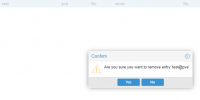
1634566395240.png

The only changes to proxmox are installing postfix (configuration) and installing sudo, for the second administrator account and of course the network configuration.
I had already had this on my previous installation, so I had put this problem on the account of a mishandling.

If anyone can help me, I would be grateful.

King regards Geds
 
what happens when you click 'yes' ? which account are you logged into?
 
Hello, thank you for taking the time to respond.

When I do "ok" the message in return is the user does not exist (500), i'm logged in root. I just formatted, for a clean install, but I have a lot of errors:

secureboot: Secure boot could not be determined (mode 0)

PPR NX GT IA PC GA_vAPIC

platform eisa.0: EISA: Cannot allocate resource for mainboard
platform eisa.0: Cannot allocate resource for EISA slot 1

nvme nvme0: missing or invalid SUBNQN field.

ata2.00: supports DRM functions and may not be fully accessible

spl: loading out-of-tree module taints kernel.
znvpair: module license 'CDDL' taints kernel.
Disabling lock debugging due to kernel taint

warning: symlink leaves directory: /etc/postfix/./makedefs.out

unknown: Started bpfilter

got inotify poll request in wrong process - disabling inotify
 
Last edited:
When I do "ok" the message in return is the user does not exist (500), i'm logged in root.
can you post the content of /etc/pve/user.cfg ?

the other messages seem unrelated
 
I deleted the user in this file, and it no longer appears in the interface now. But what I don't understand is what causes this behavior.
Could changing SSH port or adding sudo to proxmox be the cause?

My installation is fresh, I can now create and delete a pve account.

Only, I have a lot of error, mentioned above.
 
It's a disaster, I just updated the system and I have even more errors, without having to modify a system file.

systemd[1]: lxc.service: Failed with result 'exit-code'.

kernel: watchdog: watchdog0: watchdog did not stop!

kernel: secureboot: Secure boot could not be determined (mode 0)

kernel: PPR NX GT IA PC GA_vAPIC

kernel: platform eisa.0: EISA: Cannot allocate resource for mainboard
kernel: platform eisa.0: Cannot allocate resource for EISA slot 1
kernel: platform eisa.0: Cannot allocate resource for EISA slot 2
kernel: platform eisa.0: Cannot allocate resource for EISA slot 3
kernel: platform eisa.0: Cannot allocate resource for EISA slot 4
kernel: platform eisa.0: Cannot allocate resource for EISA slot 5
kernel: platform eisa.0: Cannot allocate resource for EISA slot 6
kernel: platform eisa.0: Cannot allocate resource for EISA slot 7
kernel: platform eisa.0: Cannot allocate resource for EISA slot 8

kernel: nvme nvme0: missing or invalid SUBNQN field.

kernel: ata2.00: supports DRM functions and may not be fully accessible

kernel: spl: loading out-of-tree module taints kernel.
kernel: znvpair: module license 'CDDL' taints kernel.
kernel: Disabling lock debugging due to kernel taint

smartd[735]: Device: /dev/nvme0, number of Error Log entries increased from 2587 to 2588

unknown: Started bpfilter

postfix/postfix-script[1026]: warning: symlink leaves directory: /etc/postfix/./makedefs.out

pvemailforward[1072]: mail forward failed: Connection refused

corosync[1078]: [WD ] Watchdog not enabled by configuration
proxmox3169 corosync[1078]: [WD ] resource load_15min missing a recovery key.
proxmox3169 corosync[1078]: [WD ] resource memory_used missing a recovery key
 
After two days of research, combed through sites and forums.
Read my journalctl. I understand that my worries stem from the fact that I use a Crucial NVMe.

The different problems, affect: zfs
zunicode
zzstd
zlua
zavl
Icp
zcommon
znvpair
Spl

Will I have to go back to Hyper-V?