

Unable to boot: vmlinuz-6.8.12-8-pve not found

hexadec

Active Member
Aug 28, 2018
7
0
41
38
I had a recent power outage and came back to some weirdness on the server. It is a single machine running a 3 disk ZFS pool.

I am getting the below error:
Failed to execute Proxmox Virtual Environment (\EFI\proxmox\6.8.12-8-pve\vmlinuz-6.8.12-8-pve): Not Found

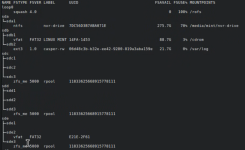
I have tried PVE 6.8 as well as the previous 2 versions in the bootloader, all with similar vmlinuz-*-pve Not Found errors. I have gotten into a Mint live environment and lsblk shows no EFI partitions. I am not sure what went wrong or how to proceed. Note SDB is the live USB Mint drive.
1782240708433.png
 
Last edited:
That sde2 that is vfat is probably your EFI partition. At least normally that would be the only the vfat partition on a system. I think you will want to do an fsck.vfat on that partition. There's supposed to be something that happens to copy that EFI stuff to the other drives so that they all have a EFI partition, (sdd2 sdc2, etc.). But that doesn't look like it has worked since your lsblk can't even tell that those should also be vfat. Still it would be worth doing the fsck.vfat on those too.
 
Will try to fsck the vfat partition.

One more note: I have tried the 7.4.1 and 8.4.1 installer ISOs to get to the recovery tools but have had weird graphics glitches such that I cannot see the screens. If I mash enter it gets me to the GUI installer, but I cannot find the menu to edit grub settings or anything else.

I have tried switching GPUs to see if that is the issue, without success. Tried Quadro 2000, K2200, and a 1060 without any luck. Not sure if there is an elegant way to recover without using the ISO or install the recovery tool independently since normal Linux distros boot without the graphics issues.