Unable to Access Internet from VM with SDN VXLAN Network in Proxmox

avinashboddeda

New Member
Dec 7, 2024
1
0
1
Hi all,

I am working with a Proxmox environment where we are managing multiple tenants, and I am trying to isolate their networks using SDN with VXLAN. However, I’m facing an issue where a VM assigned an IP address in a dedicated subnet cannot access the internet.

Here is my setup:

  • Proxmox IP: 192.168.88.51 (on subnet 192.168.88.0/24)

SDN Configuration:​

  1. Zone Configuration:
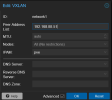
    • Zone Name: zone1
    • Peer Address List: 192.168.88.51
    • MTU: auto
    • Nodes: ALL
    • IPAM: pve
  2. VNET Configuration:
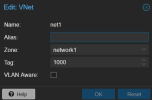
    • Name: vnet1
    • Zone: zone1
    • Tag: 1000
    • VLAN Aware: false
  3. Subnet Configuration:
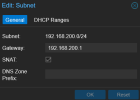
    • Subnet: 192.168.200.0/24
    • Gateway: 192.168.200.1
    • SNAT: enabled
    • DHCP Range: 192.168.200.10 - 192.168.200.50
  4. VM Configuration:
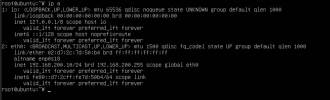
    • IP: 192.168.200.10/24
    • Gateway: 192.168.200.1

Problem:​

Despite the VM being correctly configured within the 192.168.200.0/24 subnet, I am unable to ping the internet from the VM. The internal network seems fine, but external access does not work.

  • I have verified that the VM's network interface is configured properly.
  • I have also checked firewall settings but did not find any blocking rules.
Has anyone faced a similar issue or have any suggestions on what could be wrong with the SDN VXLAN setup?

Thanks in advance for your help!
 

Attachments

  • 1733641533744.png
    1733641533744.png
    21.1 KB · Views: 20
  • 1733641577516.png
    1733641577516.png
    11.5 KB · Views: 19
  • 1733641596444.png
    1733641596444.png
    12.6 KB · Views: 17
  • 1733641626438.png
    1733641626438.png
    49.9 KB · Views: 19
  • 1733641696267.png
    1733641696267.png
    23.9 KB · Views: 20
VXLAN is a layer2 network and as such does not provide any routing functionality - the gateway setting has no effect. You'd need to add a second network device for connecting to the internet or add a gateway VM/CT to the VXLAN that has internet access and can provide routing for that network.
 
  • Like
Reactions: gurubert
VXLAN is a layer2 network and as such does not provide any routing functionality - the gateway setting has no effect. You'd need to add a second network device for connecting to the internet or add a gateway VM/CT to the VXLAN that has internet access and can provide routing for that network.
Can you explain in more detail? In a VXLAN network, how should I configure the network for the virtual machine so that it can access the internet?
 
The important point is that in a VXLAN zone, the gateway field in the subnet settings does not automatically create a real router for that network.

It only defines addressing information for the subnet.
It does not make Proxmox spawn a gateway IP that performs routing.

So if your VM is attached only to that VXLAN network, it can talk to other VMs in the same L2 domain, but it still has no path to the internet unless you provide an actual router/gateway somewhere.

A practical way to do that is to place a real gateway on the VXLAN network.
For example, if you want one Proxmox node to act as the gateway for 10.200.0.0/24, you can assign an IP on the VNet interface like this:

Bash:
ip addr add 10.200.0.254/24 dev <your-vnet-interface>

That node can then act as the gateway / entry point for the VXLAN subnet.s
In other words, the VXLAN subnet needs a real next hop, not just a gateway value in the GUI.

But that alone is not enough.

Your upstream router also needs a route back to the VXLAN subnet.

For example, if your Proxmox nodes are connected to the physical LAN through vmbr0, your upstream router usually needs a static route like this:

Bash:
10.200.0.0/24 via <IP of the chosen Proxmox node on vmbr0>

Otherwise, return traffic may never make it back to the VXLAN network.

If your end goal is to use VXLAN across a cluster, you will probably run into the next design question soon: where the gateway should live, and how to make it survive node failure.
I wrote a short overview on that here:
 
  • Like
Reactions: gurubert