

Unable to access guests via VNC using API

arandompveadmin

New Member
Nov 20, 2025
8
0
1
Hi All,

I've a use case where I need to expose specific VMs on one of my PVE hosts via VNC (and/or ideally SPICE using the spice-html5 client) via a simple web-based UI (using the current version of noVNC as the web-client here).

I've been able to integrate the necessary VM controls (reboot/shutdown/etc) without issue but I'm having issues on the display side.

Near as I can tell the way the VNC flow SHOULD work is;
  • Call /api2/json/nodes/{node}/qemu/{vmid}/vncproxy passing the "generate-password" parameter set to 1 (I've also tried with and without websocket = 1 in case the doco was wrong. If somebody can tell me if it's possible to directly pass the ticket to a vanilla noVNC instance that'd also be great)
  • Call /api2/json/nodes/{node}/qemu/{vmid}/vncwebsocket passing the ticket and port from the previous call.
  • Connect using the password from the original API call to the websocket opened by the second API call.

I see the websocket open and listen on 0.0.0.0 when I make the vncwebsocket call but when noVNC attempts to connect it says the request was refused. There are no firewalls in the mix so that's not the issue here.

I've tried pretty much every permutation I can think of for parameters to pass to noVNC (ws/wss, password in raw form, password in urlencoded form, ticket as password) but nothing seems to move the needle.

I can't for the life of me find any logging to help to explain what's going on so I'm at a bit of a loss.

Originally I was using PVE 8.3.4 but I have upgraded to 8.4.14 on the off chance it resolved the issue but I'm seeing the same problem still.

I have also attempted to test this using the ProxmoxVNC project which is basically doing what I'm attempting to but that's not working either so it seems like the issue lies on the PVE side (or there have been breaking changes since that project was released).

Any suggestions would be greatly appreciated, even if it's just a pointer to how to get logging from the PVE side for this so I might have some chance of figuring out what's going on.

Thanks
 
Last edited:
I've just done some testing with a very rudimentary websockets client, I am apparently able to connect using that so it would seem that at least the socket is opening and accepting connections (contrary to what noVNC suggests), however I've still been unable to find any logging to tell me what's happening on the PVE end (aside from the tasks being started and ending, no detail about WHAT is going on with the tasks).

I guess I'm going to have to go trawling in the PVE source to try to figure out what's going on :/
 
Hmm, further testing suggests this is maybe a noVNC issue after all, ran up websockify on the PVE host to try to test using that instead of the baked in websocket proxy and the logs suggest that noVNC isn't even trying to connect...
 
GAAAAAAAAARRRRRRRRGHHHH!!!!

OK, problem solved...

Two problems;

First is that Chrome is braindead, and during my testing I was using websockify to proxy port 6000 to 5900 apparently 6000 is an "Insecure Port" according to Chrome so it just silently stopped the WebSocket from even ATTEMPTING to connect (which explains the lack of logs).

The second is that /api2/json/nodes/{node}/qemu/{vmid}/vncwebsocket DOES NOT open a WebSocket... it opens the VNC socket to the outside world so you still need a websocket proxy in front of it.
 
Last edited:
it does open a (server-side) websocket (well, technically it allows upgrading the HTTP connection to a websocket one ;)) and forwards the data coming in over it to the vnc/terminal/.. listening on a local socket/port ;)
did you manage to get it working or do you have further questions?
 
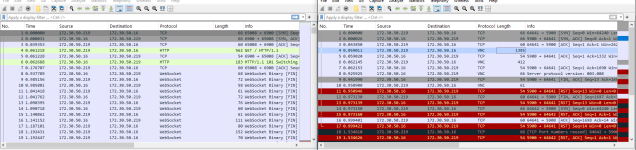
That doesn't appear to match with what I'm seeing (granted I'm not super au-fait with WebSockets).

Screenshot from 2025-11-24 19-26-53.png

Left hand trace is the connection when I have websockify in the middle (connection works as expected), right hand trace is when noVNC connects directly to the socket opened by the "vncwebsocket" call (noVNC disconnects and reports a failure to connect to the server) 172.30.50.16 is the PVE host 172.30.50.219 is the Client.

When I use a python test script to connect to the socket created by "vncwebsocket" I get the following;

Code:
2025-11-21 01:46:31,518 Starting new HTTPS connection (1): 172.30.50.16:8006
2025-11-21 01:46:31,578 https://172.30.50.16:8006 "POST /api2/json/access/ticket HTTP/1.1" 200 737
2025-11-21 01:46:31,580 Starting new HTTPS connection (1): 172.30.50.16:8006
2025-11-21 01:46:31,635 https://172.30.50.16:8006 "POST /api2/json/nodes/pve1c/qemu/8910/vncproxy HTTP/1.1" 200 1
977
Proxy: {'user': 'root@pam', 'port': '5900', 'ticket': 'PVEVNC:XXXX::XXXX', 'cert': 'XXXX', 'upid': 'UPID:pve1c:XXX:XXX:691FC477:vncproxy:8910
:root@pam:'}
2025-11-21 01:46:31,637 Resetting dropped connection: 172.30.50.16
2025-11-21 01:46:31,646 https://172.30.50.16:8006 "GET /api2/json/nodes/pve1c/qemu/8910/vncwebsocket?vncticket=XXX&port=5900 HTTP/1.1" 200 24
Sock: {'port': '5900'}
Attempting to connect to ws://172.30.50.16:5900/
2025-11-21 01:46:31,647 = connection is CONNECTING
2025-11-21 01:46:31,648 > GET / HTTP/1.1
2025-11-21 01:46:31,648 > Host: 172.30.50.16:5900
2025-11-21 01:46:31,648 > Upgrade: websocket
2025-11-21 01:46:31,648 > Connection: Upgrade
2025-11-21 01:46:31,648 > Sec-WebSocket-Key: vLaZXL5DIGwlkzAfsXLkLw==
2025-11-21 01:46:31,648 > Sec-WebSocket-Version: 13
2025-11-21 01:45:38,713 > Sec-WebSocket-Extensions: permessage-deflate; client_max_window_bits
2025-11-21 01:45:38,713 > User-Agent: Python/3.12 websockets/15.0.1
2025-11-21 01:45:39,576 > EOF
2025-11-21 01:45:39,591 < EOF
2025-11-21 01:45:39,591 = connection is CLOSED

But if I connect directly with netcat I get an RFB header as I'd expect if I were connecting to a "normal" VNC socket;

Code:
2025-11-24 08:41:38,308 Starting new HTTPS connection (1): 172.30.50.16:8006
2025-11-24 08:41:38,368 https://172.30.50.16:8006 "POST /api2/json/access/ticket HTTP/1.1" 200 741
2025-11-24 08:41:38,370 Starting new HTTPS connection (1): 172.30.50.16:8006
2025-11-24 08:41:38,423 https://172.30.50.16:8006 "POST /api2/json/nodes/pve1c/qemu/8910/vncproxy HTTP/1.1" 200 1977
Proxy: {'cert': 'XXX', 'upid': 'UPID:pve1c:XXX:XXX:XXX:vncproxy:8910:root@pam:', 'ticket': 'PVEVNC:XXX::XXX', 'port': '5900', 'user': 'root@pam'}
2025-11-24 08:41:38,425 Resetting dropped connection: 172.30.50.16
2025-11-24 08:41:38,436 https://172.30.50.16:8006 "GET /api2/json/nodes/pve1c/qemu/8910/vncwebsocket?vncticket=XXX&port=5900 HTTP/1.1" 200 24
Sock: {'port': '5900'}
XXX@XXX:~$ nc 172.30.50.16 5900
RFB 003.008

If there is a way to get this to work without the need to spawn a bunch of websockify processes in the middle that would be much preferable.

Is there something noVNC *should* be doing but isn't here? (or alternatively some way I can poke the socket before telling noVNC to connect)? (I've tested several versions and have the same behaviour in every case)

I'd assumed based on the doco that what got opened by "vncwebsocket" was a WebSocket which would "just work" (but again, I'm not particularly au-fait with WebSockets beyond it "just works" with websockify but not with a direct connection).
 
Last edited:
you are still misunderstanding the process/interactions..

1. vncproxy call -> this opens the local port/socket (5900 in this case) and gives you a ticket that allows accessing it
2. vncwebsocket -> this verifies the ticket and allows you to upgrade to a websocket connection that is forwarded to the local port/socket

if you connect directly to the port/socket, there is no websocket involved... if you just do a request to vncwebsocket without upgrading to a websocket connection than that request is pointless
 
Huh?

When I call vncproxy I see a listener start up on 127.0.0.1:<port> which makes sense, I assume this is a vanilla RFB socket (EDIT: just tested, appears that that is correct)? When I call vncwebsocket passing the ticket and port I see another listener open up on 0.0.0.0:<port> the principle of least surprise would tend to suggest that this should be a socket which is upgradable to a WebSocket which proxies to the first socket (owing to the name of the API call) but it evidently isn't...

How do i "upgrade to a websocket connection" in this context?

Everything I've read suggests that it's pass an HTTP request to the socket with the various WebSocket headers set but when I do that the socket still responds with the RFB banner (causing the request object to die and then when the socket closes at my end Proxmox closes the socket at its end).

So clearly I must be missing something?

POTENTIALLY IMPORTANT CONTEXT:
These API requests are being made by a third host so I can't do anything with the socket (unless I'm being thick and completely missing some relevant API call) created by vncproxy because it's bound to 127.0.0.1. My first opportunity for interaction is after the call to vncwebsocket is made and the socket bound to 0.0.0.0 opens.
 
Last edited:
OK, so on the suggestion from some people I asked to sanity check this thread for me I tried upgrading the *API* connection to a WebSocket by passing the relevant headers to the *API* when I called vncwebsocket, which did indeed open a WebSocket but on that existing connection so there is no way to actually connect to it using noVNC (and it confuses me why the call WITHOUT the headers supplied would cause a tcp socket to be opened and return a port number if this is the expected behaviour but it is what it is).

Is this what you meant? If so, it would seem what I'm needing to do isn't possible without websockify or similar in the mix (at least without modifications to noVNC in any case which I'd prefer to avoid) because there's no way to attach that WebSocket connection to noVNC (as it expects to connect OUT to a port and send an HTTP request with the relevant WebSocket upgrade headers)
 
Last edited:
okay, now it's a bit more clear! PVE indeed uses a patched version of novnc to make this possible. if your VM doesn't use a serial console, or you don't set the websocket parameter, then indeed the VNC port is accessible if your firewall settings allow it, and you can talk directly to it - if you want to do this using a client that requires a websocket, then you need to handle it yourself ;) if you do set the websocket parameter, then you are expected to follow that with a websocket connection to vncwebsocket, and configure your client to do that.
 
Yeah, I was aware that Proxmox was using a pretty heavily modified version of noVNC, I had a look at going that route earlier but there were too many dependencies and I would've had to expose some Proxmox API credentials to the clients to make it sufficiently frictionless so I've just integrated the websocket proxy into my middleware server and it's working as desired.

Part of the confusion was that vncproxy only opened a socket on 127.0.0.1 or that's what netstat showed in any case, but I realised today that the screenshot code on my middleware server (which also uses VNC) ONLY calls vncproxy and that code works so even though netstat only shows the socket on 127.0.0.1 it's apparently accessible via the bridge interface too *shrug*.
 
the socket is bound to localhost if the guest has a serial console and you set the websocket parameter, maybe that's what caused the confusion?