Ubuntu 26.04 installation fails for unknown reason

itsnota2ma

Member
Feb 5, 2025
31
1
8
Milwaukee, WI
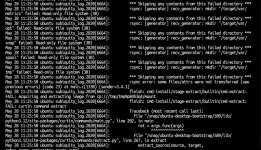
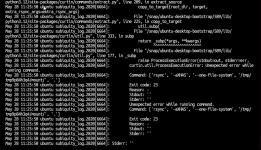
I am attempting to create my first VM with Ubuntu 26.04. I downloaded, but I did not add the checksum (is this required?). I have seen exit code 11 and exit code 23. I have tried several different combination of VM settings, but it seems to be failing while extracting the .iso?? Not really sure what is failing.

2026-05-28_12-26-25.png
2026-05-28_12-25-43.png
 
Hi,

Have you checked with other OS like debian ?

Note : you should always check the checksum of an iso (when the editor gives them) to make sure that your download and the ISO are good.

Best regards,
 
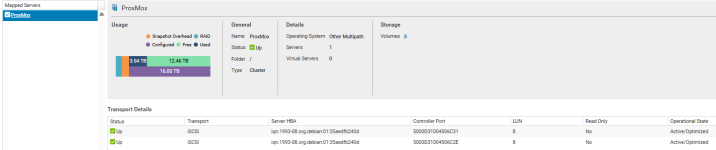
Ok, good to know a SAN is involved. Is your SAN also read-only on the host, outside of the VM?
Anything useful/relevant in the systemd journal (journalctl -e) or kernel logs (dmesg -T) ?
 
Here is the output of <journalctl -e>
Code:
May 28 14:02:39 pve1 kernel: sd 14:0:0:2: alua: device naa.6000d31004506c000000000000000004 p>
May 28 14:02:39 pve1 kernel: sd 14:0:0:4: alua: supports implicit TPGS
May 28 14:02:39 pve1 kernel: sd 14:0:0:4: alua: device naa.6000d31004506c000000000000000006 p>
May 28 14:02:39 pve1 kernel: sd 14:0:0:5: alua: supports implicit TPGS
May 28 14:02:39 pve1 kernel: sd 14:0:0:5: alua: device naa.6000d31004506c000000000000000007 p>
May 28 14:02:39 pve1 kernel: sd 14:0:0:8: alua: supports implicit TPGS
May 28 14:02:39 pve1 kernel: sd 14:0:0:8: alua: device naa.6000d31004506c000000000000000cec p>
May 28 14:02:51 pve1 pvedaemon[1132771]: starting termproxy UPID:pve1:001148E3:16AA7CC4:6A189>
May 28 14:02:51 pve1 pvedaemon[986348]: <root@pam> starting task UPID:pve1:001148E3:16AA7CC4:>
May 28 14:02:52 pve1 pvedaemon[993210]: <root@pam> successful auth for user 'root@pam'
May 28 14:02:52 pve1 login[1132774]: pam_unix(login:session): session opened for user root(ui>
May 28 14:02:52 pve1 systemd-logind[2696]: New session 89973 of user root.
May 28 14:02:52 pve1 systemd[1]: Started session-89973.scope - Session 89973 of User root.
May 28 14:02:52 pve1 login[1132774]: ROOT LOGIN ON pts/1
May 28 14:02:59 pve1 kernel: sd 12:0:0:1: alua: supports implicit TPGS
May 28 14:02:59 pve1 kernel: sd 12:0:0:1: alua: device naa.6000d31004506c000000000000000003 p>
May 28 14:02:59 pve1 kernel: sd 12:0:0:3: alua: supports implicit TPGS
May 28 14:02:59 pve1 kernel: sd 12:0:0:3: alua: device naa.6000d31004506c000000000000000005 p>
May 28 14:02:59 pve1 kernel: sd 12:0:0:6: alua: supports implicit TPGS
May 28 14:02:59 pve1 kernel: sd 12:0:0:6: alua: device naa.6000d31004506c000000000000000008 p>
May 28 14:02:59 pve1 kernel: sd 12:0:0:7: alua: supports implicit TPGS
May 28 14:02:59 pve1 kernel: sd 12:0:0:7: alua: device naa.6000d31004506c000000000000000009 p>

 
And this is the output of <dmesg -T> (Shortened, because it was too long for the post).
Code:
[Thu May 28 13:27:46 2026] sd 12:0:0:1: alua: supports implicit TPGS
[Thu May 28 13:27:46 2026] sd 12:0:0:1: alua: device naa.6000d31004506c000000000000000003 port group f02f rel port 2f
[Thu May 28 13:27:46 2026] sd 12:0:0:3: alua: supports implicit TPGS
[Thu May 28 13:27:46 2026] sd 12:0:0:3: alua: device naa.6000d31004506c000000000000000005 port group f02f rel port 2f
[Thu May 28 13:27:47 2026] sd 12:0:0:6: alua: supports implicit TPGS
[Thu May 28 13:27:47 2026] sd 12:0:0:6: alua: device naa.6000d31004506c000000000000000008 port group f02f rel port 2f
[Thu May 28 13:27:47 2026] sd 12:0:0:7: alua: supports implicit TPGS
[Thu May 28 13:27:47 2026] sd 12:0:0:7: alua: device naa.6000d31004506c000000000000000009 port group f02f rel port 2f
[Thu May 28 13:28:06 2026] sd 13:0:0:1: alua: supports implicit TPGS
[Thu May 28 13:28:06 2026] sd 13:0:0:1: alua: device naa.6000d31004506c000000000000000003 port group f032 rel port 32
[Thu May 28 13:28:06 2026] sd 13:0:0:3: alua: supports implicit TPGS
[Thu May 28 13:28:06 2026] sd 13:0:0:3: alua: device naa.6000d31004506c000000000000000005 port group f032 rel port 32
[Thu May 28 13:28:06 2026] sd 13:0:0:6: alua: supports implicit TPGS
[Thu May 28 13:28:06 2026] sd 13:0:0:6: alua: device naa.6000d31004506c000000000000000008 port group f032 rel port 32
[Thu May 28 13:28:06 2026] sd 13:0:0:7: alua: supports implicit TPGS
[Thu May 28 13:28:06 2026] sd 13:0:0:7: alua: device naa.6000d31004506c000000000000000009 port group f032 rel port 32
[Thu May 28 13:28:26 2026] sd 15:0:0:2: alua: supports implicit TPGS
[Thu May 28 13:28:26 2026] sd 15:0:0:2: alua: device naa.6000d31004506c000000000000000004 port group f031 rel port 31
[Thu May 28 13:28:26 2026] sd 15:0:0:4: alua: supports implicit TPGS
[Thu May 28 13:28:26 2026] sd 15:0:0:4: alua: device naa.6000d31004506c000000000000000006 port group f031 rel port 31
[Thu May 28 13:28:26 2026] sd 15:0:0:5: alua: supports implicit TPGS
[Thu May 28 13:28:26 2026] sd 15:0:0:5: alua: device naa.6000d31004506c000000000000000007 port group f031 rel port 31
[Thu May 28 13:28:26 2026] sd 15:0:0:8: alua: supports implicit TPGS
[Thu May 28 13:28:26 2026] sd 15:0:0:8: alua: device naa.6000d31004506c000000000000000cec port group f031 rel port 31
[Thu May 28 13:28:46 2026] sd 15:0:0:2: alua: supports implicit TPGS
[Thu May 28 13:28:46 2026] sd 15:0:0:2: alua: device naa.6000d31004506c000000000000000004 port group f031 rel port 31
[Thu May 28 13:28:46 2026] sd 15:0:0:4: alua: supports implicit TPGS
[Thu May 28 13:28:46 2026] sd 15:0:0:4: alua: device naa.6000d31004506c000000000000000006 port group f031 rel port 31
[Thu May 28 13:28:46 2026] sd 15:0:0:5: alua: supports implicit TPGS
[Thu May 28 13:28:46 2026] sd 15:0:0:5: alua: device naa.6000d31004506c000000000000000007 port group f031 rel port 31
[Thu May 28 13:28:46 2026] sd 15:0:0:8: alua: supports implicit TPGS
[Thu May 28 13:28:46 2026] sd 15:0:0:8: alua: device naa.6000d31004506c000000000000000cec port group f031 rel port 31
[Thu May 28 13:29:06 2026] sd 13:0:0:1: alua: supports implicit TPGS
 
That does not look very related. You can also keep journalctl -ef and dmesg -wT open while trying the install and see if that tells you anything.
Did you try to write on the SAN from the host?
 
That does not look very related. You can also keep journalctl -ef and dmesg -wT open while trying the install and see if that tells you anything.
Did you try to write on the SAN from the host?
Veeam was able to install it's own VM for migrating, and I have migrated over one VM (although it will not boot because it cannot find it's drive). So I do not understand why the Veeam VM works...