

[SOLVED] Trouble after renaming non-boot ZFS pool

Broadways3991

New Member
Aug 3, 2025
3
1
3
Hello,

I've run into trouble after renaming a non-boot ZFS pool. The actual renaming went fine and shows up correctly when running zfs list, but in the web UI the old name still persists with a question mark on the icon. Any way to fix this?

Old name: all-media
New name: whirlpool
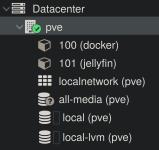
Screenshot_20250803_191525.png
 
Last edited:
Hi,

Please provide the contents of /etc/pve/storage.cfg.
You also need to adjust the name as needed in /etc/pve/storage.cfg, as that is where it is referenced and made known to the stack.
 
Ah, thanks for pointing it out! Do I just replace all references to the old name?

Output of /etc/pve/storage.cfg:
dir: local
path /var/lib/vz
content iso,vztmpl,backup

lvmthin: local-lvm
thinpool data
vgname pve
content images,rootdir

zfspool: all-media
pool all-media
content images,rootdir
mountpoint /all-media
nodes pve
 
Do I just replace all references to the old name?
Yes, exactly, at least for both properties in the zfspool: all-media section.

The storage name itself should not be changed if not necessary, as that is referenced everywhere this storage is used.
If you have used the (old) all-media storage anywhere, renaming is an unsafe (and unsupported) operation, and might break things subtly.
 
Edited the file and rebooted the system, all is well. I haven't used the pool for/in anything since creating and renaming it, so I think I'll be okay from here. Thanks for your help! Marking as solved.
 
  • Like
Reactions: cheiss