

Tripp-Lite console is getting cut-off

jamesmweir3

Member
Jan 17, 2021
3
0
6
45
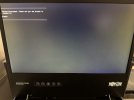
So at some point in the last year something I did caused the display on my server's console to get cut-off about an inch on the left. I primarily control it remotely but have been trying to fix this off and on with no success. I can't tell if this is from Proxmox, but everything looks fine during boot until it loads. I've included a picture of the screen.

Tripp-Lite Rackmount Console B021-000-17 running at 1280x768 @ 60Hz
Connected to my Dell Poweredge R720 via VGA
Running Proxmox 7.3

I've tried various
Code:
VGA=
values in /etc/kernel/cmdline as well as
Code:
nomodeset

console.jpg
 
Yeah, there aren't many controls on the display but the Horizontal/Vertical buttons don't do anything & the Auto button flashes a bunch but doesn't fix anything.
 
Since VGA is an analog signal, the monitor needs to adjust it to match the output. They are usually quite good to do it automatically, but if they have issues there should be some way to adjust it manually. Have you tried that "Auto" button? Otherwise, I assume that the "Menu" might have some items to adjust the image location.
Unless there is someone here that has the same monitor, you will have to try yourself or see what the manual says :)
 
Since VGA is an analog signal, the monitor needs to adjust it to match the output. They are usually quite good to do it automatically, but if they have issues there should be some way to adjust it manually. Have you tried that "Auto" button? Otherwise, I assume that the "Menu" might have some items to adjust the image location.
Unless there is someone here that has the same monitor, you will have to try yourself or see what the manual says :)
It's not the monitor. Everything is displayed properly during boot sequence. It's not until Proxmox starts running that everything shifts (resolution change?). I mentioned that the Auto button just makes things flash, and the Menu has horizontal & vertical buttons that do nothing.