

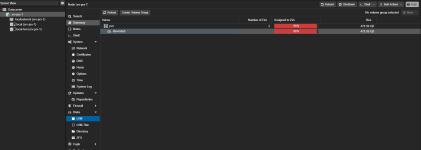
The PVE shows 96%. What does it affect
- Thread starter Sergei121352
- Start date
You are using an out of date browser. It may not display this or other websites correctly.
You should upgrade or use an alternative browser.
You should upgrade or use an alternative browser.

Hi,
this shows the default LVM volume group, which takes the specified partition as a whole. Looks like a normal installation.
The volume group (VG) is then splitted into 3 logical volumes,
If you want to see the current disk usage, you have to go to the actual storage entries in the left side bar,
Hope this helps!
this shows the default LVM volume group, which takes the specified partition as a whole. Looks like a normal installation.
The volume group (VG) is then splitted into 3 logical volumes,
root, data and swap (if not disabled).If you want to see the current disk usage, you have to go to the actual storage entries in the left side bar,
local and local-lvmHope this helps!

Thanks for the quick response!Hi,
this shows the default LVM volume group, which takes the specified partition as a whole. Looks like a normal installation.
The volume group (VG) is then splitted into 3 logical volumes,root,dataandswap(if not disabled).
If you want to see the current disk usage, you have to go to the actual storage entries in the left side bar,localandlocal-lvm
Hope this helps!
There is no such indicator on the old Proxmox server. (screenshot of the old server.)
I'm worried about the red indicator and 96%.
That's why I created this theme.
Please tell me how to fix this, or can I leave it as it is?
Attachments
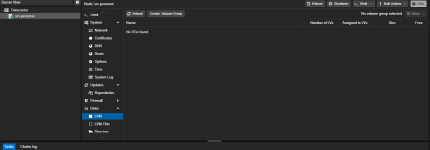
Then this server does not use ext4/xfs (and thus LVM) for its file system(s), but probably ZFS instead.There is no such indicator on the old Proxmox server. (screenshot of the old server.)
It's fine, there is nothing to fix. This is expected.Please tell me how to fix this, or can I leave it as it is?
The partition the LVM resides on is 96% full, not the volume groups itself.
ThanksThen this server does not use ext4/xfs (and thus LVM) for its file system(s), but probably ZFS instead.
It's fine, there is nothing to fix. This is expected.
The partition the LVM resides on is 96% full, not the volume groups itself.