[SOLVED] The cluster host displays a different storage capacity than the actual capacity.

micahel jiang

New Member
Oct 13, 2025
4
0
1
Hi

How are you! I am a new.

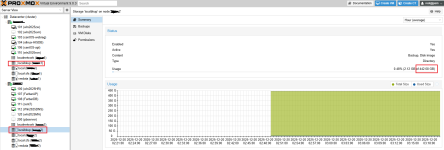
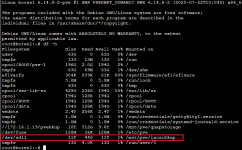
The attached image shows that although my storage device has 11TB, another host in cluster only shows 442GB. Why is this? Can anyone tell me? Thanks!
 

Attachments
  • aa3.png
    aa3.png
    97 KB · Views: 3
  • aa2.png
    aa2.png
    61 KB · Views: 3
  • aa1.png
    aa1.png
    110 KB · Views: 3
Last edited:
Hi @micahel jiang ,
You are confused about storage location, shared properties and reporting. What you have :
- 11TB disk mounted to host1, this disk is not shared even if it is external.
- Proxmox storage pool of type DIRECTORY that points to the mounted location on host1
- This pool is NOT restricted to a particular host, i.e. host1 where this disk is mounted.
- This makes PVE expect this DIRECTORY location to be present across all hosts

On host2 this directory location points to an empty directory on host2 and its space is reported as that of the parent disk (root disk?).

So the discrepancy in capacity is expected. On host1 the backing directory is backed by 11TB disk, but on host2 it is not.

Hope this makes sense.


Blockbridge : Ultra low latency all-NVME shared storage for Proxmox - https://www.blockbridge.com/proxmox
 
Hi @micahel jiang ,
You are confused about storage location, shared properties and reporting. What you have :
- 11TB disk mounted to host1, this disk is not shared even if it is external.
- Proxmox storage pool of type DIRECTORY that points to the mounted location on host1
- This pool is NOT restricted to a particular host, i.e. host1 where this disk is mounted.
- This makes PVE expect this DIRECTORY location to be present across all hosts

On host2 this directory location points to an empty directory on host2 and its space is reported as that of the parent disk (root disk?).
Understood, thank you for your great reply!
 
Last edited: