TaskFailed when Create ZFS

OberZhang

New Member
Mar 6, 2021
10
2
3
28
I choose RAID level as Mirror. After choosing two hard disks, click Create ZFS, and then the error is reported as follows. I hope someone can help me.Thank you
This error is displayed like this:
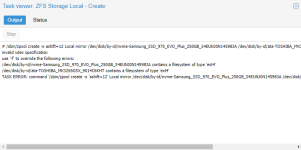
command '/sbin/zpool create -o 'ashift=12' Local mirror /dev/disk/by-id/nvme-Samsung_SSD_970_EVO_Plus_250GB_S4EUNJ0N145983A /dev/disk/by-id/ata-TOSHIBA_MK3265GSX_9014C6KHT' failed: exit code 1
1.png
 
It tells you that these drives are already formated with ext4 partitions. Try to remove all partitions or write a new fresh partition table and try it again with empty drives.
 
It tells you that these drives are already formated with ext4 partitions. Try to remove all partitions or write a new fresh partition table and try it again with empty drives.
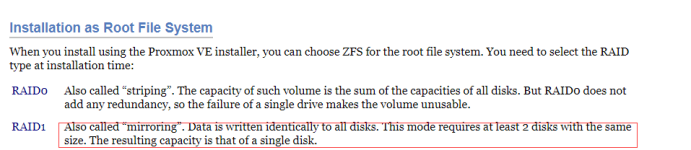
I deleted all the two hard drive partitions and formatted them as ext4. I'm sorry I can't understand what you mean. I found this on the official website, but I don't know if it can be solved. Finally, thank you very much for your reply1 (2).png
 
You should not partition as ext4 yourself.

There is no data that you need on your drives anymore, right? Then you can do the following:

DANGEROUS: This will remove everything!
Double check which drives your wiping!
Code:
wipefs -a /dev/sdX
dd if=/dev/zero of=/dev/sdX bs=1M count=200

You have to replace the X with your drive. Afterewards, you should be able to create the Mirror in the GUI.
 
You should not partition as ext4 yourself.

There is no data that you need on your drives anymore, right? Then you can do the following:

DANGEROUS: This will remove everything!
Double check which drives your wiping!
Code:
wipefs -a /dev/sdX
dd if=/dev/zero of=/dev/sdX bs=1M count=200

You have to replace the X with your drive. Afterewards, you should be able to create the Mirror in the GUI.
Thank you very much for your reply. I just performed the above operations on two hard drives, but found that error code 1 is still returned. So I would like to ask if it is caused by the different sizes of the two hard drives? (I have a 320GB hard drive and one 250GB) Thank you very much
 
Different disk sizes are indeed a problem. But then the error log should say:
Code:
invalid vdev specification
use '-f' to override the following errors:
mirror contains devices of different sizes
You cannot use the -f in the GUI, because this is not an ideal situation. You will only have the size of the smaller disk available. Therefore, you have to perform that task on the command line.
 
Different disk sizes are indeed a problem. But then the error log should say:
Code:
invalid vdev specification
use '-f' to override the following errors:
mirror contains devices of different sizes
You cannot use the -f in the GUI, because this is not an ideal situation. You will only have the size of the smaller disk available. Therefore, you have to perform that task on the command line.
I use the terminal to execute the command. My process is posted below. If it is really a hard drive problem, the hard drive I bought will arrive tomorrow.Thank you
sudo wipefs -a /dev/nvme0n1
icewhale@icewhale:~$ sudo dd if=/dev/zero of=/dev/nvme0n1 bs=1M count=200
200+0 records in
200+0 records out
209715200 bytes (210 MB, 200 MiB) copied, 0.500765 s, 419 MB/s
icewhale@icewhale:~$ sudo wipefs -a /dev/sda
icewhale@icewhale:~$ sudo dd if=/dev/zero of=/dev/sda bs=1M count=200
200+0 records in
200+0 records out
209715200 bytes (210 MB, 200 MiB) copied, 8.09501 s, 25.9 MB/s
 
I mean the error log when you create the zpool in the GUI :)
 
No worries, I didn't.


Using wipefs and dd in the terminal is fine. In the same terminal you can then try
Code:
 zpool create testpool mirror /dev/nvme0n1 /dev/sda
"testpool" is the name of the pool. You can choose a different name.
But this should give you the error
Code:
➜  ~ zpool create testpool mirror /dev/nvme0n1 /dev/sda
invalid vdev specification
use '-f' to override the following errors:
mirror contains devices of different sizes
so you have to append -f
Code:
zpool create testpool mirror /dev/nvme0n1 /dev/sda -f
and if you then type
Code:
zpool list
then the name of your pool should appear
Code:
➜  ~ zpool list
NAME       SIZE  ALLOC   FREE  CKPOINT  EXPANDSZ   FRAG    CAP  DEDUP    HEALTH  ALTROOT
testpool  4.50G   108K  4.50G        -         -     0%     0%  1.00x    ONLINE  -
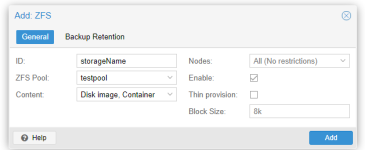
After that, you should be able to add your pool as storage for PVE in Datacenter->Storage->Add->ZFS
1615272814590.png
 
No worries, I didn't.


Using wipefs and dd in the terminal is fine. In the same terminal you can then try
Code:
zpool create testpool mirror /dev/nvme0n1 /dev/sda
"testpool" is the name of the pool. You can choose a different name.
But this should give you the error
Code:
➜  ~ zpool create testpool mirror /dev/nvme0n1 /dev/sda
invalid vdev specification
use '-f' to override the following errors:
mirror contains devices of different sizes
so you have to append -f
Code:
zpool create testpool mirror /dev/nvme0n1 /dev/sda -f
and if you then type
Code:
zpool list
then the name of your pool should appear
Code:
➜  ~ zpool list
NAME       SIZE  ALLOC   FREE  CKPOINT  EXPANDSZ   FRAG    CAP  DEDUP    HEALTH  ALTROOT
testpool  4.50G   108K  4.50G        -         -     0%     0%  1.00x    ONLINE  -
After that, you should be able to add your pool as storage for PVE in Datacenter->Storage->Add->ZFS
View attachment 24284
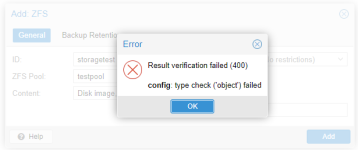
When I thought I was done, he showed up. . .2.png
 
I could not reproduce this problem (yet). Are you sure that your installation is fully updated? There have been some fixes on the relevant part of the codebase in the last months.
 
I could not reproduce this problem (yet). Are you sure that your installation is fully updated? There have been some fixes on the relevant part of the codebase in the last months.
I downloaded 6.3-1 from the official website, and then I remember I executed apt upgrade and apt update. . .