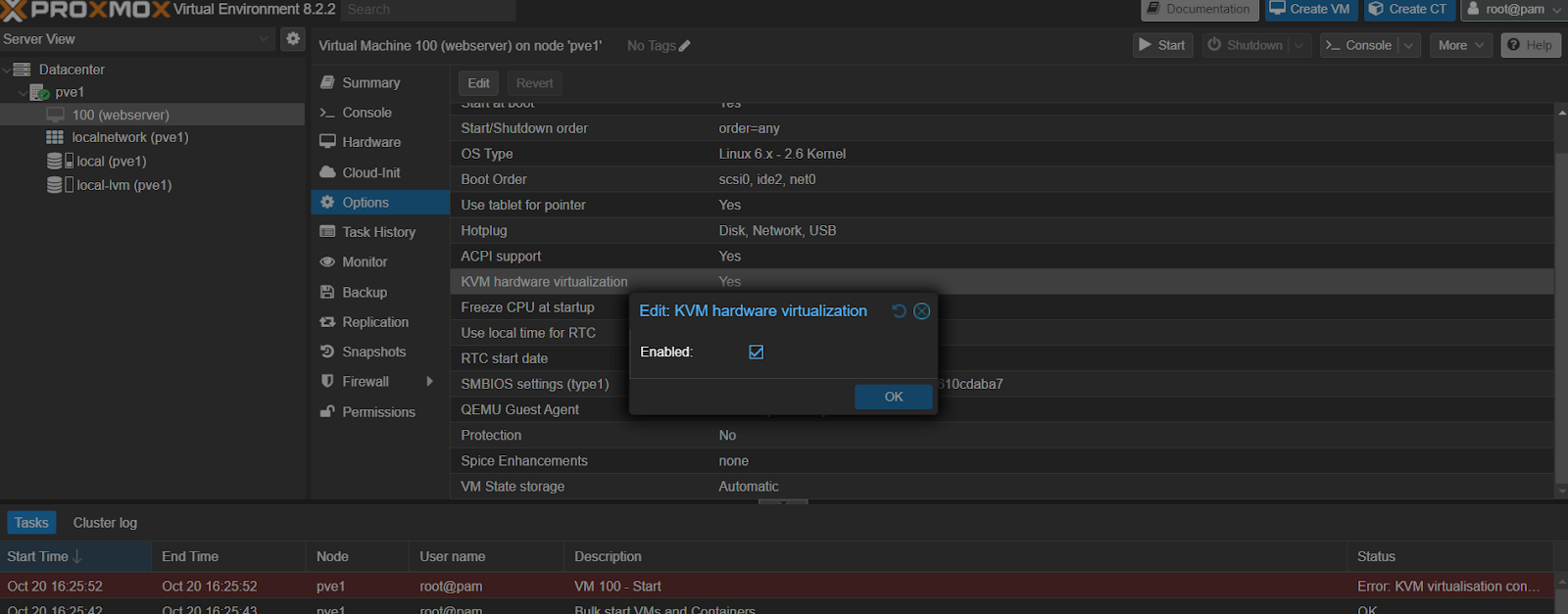
TASK ERROR: KVM virtualisation configured, but not available. Either disable in VM configuration or enable in BIOS. - I want to open my VM and can't!!
- Thread starter kyleatkins@alleviatetax
- Start date
You are using an out of date browser. It may not display this or other websites correctly.
You should upgrade or use an alternative browser.
You should upgrade or use an alternative browser.


the error already tells you what to do:
the vm configuration has 'kvm hardware virtualization' enabled, for that there are hardware extensions that can be enabled/disabled in the bios of the machine (e.g. for intel often named 'vt-x')
either you enable that in the bios of your machine, or you need to disable it in the vm configuration (on the page of your second screenshot)
KVM virtualisation configured, but not available. Either disable in VM configuration or enable in BIOS.
the vm configuration has 'kvm hardware virtualization' enabled, for that there are hardware extensions that can be enabled/disabled in the bios of the machine (e.g. for intel often named 'vt-x')
either you enable that in the bios of your machine, or you need to disable it in the vm configuration (on the page of your second screenshot)
I just tried disabling intel virtualization technology and that stopped me from using VirutalBox. What is the second screenshot that I have to disable or enable since I can't get my VM's to work. Also I don't have a valid subscription for ProxMox, would that be the issue?the error already tells you what to do:
the vm configuration has 'kvm hardware virtualization' enabled, for that there are hardware extensions that can be enabled/disabled in the bios of the machine (e.g. for intel often named 'vt-x')
either you enable that in the bios of your machine, or you need to disable it in the vm configuration (on the page of your second screenshot)
there is the option 'KVM hardware virtualization' in the vm options in your third (sorry, i miswrote before) screenshot. What is the second screenshot that I have to disable or enable since I can't get my VM's to work.
no there is no difference in features or functionality with or without a subscription, it's just additional services (like the more stable enterprise repo and for some packages ticket support)Also I don't have a valid subscription for ProxMox, would that be the issue?

thank you that solved my issue!!!!there is the option 'KVM hardware virtualization' in the vm options in your third (sorry, i miswrote before) screenshot
no there is no difference in features or functionality with or without a subscription, it's just additional services (like the more stable enterprise repo and for some packages ticket support)