

EDIT - I resolved the issue by updating my motherboard firmware, restoring to factory settings, and re-enabling virtualization and IOMMU after firmware upgrade. No settings were changed from below.
Mods, if you want to delete the post as its not actually troubleshooting, feel free. Or you can leave it up, as there was another thread in 2023 (unknown motherboard) about the same issue which was never marked as resolved or edited (https://forum.proxmox.com/threads/a...re-pci-pass-through-iommu-not-present.123808/)
Proxmox 8.4.17 (was 8.4.1 when the power outage occurred)
GPU Nvidia 1050 Ti
CPU Amd Ryzen 5 3600
Mobo ASRock B550M
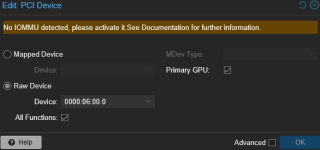
I previously had GPU passthrough working for ages. This week, while on vacation, I had a power outage and my server shut down unexpectedly. On a reboot one of my VMs that has my 1050 Ti passed through to it will not start (TASK ERROR: cannot prepare PCI pass-through, IOMMU not present)
Virtualization is (still) enabled in my bios (tried once disabling IOMMU & virtualization, rebooting, and then enabling them again - did nothing)
/etc/default/grub:
GRUB_DEFAULT=0
GRUB_TIMEOUT=5
GRUB_DISTRIBUTOR=`lsb_release -i -s 2> /dev/null || echo Debian`
GRUB_CMDLINE_LINUX_DEFAULT="quiet intel_iommu=on"
GRUB_CMDLINE_LINUX=""
/etc/kernel/cmdline
amd_iommu=on
/etc/modules
vfio
vfio_iommu_type1
vfio_pci
vfio_virqfd
dmesg | grep -e DMAR -e IOMMU
DMAR: IOMMU enabled
pvesh get /nodes/proxmox/hardware/pci --pci-class-blacklist ""
Lists all my devices, but the iommugroup is all -1. Per the documentation, these should all have actual group numbers.
I tried adding "pcie_acs_override=downstream" to both grub and systemd-boot kernel boot command lines to no avail. (I deleted these after updating motherboard firmware, as they were not needed prior to the power outage)
Mods, if you want to delete the post as its not actually troubleshooting, feel free. Or you can leave it up, as there was another thread in 2023 (unknown motherboard) about the same issue which was never marked as resolved or edited (https://forum.proxmox.com/threads/a...re-pci-pass-through-iommu-not-present.123808/)
Proxmox 8.4.17 (was 8.4.1 when the power outage occurred)
GPU Nvidia 1050 Ti
CPU Amd Ryzen 5 3600
Mobo ASRock B550M
I previously had GPU passthrough working for ages. This week, while on vacation, I had a power outage and my server shut down unexpectedly. On a reboot one of my VMs that has my 1050 Ti passed through to it will not start (TASK ERROR: cannot prepare PCI pass-through, IOMMU not present)
Virtualization is (still) enabled in my bios (tried once disabling IOMMU & virtualization, rebooting, and then enabling them again - did nothing)
/etc/default/grub:
GRUB_DEFAULT=0
GRUB_TIMEOUT=5
GRUB_DISTRIBUTOR=`lsb_release -i -s 2> /dev/null || echo Debian`
GRUB_CMDLINE_LINUX_DEFAULT="quiet intel_iommu=on"
GRUB_CMDLINE_LINUX=""
/etc/kernel/cmdline
amd_iommu=on
/etc/modules
vfio
vfio_iommu_type1
vfio_pci
vfio_virqfd
dmesg | grep -e DMAR -e IOMMU
DMAR: IOMMU enabled
pvesh get /nodes/proxmox/hardware/pci --pci-class-blacklist ""
Lists all my devices, but the iommugroup is all -1. Per the documentation, these should all have actual group numbers.
I tried adding "pcie_acs_override=downstream" to both grub and systemd-boot kernel boot command lines to no avail. (I deleted these after updating motherboard firmware, as they were not needed prior to the power outage)
Last edited:

