

Hi Everyone,
I am trying to convert my Synology Virtual Machine Manager (VMM) Virtual Machines to run on Proxmox VE. The export was successful and I have uploaded them to my Proxmox VE server. However, my Synology VMM VMs used UFEI as a boot option and now I am using SeaBIOS (legacy) on Proxmox VE so when I boot my VMs they now are stuck on boot with the "Booting from Hard Disk..." message:

Any idea how I can convert my VMs from UFEI to SeaBIOS (legacy)? Or, how can I get the UFEI file off my Synology? I am going to open a ticket with Synology as well and share their response with this thread once I get an answer.
Thanks for the help
Edit:
Here is the configuration on my Synology:
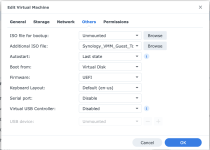
Here is the configuration on my Proxmox VE:
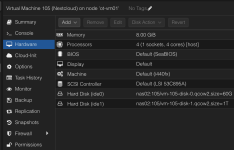
Ticket created with Synology, let's see what they say.
I am trying to convert my Synology Virtual Machine Manager (VMM) Virtual Machines to run on Proxmox VE. The export was successful and I have uploaded them to my Proxmox VE server. However, my Synology VMM VMs used UFEI as a boot option and now I am using SeaBIOS (legacy) on Proxmox VE so when I boot my VMs they now are stuck on boot with the "Booting from Hard Disk..." message:
Any idea how I can convert my VMs from UFEI to SeaBIOS (legacy)? Or, how can I get the UFEI file off my Synology? I am going to open a ticket with Synology as well and share their response with this thread once I get an answer.
Thanks for the help
Edit:
Here is the configuration on my Synology:
Here is the configuration on my Proxmox VE:
Ticket created with Synology, let's see what they say.
Last edited:

