Super slow, timeout, and VM stuck while backing up, after updated to PVE 9.1.1 and PBS 4.0.20

I don't want to celebrate too soon, but after two days with PBS running kernel 6.17.4-2-pve, all the scheduled backups have worked smoothly.
In fact, it seems even faster to me. Let's keep our fingers crossed for the next few days...
In the meantime, Merry Christmas to all the Proxmox staff and to all of you!
 
  • Like
Reactions: ebiss
I don't want to celebrate too soon, but after two days with PBS running kernel 6.17.4-2-pve, all the scheduled backups have worked smoothly.
In fact, it seems even faster to me. Let's keep our fingers crossed for the next few days...
In the meantime, Merry Christmas to all the Proxmox staff and to all of you!
We finally see the light! :cool: Merry Xmas to everybody.
 
Are these upgrades mandatory in order to retain paid support, or are they optional? Stuff like this makes me really hesitate to commit to a product. I'm very much in the old school mind set that 'if it ain't broke, don't fix it' and surely major security issues would be stopped with correct Firewall setups..?
 
Kernel 6.17.4-2-pve is now available in the no-subscription repositories, so I updated, unpinned the old 6.14.11 kernel, and rebooted all nodes. The first backup job went fine. I will report back on friday if any issues arise.
Until then, thanks a lot for the hard work to the Proxmox developers, and a good new year to all of you!
Code:
# uname -a
Linux pve2 6.17.4-2-pve #1 SMP PREEMPT_DYNAMIC PMX 6.17.4-2 (2025-12-19T07:49Z) x86_64 GNU/Linux

# proxmox-boot-tool kernel list
Manually selected kernels:
None.

Automatically selected kernels:
6.14.11-5-pve
6.17.4-1-pve
6.17.4-2-pve

# pveversion
pve-manager/9.1.4/5ac30304265fbd8e (running kernel: 6.17.4-2-pve)

# proxmox-backup-manager versions
proxmox-backup-server 4.1.1-1 running version: 4.1.1
 
Last edited:
Edit: I just deleted this whole wall of text from yesterday because it seems unrelated now.

AFAICT with latest kernel 6.17.4-2-pve and PBS 4.1.1 everything is working fine.

Something to be aware of: We use a PBS pull sync job between PBS nodes. The first sync after upgrading took way longer (1 hour instead of 2 minutes), which led me on a chase of downgrading both kernel and PBS packages again because I thought the PBS sync job hangs. But it just needed a little bit of patience. After this initial long sync, all subsequent sync jobs finished within minutes.
 
Last edited:
  • Like
Reactions: Gayan Kodithuwakku
Hi everyone!

Created account so I can post that I've faced similar problem, could not figure out whats going on until found this topic. Yesterday I reinstalled/recreated my PBS 3.x to newest 4.x, simple default install, empty data store running on second VM disk formatted as XFS.

Facts:
Dell R640, datacenter ssd, hw raid.

Non subscription proxmox:
PVE 8.X with all the latest updates
PBS 4.x with all the latest updates

Currently the only problematic VM is Win2k22, virtio scsi single with 2 disks, 800GB and 1TB, latest virtio drivers, discard on, iothread on. However I believe it could be any other VM as well, this windows VM is the only one that I have with such big disks.

So, after reinstalled a fresh PBS, on the first run my Win2k22 backup stuck at 34% when zabbix started to panic that my VM is offline.

First what I noticed, the backup was still running, tried to stop the task, it somewhat stopped but VM stayed locked.

Task log:
Code:
....
INFO:  31% (567.1 GiB of 1.8 TiB) in 1h 17m 26s, read: 852.3 MiB/s, write: 79.8 MiB/s
INFO:  32% (583.7 GiB of 1.8 TiB) in 1h 17m 50s, read: 706.3 MiB/s, write: 82.7 MiB/s
INFO:  33% (603.1 GiB of 1.8 TiB) in 1h 19m 8s, read: 255.4 MiB/s, write: 93.9 MiB/s
INFO:  34% (621.4 GiB of 1.8 TiB) in 1h 19m 35s, read: 693.0 MiB/s, write: 87.3 MiB/s
ERROR: interrupted by signal
INFO: aborting backup job

PVE syslog:
Code:
Dec 31 20:06:40 pve-1 pvedaemon[1635155]: VM 108 qmp command failed - VM 108 qmp command 'query-backup' failed - got timeout
Dec 31 20:08:54 pve-1 pvedaemon[1520992]: <root@pam> successful auth for user 'root@pam'
Dec 31 20:09:05 pve-1 pvedaemon[1520991]: VM 108 qmp command failed - VM 108 qmp command 'guest-ping' failed - got timeout
Dec 31 20:09:29 pve-1 pvedaemon[1520991]: VM 108 qmp command failed - VM 108 qmp command 'guest-ping' failed - got timeout
Dec 31 20:09:48 pve-1 pvedaemon[1520993]: VM 108 qmp command failed - VM 108 qmp command 'guest-ping' failed - unable to connect to VM 108 qga socket - timeout after 31 retries
Dec 31 20:10:10 pve-1 pvedaemon[1520991]: VM 108 qmp command failed - VM 108 qmp command 'guest-ping' failed - unable to connect to VM 108 qga socket - timeout after 31 retries
Dec 31 20:10:51 pve-1 pvedaemon[1520991]: VM 108 qmp command failed - VM 108 qmp command 'guest-ping' failed - unable to connect to VM 108 qga socket - timeout after 31 retries
Dec 31 20:11:02 pve-1 pvedaemon[1520992]: <root@pam> starting task UPID:pve-1:001A2EAF:01A98813:69556736:vncproxy:108:root@pam:
Dec 31 20:11:02 pve-1 pvedaemon[1715887]: starting vnc proxy UPID:pve-1:001A2EAF:01A98813:69556736:vncproxy:108:root@pam:
Dec 31 20:11:03 pve-1 pvedaemon[1715890]: starting vnc proxy UPID:pve-1:001A2EB2:01A9889B:69556737:vncproxy:108:root@pam:
Dec 31 20:11:03 pve-1 pvedaemon[1520991]: <root@pam> starting task UPID:pve-1:001A2EB2:01A9889B:69556737:vncproxy:108:root@pam:
Dec 31 20:11:08 pve-1 qm[1715889]: VM 108 qmp command failed - VM 108 qmp command 'set_password' failed - unable to connect to VM 108 qmp socket - timeout after 51 retries
Dec 31 20:11:08 pve-1 pvedaemon[1715887]: Failed to run vncproxy.
Dec 31 20:11:08 pve-1 pvedaemon[1520992]: <root@pam> end task UPID:pve-1:001A2EAF:01A98813:69556736:vncproxy:108:root@pam: Failed to run vncproxy.
Dec 31 20:11:09 pve-1 qm[1715892]: VM 108 qmp command failed - VM 108 qmp command 'set_password' failed - unable to connect to VM 108 qmp socket - timeout after 51 retries
Dec 31 20:11:09 pve-1 pvedaemon[1715890]: Failed to run vncproxy.
Dec 31 20:11:09 pve-1 pvedaemon[1520991]: <root@pam> end task UPID:pve-1:001A2EB2:01A9889B:69556737:vncproxy:108:root@pam: Failed to run vncproxy.
Dec 31 20:11:13 pve-1 pvedaemon[1520993]: VM 108 qmp command failed - VM 108 qmp command 'guest-ping' failed - unable to connect to VM 108 qga socket - timeout after 31 retries
Dec 31 20:11:23 pve-1 pveproxy[1641711]: worker exit
Dec 31 20:11:23 pve-1 pveproxy[1488]: worker 1641711 finished
Dec 31 20:11:23 pve-1 pveproxy[1488]: starting 1 worker(s)
Dec 31 20:11:23 pve-1 pveproxy[1488]: worker 1716020 started
Dec 31 20:11:25 pve-1 pvedaemon[1635155]: VM 108 qmp command failed - VM 108 qmp command 'backup-cancel' failed - interrupted by signal
Dec 31 20:11:30 pve-1 pvedaemon[1520992]: <root@pam> end task UPID:pve-1:0018F353:0196BA03:69553712:vzdump::root@pam: unexpected status

At this point no more active tasks were running on PVE, VM was locked but was on/running, only not responsible.

While trying to figure out whats happening, I noticed that on PBS I had still the backup task running (even I stopped it from PVE). Well.. lets give it a try and stop that task as well.. and wolaa.. after few seconds my VM started to respond again and everything seemed fine from there on, nothing even crashed and everything conitued to work from there on, except the downtime/freeze.

Windows VM eventlogs:
Code:
vioscsci: Reset to device, \Device\RaidPort1, was issued.

Kernel PNP: The application \Device\HarddiskVolume3\Program Files\Qemu-ga\qemu-ga.exe with process id 3540 stopped the removal or ejection for the device PCI\VEN_1AF4&DEV_1003&SUBSYS_00031AF4&REV_00\5&2490727a&0&4008F0. Process command line: "C:\Program Files\Qemu-ga\qemu-ga.exe" -d --retry-path

Storahci: Reset to device, \Device\RaidPort0, was issued.

What I tried:
1) chkdsk all disks - everything fine
2) Updated everything I can to the latest (including virtio drivers on Windows)
3) Multiple backup tries ended the same way - with a freeze in different percentage done

In the end I did completley shutdown the VM and the backup was successfull. Currently VM is back on running with incremental backup task (as snapshot) running, will see how that ends.

Edit: Incremental backup via snapshot ended successful. However, only a little bit has changed over the night, so nothing much has actually saved.

Code:
INFO:  98% (1.7 TiB of 1.8 TiB) in 1h 4m 18s, read: 3.0 GiB/s, write: 0 B/s
INFO:  99% (1.8 TiB of 1.8 TiB) in 1h 4m 24s, read: 3.0 GiB/s, write: 0 B/s
INFO: 100% (1.8 TiB of 1.8 TiB) in 1h 4m 31s, read: 2.3 GiB/s, write: 75.4 KiB/s
INFO: backup is sparse: 713.79 GiB (39%) total zero data
INFO: backup was done incrementally, reused 1.78 TiB (99%)
INFO: transferred 1.78 TiB in 3871 seconds (482.5 MiB/s)
INFO: adding notes to backup
INFO: Finished Backup of VM 108 (01:04:38)
INFO: Backup finished at 2026-01-01 11:30:57
INFO: Backup job finished successfully
INFO: skipping disabled target 'mail-to-root'

In my case, I can only repeat the error/bug only on full backup on *large* disks (1.8T total) + while VM is actually running.

 
Last edited:
Hello,

a few days ago, we upgraded our 5-node cluster (with Ceph 19.2.3) from PVE 8.4 to PVe 9.1.1 and PBS from 3 to 4.1.0.
After these upgrades, we started experiencing the issues described in this thread.
Now, after carefully reading this thread, I understand that installing the 6.17.4-2-pve kernel (or 6.14.11-4-pve ) on PBS should resolve the issue.
Given that we have an Enterprise subscription, how can I install the 6.17.4-2-pve kernel (or 6.17.4-2-pve kernel) ?
Do I need to manually add any repositories? If so, which ones?Thank you very much.


Thank you
 
... Do I need to manually add any repositories? If so, which ones?Thank you very much...
Hello,
If kernel 6.17.4-2-pve is not available in the enterprise repository, I think the way to install it automatically is to enable (at least temporarily) the no-subscription repository, at least on PBS.
However, it is best to ask Proxmox official support for confirmation.
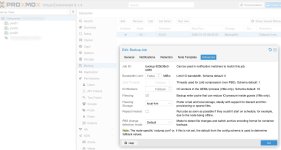
As a workaround with the old kernel, one thing that worked for me was to enable “Fleecing” on Local-LVM on the backup job.
Screenshot.jpg
 
  • Like
Reactions: zeuxprox
Hi,

as suggested @Heracleos , I enabled the non-subscription repository and installed Kernel 6.17.14-2-pve with the command
apt install proxmox-kernel-6.17.4-2-pve . I'll update you tomorrow morning if the problem is solved with Kernel 6.17.14-2-pve .

I installed only the kernel, PBS version is still 4.1.0

Any other suggestions are welcome.

Thank you
 
Last edited:
I guess I am late to this party, but I noticed similar issues for the past 3/4 weeks. I have two clusters, one on 8.4.14(waiting for the upgrade to 9) and one on 9.1. It seems that both of them are affected. I am running two PBS-es. Both of them are on 4.0.20. The primary PBS that is taking backups of about 400VMs is affected. The second PBS only pulls those backups to a secondary location is working fine.

Both PVE clusters are using Fleecing due to the performance issues in the past(already resolved by using bare metal ZFS storage) but I left Fleecing enabled as it does not hurt.

It does not happen every day and also not for a specific VM. But it is quite random. I might not even notice a problem if backup job eventually finishes in a few hours. But there were a couple of instances that backup was running for more than a day and that blocked the next cycle.

As I am traveling I cannot upgrade them right away, but once I am back I will try to upgrade the new kernel, I hope it resolves this problem.

Thanks to everyone else for reporting and troubleshooting this issue.
 
Hello,
If kernel 6.17.4-2-pve is not available in the enterprise repository, I think the way to install it automatically is to enable (at least temporarily) the no-subscription repository, at least on PBS.
However, it is best to ask Proxmox official support for confirmation.
As a workaround with the old kernel, one thing that worked for me was to enable “Fleecing” on Local-LVM on the backup job.
View attachment 94549
I have Fleecing enabled and it does not solve the problem. As someone else pointed out, it seems to help as it prevents hanging a VM. But I still miss a backup every couple of days. Just FYI, I am using a dedicated NVMe disk for Fleecing not a local-lvm.
 
Hello,

as mentioned in yesterday's post, after installing the 6.17.4-2-pve kernel (enabling the no-subscription repository on PBS), all backups were performed correctly last night.
Question: when will kernel proxmox-kernel-6.17.4-2-pve be available in the enterprise repository?

Thank you
 
Hello,

I've been having stalls on PVE as well. I'm a new Proxmox user and I never installed it on the desktop I'm using. In my setup I have a PVE on a desktop with i5 Intel, 16GB RAM, an consumer ssd where I install pve, LXCs, VMS and PBS as an LXC and a WD Red 6TB HDD. PBS has 2 cores and 2GB RAM. Backups are stored in 6TB HDD. I have verification ON. To troubleshoot the stalls I started a backup a frequent backup schedule of 3VMs.

The kernel I was using 6.17.4-1-pve . After seeing this post I moved back to kernel 6.14.11-4-pve But I still experience the same stalls. I will try the test kernel and report back.

Bash:
proxmox-boot-tool kernel list
Manually selected kernels:
None.
Automatically selected kernels:
6.14.11-4-pve
6.17.4-1-pve

Pinned kernel:
6.14.11-4-pve

Stalls happen especially during or after backups. When it happens PVE, VMs, LXCs are unreachable, cannot be pinged. Caps Lock doesn't work. The connected monitor over HDMI doesn't receive signal.

list-boots:
Bash:
-1 f6f11f11cbaf4512b6f3ccaadd7f423b Sat 2026-01-03 00:43:56 +03 Sat 2026-01-03 16:40:59 +03


journalctl until the crash happens:
Bash:
Oca 03 16:40:51 pve kernel: veth114i0: entered allmulticast mode
Oca 03 16:40:51 pve kernel: veth114i0: entered promiscuous mode
Oca 03 16:40:51 pve kernel: eth0: renamed from vethgEWLqB
Oca 03 16:40:51 pve pvescheduler[1469364]: INFO: Finished Backup of VM 114 (00:00:18)
Oca 03 16:40:52 pve pvescheduler[1469364]: INFO: Starting Backup of VM 1001 (lxc)
Oca 03 16:40:52 pve kernel: audit: type=1400 audit(1767447652.091:19408): apparmor="DENIED" operation="mount" class="mount" info="failed flags match" error=-13 profile="lxc-1001_</var/lib/lxc>" name="/run/systemd/namespace-ngqfa5/" pid=>
Oca 03 16:40:52 pve kernel: vmbr0: port 7(veth1001i0) entered disabled state
Oca 03 16:40:52 pve kernel: veth1001i0 (unregistering): left allmulticast mode
Oca 03 16:40:52 pve kernel: veth1001i0 (unregistering): left promiscuous mode
Oca 03 16:40:52 pve kernel: vmbr0: port 7(veth1001i0) entered disabled state
Oca 03 16:40:52 pve kernel: audit: type=1400 audit(1767447652.389:19409): apparmor="STATUS" operation="profile_remove" profile="/usr/bin/lxc-start" name="lxc-1001_</var/lib/lxc>" pid=1473070 comm="apparmor_parser"
Oca 03 16:40:52 pve kernel: fwbr114i0: port 2(veth114i0) entered blocking state
Oca 03 16:40:52 pve kernel: fwbr114i0: port 2(veth114i0) entered forwarding state
Oca 03 16:40:53 pve kernel: EXT4-fs (loop5): unmounting filesystem e89cf519-de30-4fa8-8bc4-3c21f4280ecc.
Oca 03 16:40:53 pve systemd[1]: pve-container@1001.service: Deactivated successfully.
Oca 03 16:40:53 pve systemd[1]: pve-container@1001.service: Consumed 706ms CPU time, 94.1M memory peak.
Oca 03 16:40:53 pve kernel: loop5: detected capacity change from 0 to 8388608
Oca 03 16:40:53 pve kernel: EXT4-fs (loop5): mounted filesystem e89cf519-de30-4fa8-8bc4-3c21f4280ecc r/w with ordered data mode. Quota mode: none.
Oca 03 16:40:53 pve iptag[839]: = LXC 105: IP tag [1.105] unchanged
Oca 03 16:40:54 pve pvedaemon[1460770]: VM 113 qga command failed - VM 113 qga command 'guest-ping' failed - got timeout
Oca 03 16:40:56 pve iptag[839]: = LXC 114: IP tag [1.121] unchanged
Oca 03 16:40:57 pve iptag[839]: = LXC 1001: No IP detected, tags unchanged
Oca 03 16:40:57 pve iptag[839]: ✓ Completed processing LXC containers
Oca 03 16:40:57 pve iptag[839]: ℹ Processing 2 virtual machine(s) sequentially
Oca 03 16:40:58 pve kernel: audit: type=1400 audit(1767447658.848:19410): apparmor="DENIED" operation="create" class="net" info="failed protocol match" error=-13 profile="docker-default" pid=1277 comm="agent" family="unix" sock_type="st>
Oca 03 16:40:59 pve iptag[839]: = VM 112: IP tag [1.107] unchanged

task list from the PBS UI:
1767450575155.png

proxmox-backup-manager task list:
1767451380326.png


Task log is below. However stalls don't happen always at the same stage of the backup process.
Bash:
pvenode task log UPID:pve:00166BB4:00578C0E:69591C39:vzdump::root@pam:
INFO: starting new backup job: vzdump 1001 114 104 --storage pbs-unencrypted-datastore1 --notification-mode notification-system --quiet 1 --fleecing 0 --mode stop --notes-template '{{cluster}}, {{guestname}}, {{node}}, {{vmid}}'
INFO: Starting Backup of VM 104 (lxc)
INFO: Backup started at 2026-01-03 16:40:09
INFO: status = running
INFO: backup mode: stop
INFO: ionice priority: 7
INFO: CT Name: tstui
INFO: including mount point rootfs ('/') in backup
INFO: stopping virtual guest
INFO: creating Proxmox Backup Server archive 'ct/104/2026-01-03T13:40:09Z'
INFO: set max number of entries in memory for file-based backups to 1048576
INFO: run: lxc-usernsexec -m u:0:100000:65536 -m g:0:100000:65536 -- /usr/bin/proxmox-backup-client backup --crypt-mode=encrypt --keyfd=11 pct.conf:/var/tmp/vzdumptmp1469364_104/etc/vzdump/pct.conf root.pxar:/mnt/vzsnap0 --include-dev /mnt/vzsnap0/./ --skip-lost-and-found --exclude=/tmp/?* --exclude=/var/tmp/?* --exclude=/var/run/?*.pid --backup-type ct --backup-id 104 --backup-time 1767447609 --entries-max 1048576 --repository root@pam@pbs.***.net:pbs-unencrypted-datastore1
INFO: Starting backup: ct/104/2026-01-03T13:40:09Z 
INFO: Client name: pve 
INFO: Starting backup protocol: Sat Jan  3 16:40:11 2026 
INFO: Using encryption key from file descriptor.. 
INFO: Encryption key fingerprint: 7f:a1:42:c8:a3:b3:ed:e8 
INFO: Downloading previous manifest (Sat Jan  3 16:20:09 2026) 
INFO: Upload config file '/var/tmp/vzdumptmp1469364_104/etc/vzdump/pct.conf' to 'root@pam@pbs.***.net:8007:pbs-unencrypted-datastore1' as pct.conf.blob 
INFO: Upload directory '/mnt/vzsnap0' to 'root@pam@pbs.***.net:8007:pbs-unencrypted-datastore1' as root.pxar.didx 
INFO: root.pxar: had to backup 86.922 MiB of 4.335 GiB (compressed 22.363 MiB) in 18.18 s (average 4.782 MiB/s)
INFO: root.pxar: backup was done incrementally, reused 4.25 GiB (98.0%)
INFO: Uploaded backup catalog (1.691 MiB)
INFO: Duration: 18.75s 
INFO: End Time: Sat Jan  3 16:40:30 2026 
INFO: adding notes to backup
INFO: restarting vm
INFO: guest is online again after 23 seconds
INFO: Finished Backup of VM 104 (00:00:23)
INFO: Backup finished at 2026-01-03 16:40:32
INFO: Starting Backup of VM 114 (lxc)
INFO: Backup started at 2026-01-03 16:40:33
INFO: status = running
INFO: backup mode: stop
INFO: ionice priority: 7
INFO: CT Name: turnkeyFM
INFO: including mount point rootfs ('/') in backup
INFO: stopping virtual guest
INFO: creating Proxmox Backup Server archive 'ct/114/2026-01-03T13:40:33Z'
INFO: set max number of entries in memory for file-based backups to 1048576
INFO: run: lxc-usernsexec -m u:0:100000:65536 -m g:0:100000:65536 -- /usr/bin/proxmox-backup-client backup --crypt-mode=encrypt --keyfd=11 pct.conf:/var/tmp/vzdumptmp1469364_114/etc/vzdump/pct.conf root.pxar:/mnt/vzsnap0 --include-dev /mnt/vzsnap0/./ --skip-lost-and-found --exclude=/tmp/?* --exclude=/var/tmp/?* --exclude=/var/run/?*.pid --backup-type ct --backup-id 114 --backup-time 1767447633 --entries-max 1048576 --repository root@pam@pbs.***.net:pbs-unencrypted-datastore1
INFO: Starting backup: ct/114/2026-01-03T13:40:33Z 
INFO: Client name: pve 
INFO: Starting backup protocol: Sat Jan  3 16:40:35 2026 
INFO: Using encryption key from file descriptor.. 
INFO: Encryption key fingerprint: 7f:a1:42:c8:a3:b3:ed:e8 
INFO: Downloading previous manifest (Sat Jan  3 16:20:36 2026) 
INFO: Upload config file '/var/tmp/vzdumptmp1469364_114/etc/vzdump/pct.conf' to 'root@pam@pbs.***.net:8007:pbs-unencrypted-datastore1' as pct.conf.blob 
INFO: Upload directory '/mnt/vzsnap0' to 'root@pam@pbs.***.net:8007:pbs-unencrypted-datastore1' as root.pxar.didx 
INFO: root.pxar: had to backup 83.119 MiB of 2.053 GiB (compressed 18.343 MiB) in 12.82 s (average 6.483 MiB/s)
INFO: root.pxar: backup was done incrementally, reused 1.972 GiB (96.0%)
INFO: Uploaded backup catalog (2.083 MiB)
INFO: Duration: 13.64s 
INFO: End Time: Sat Jan  3 16:40:49 2026 
INFO: adding notes to backup
INFO: restarting vm
INFO: guest is online again after 18 seconds
INFO: Finished Backup of VM 114 (00:00:18)
INFO: Backup finished at 2026-01-03 16:40:51
INFO: Starting Backup of VM 1001 (lxc)
INFO: Backup started at 2026-01-03 16:40:52
INFO: status = running
INFO: backup mode: stop
INFO: ionice priority: 7
INFO: CT Name: pve-scripts-local
INFO: including mount point rootfs ('/') in backup
INFO: stopping virtual guest
INFO: creating Proxmox Backup Server archive 'ct/1001/2026-01-03T13:40:52Z'
INFO: set max number of entries in memory for file-based backups to 1048576
INFO: run: lxc-usernsexec -m u:0:100000:65536 -m g:0:100000:65536 -- /usr/bin/proxmox-backup-client backup --crypt-mode=encrypt --keyfd=11 pct.conf:/var/tmp/vzdumptmp1469364_1001/etc/vzdump/pct.conf root.pxar:/mnt/vzsnap0 --include-dev /mnt/vzsnap0/./ --skip-lost-and-found --exclude=/tmp/?* --exclude=/var/tmp/?* --exclude=/var/run/?*.pid --backup-type ct --backup-id 1001 --backup-time 1767447652 --entries-max 1048576 --repository root@pam@pbs.***.net:pbs-unencrypted-datastore1
INFO: Starting backup: ct/1001/2026-01-03T13:40:52Z 
INFO: Client name: pve 
INFO: Starting backup protocol: Sat Jan  3 16:40:53 2026 
INFO: Using encryption key from file descriptor.. 
INFO: Encryption key fingerprint: 7f:a1:42:c8:a3:b3:ed:e8 
INFO: Downloading previous manifest (Sat Jan  3 16:20:55 2026) 
INFO: Upload config file '/var/tmp/vzdumptmp1469364_1001/etc/vzdump/pct.conf' to 'root@pam@pbs.***.net:8007:pbs-unencrypted-datastore1' as pct.conf.blob 
INFO: Upload directory '/mnt/vzsnap0' to 'root@pam@pbs.***.net:8007:pbs-unencrypted-datastore1' as root.pxar.didx

proxmox-backup-manager task logs are below but don't show much info:
Bash:
proxmox-backup-manager task log "UPID:proxmox-backup-server:00000119:00001185:00000280:69591C4E:verify:pbs\x2dunencrypted\x2ddatastore1\x3act-104-69591C39:root@pam:"
Automatically verifying newly added snapshot
verify pbs-unencrypted-datastore1:ct/104/2026-01-03T13:40:09Z
  check pct.conf.blob
  check root.pxar.didx
Error: task failed (status unknown)

proxmox-backup-manager task log "UPID:proxmox-backup-server:00000119:00001185:00000282:69591C61:verify:pbs\x2dunencrypted\x2ddatastore1\x3act-114-69591C51:root@pam:"
Automatically verifying newly added snapshot
verify pbs-unencrypted-datastore1:ct/114/2026-01-03T13:40:33Z
  check pct.conf.blob
  check root.pxar.didx
Error: task failed (status unknown)

proxmox-backup-manager task log  "UPID:proxmox-backup-server:00000119:00001185:00000283:69591C65:backup:pbs\x2dunencrypted\x2ddatastore1\x3act-1001:root@pam:"
Error: task failed (status unknown)


I run iostat and vmstat continuously to see any issues. The HDD utilization goes crazy but not sure if it can be a cause to stop whole system.

As I said my stalls happen both on 6.17.4-1-pve and 6.14.11-4-pve below are from 6.17.4-1-pve . But perf script didn't show much on pve:
Bash:
cat /proc/sys/net/ipv4/tcp_rmem
4096    131072  33554432

perf record -a -e tcp:tcp_rcvbuf_grow sleep 30 ; perf script
[ perf record: Woken up 1 times to write data ]
[ perf record: Captured and wrote 0,623 MB perf.data ]


rm: cannot remove 'dump.pcap': No such file or directory
[1] 6501
tcpdump: your-interface: No such device exists
(No such device exists)
SHA256 speed: 469.70 MB/s    
Compression speed: 438.59 MB/s    
Decompress speed: 722.22 MB/s    
AES256/GCM speed: 2484.33 MB/s    
Verify speed: 280.96 MB/s    
┌───────────────────────────────────┬────────────────────┐
│ Name                              │ Value              │
╞═══════════════════════════════════╪════════════════════╡
│ TLS (maximal backup upload speed) │ not tested         │
├───────────────────────────────────┼────────────────────┤
│ SHA256 checksum computation speed │ 469.70 MB/s (23%)  │
├───────────────────────────────────┼────────────────────┤
│ ZStd level 1 compression speed    │ 438.59 MB/s (58%)  │
├───────────────────────────────────┼────────────────────┤
│ ZStd level 1 decompression speed  │ 722.22 MB/s (60%)  │
├───────────────────────────────────┼────────────────────┤
│ Chunk verification speed          │ 280.96 MB/s (37%)  │
├───────────────────────────────────┼────────────────────┤
│ AES256 GCM encryption speed       │ 2484.33 MB/s (68%) │
└───────────────────────────────────┴────────────────────┘
[1]+  Exit 1                  tcpdump port 8007 -i $iface -w dump.pcap
tcpdump: no process found
8

I'm not sure if this issue is because of a faulty HW (RAM -though I run memtest several times-, HDD/SSD, CPU, PSU or mainboard) or SW. But I'd appreciate any help to troubleshoot more or solve the issue.

Many thanks in advance!
 
Last edited:
Hello,

I've been having stalls on PVE as well. I'm a new Proxmox user and I never installed it on the desktop I'm using. In my setup I have a PVE on a desktop with i5 Intel, 16GB RAM, an consumer ssd where I install pve, LXCs, VMS and PBS as an LXC and a WD Red 6TB HDD. PBS has 2 cores and 2GB RAM. Backups are stored in 6TB HDD. I have verification ON. To troubleshoot the stalls I started a backup a frequent backup schedule of 3VMs.

The kernel I was using 6.17.4-1-pve . After seeing this post I moved back to kernel 6.14.11-4-pve But I still experience the same stalls. I will try the test kernel and report back.

Bash:
proxmox-boot-tool kernel list
Manually selected kernels:
None.
Automatically selected kernels:
6.14.11-4-pve
6.17.4-1-pve

Pinned kernel:
6.14.11-4-pve

Stalls happen especially during or after backups. When it happens PVE, VMs, LXCs are unreachable, cannot be pinged. Caps Lock doesn't work. The connected monitor over HDMI doesn't receive signal.

list-boots:
Bash:
-1 f6f11f11cbaf4512b6f3ccaadd7f423b Sat 2026-01-03 00:43:56 +03 Sat 2026-01-03 16:40:59 +03


journalctl until the crash happens:
Bash:
Oca 03 16:40:51 pve kernel: veth114i0: entered allmulticast mode
Oca 03 16:40:51 pve kernel: veth114i0: entered promiscuous mode
Oca 03 16:40:51 pve kernel: eth0: renamed from vethgEWLqB
Oca 03 16:40:51 pve pvescheduler[1469364]: INFO: Finished Backup of VM 114 (00:00:18)
Oca 03 16:40:52 pve pvescheduler[1469364]: INFO: Starting Backup of VM 1001 (lxc)
Oca 03 16:40:52 pve kernel: audit: type=1400 audit(1767447652.091:19408): apparmor="DENIED" operation="mount" class="mount" info="failed flags match" error=-13 profile="lxc-1001_</var/lib/lxc>" name="/run/systemd/namespace-ngqfa5/" pid=>
Oca 03 16:40:52 pve kernel: vmbr0: port 7(veth1001i0) entered disabled state
Oca 03 16:40:52 pve kernel: veth1001i0 (unregistering): left allmulticast mode
Oca 03 16:40:52 pve kernel: veth1001i0 (unregistering): left promiscuous mode
Oca 03 16:40:52 pve kernel: vmbr0: port 7(veth1001i0) entered disabled state
Oca 03 16:40:52 pve kernel: audit: type=1400 audit(1767447652.389:19409): apparmor="STATUS" operation="profile_remove" profile="/usr/bin/lxc-start" name="lxc-1001_</var/lib/lxc>" pid=1473070 comm="apparmor_parser"
Oca 03 16:40:52 pve kernel: fwbr114i0: port 2(veth114i0) entered blocking state
Oca 03 16:40:52 pve kernel: fwbr114i0: port 2(veth114i0) entered forwarding state
Oca 03 16:40:53 pve kernel: EXT4-fs (loop5): unmounting filesystem e89cf519-de30-4fa8-8bc4-3c21f4280ecc.
Oca 03 16:40:53 pve systemd[1]: pve-container@1001.service: Deactivated successfully.
Oca 03 16:40:53 pve systemd[1]: pve-container@1001.service: Consumed 706ms CPU time, 94.1M memory peak.
Oca 03 16:40:53 pve kernel: loop5: detected capacity change from 0 to 8388608
Oca 03 16:40:53 pve kernel: EXT4-fs (loop5): mounted filesystem e89cf519-de30-4fa8-8bc4-3c21f4280ecc r/w with ordered data mode. Quota mode: none.
Oca 03 16:40:53 pve iptag[839]: = LXC 105: IP tag [1.105] unchanged
Oca 03 16:40:54 pve pvedaemon[1460770]: VM 113 qga command failed - VM 113 qga command 'guest-ping' failed - got timeout
Oca 03 16:40:56 pve iptag[839]: = LXC 114: IP tag [1.121] unchanged
Oca 03 16:40:57 pve iptag[839]: = LXC 1001: No IP detected, tags unchanged
Oca 03 16:40:57 pve iptag[839]: ✓ Completed processing LXC containers
Oca 03 16:40:57 pve iptag[839]: ℹ Processing 2 virtual machine(s) sequentially
Oca 03 16:40:58 pve kernel: audit: type=1400 audit(1767447658.848:19410): apparmor="DENIED" operation="create" class="net" info="failed protocol match" error=-13 profile="docker-default" pid=1277 comm="agent" family="unix" sock_type="st>
Oca 03 16:40:59 pve iptag[839]: = VM 112: IP tag [1.107] unchanged

task list from the PBS UI:
View attachment 94579

proxmox-backup-manager task list:
View attachment 94582


Task log is below. However stalls don't happen always at the same stage of the backup process.
Bash:
pvenode task log UPID:pve:00166BB4:00578C0E:69591C39:vzdump::root@pam:
INFO: starting new backup job: vzdump 1001 114 104 --storage pbs-unencrypted-datastore1 --notification-mode notification-system --quiet 1 --fleecing 0 --mode stop --notes-template '{{cluster}}, {{guestname}}, {{node}}, {{vmid}}'
INFO: Starting Backup of VM 104 (lxc)
INFO: Backup started at 2026-01-03 16:40:09
INFO: status = running
INFO: backup mode: stop
INFO: ionice priority: 7
INFO: CT Name: tstui
INFO: including mount point rootfs ('/') in backup
INFO: stopping virtual guest
INFO: creating Proxmox Backup Server archive 'ct/104/2026-01-03T13:40:09Z'
INFO: set max number of entries in memory for file-based backups to 1048576
INFO: run: lxc-usernsexec -m u:0:100000:65536 -m g:0:100000:65536 -- /usr/bin/proxmox-backup-client backup --crypt-mode=encrypt --keyfd=11 pct.conf:/var/tmp/vzdumptmp1469364_104/etc/vzdump/pct.conf root.pxar:/mnt/vzsnap0 --include-dev /mnt/vzsnap0/./ --skip-lost-and-found --exclude=/tmp/?* --exclude=/var/tmp/?* --exclude=/var/run/?*.pid --backup-type ct --backup-id 104 --backup-time 1767447609 --entries-max 1048576 --repository root@pam@pbs.***.net:pbs-unencrypted-datastore1
INFO: Starting backup: ct/104/2026-01-03T13:40:09Z
INFO: Client name: pve
INFO: Starting backup protocol: Sat Jan  3 16:40:11 2026
INFO: Using encryption key from file descriptor..
INFO: Encryption key fingerprint: 7f:a1:42:c8:a3:b3:ed:e8
INFO: Downloading previous manifest (Sat Jan  3 16:20:09 2026)
INFO: Upload config file '/var/tmp/vzdumptmp1469364_104/etc/vzdump/pct.conf' to 'root@pam@pbs.***.net:8007:pbs-unencrypted-datastore1' as pct.conf.blob
INFO: Upload directory '/mnt/vzsnap0' to 'root@pam@pbs.***.net:8007:pbs-unencrypted-datastore1' as root.pxar.didx
INFO: root.pxar: had to backup 86.922 MiB of 4.335 GiB (compressed 22.363 MiB) in 18.18 s (average 4.782 MiB/s)
INFO: root.pxar: backup was done incrementally, reused 4.25 GiB (98.0%)
INFO: Uploaded backup catalog (1.691 MiB)
INFO: Duration: 18.75s
INFO: End Time: Sat Jan  3 16:40:30 2026
INFO: adding notes to backup
INFO: restarting vm
INFO: guest is online again after 23 seconds
INFO: Finished Backup of VM 104 (00:00:23)
INFO: Backup finished at 2026-01-03 16:40:32
INFO: Starting Backup of VM 114 (lxc)
INFO: Backup started at 2026-01-03 16:40:33
INFO: status = running
INFO: backup mode: stop
INFO: ionice priority: 7
INFO: CT Name: turnkeyFM
INFO: including mount point rootfs ('/') in backup
INFO: stopping virtual guest
INFO: creating Proxmox Backup Server archive 'ct/114/2026-01-03T13:40:33Z'
INFO: set max number of entries in memory for file-based backups to 1048576
INFO: run: lxc-usernsexec -m u:0:100000:65536 -m g:0:100000:65536 -- /usr/bin/proxmox-backup-client backup --crypt-mode=encrypt --keyfd=11 pct.conf:/var/tmp/vzdumptmp1469364_114/etc/vzdump/pct.conf root.pxar:/mnt/vzsnap0 --include-dev /mnt/vzsnap0/./ --skip-lost-and-found --exclude=/tmp/?* --exclude=/var/tmp/?* --exclude=/var/run/?*.pid --backup-type ct --backup-id 114 --backup-time 1767447633 --entries-max 1048576 --repository root@pam@pbs.***.net:pbs-unencrypted-datastore1
INFO: Starting backup: ct/114/2026-01-03T13:40:33Z
INFO: Client name: pve
INFO: Starting backup protocol: Sat Jan  3 16:40:35 2026
INFO: Using encryption key from file descriptor..
INFO: Encryption key fingerprint: 7f:a1:42:c8:a3:b3:ed:e8
INFO: Downloading previous manifest (Sat Jan  3 16:20:36 2026)
INFO: Upload config file '/var/tmp/vzdumptmp1469364_114/etc/vzdump/pct.conf' to 'root@pam@pbs.***.net:8007:pbs-unencrypted-datastore1' as pct.conf.blob
INFO: Upload directory '/mnt/vzsnap0' to 'root@pam@pbs.***.net:8007:pbs-unencrypted-datastore1' as root.pxar.didx
INFO: root.pxar: had to backup 83.119 MiB of 2.053 GiB (compressed 18.343 MiB) in 12.82 s (average 6.483 MiB/s)
INFO: root.pxar: backup was done incrementally, reused 1.972 GiB (96.0%)
INFO: Uploaded backup catalog (2.083 MiB)
INFO: Duration: 13.64s
INFO: End Time: Sat Jan  3 16:40:49 2026
INFO: adding notes to backup
INFO: restarting vm
INFO: guest is online again after 18 seconds
INFO: Finished Backup of VM 114 (00:00:18)
INFO: Backup finished at 2026-01-03 16:40:51
INFO: Starting Backup of VM 1001 (lxc)
INFO: Backup started at 2026-01-03 16:40:52
INFO: status = running
INFO: backup mode: stop
INFO: ionice priority: 7
INFO: CT Name: pve-scripts-local
INFO: including mount point rootfs ('/') in backup
INFO: stopping virtual guest
INFO: creating Proxmox Backup Server archive 'ct/1001/2026-01-03T13:40:52Z'
INFO: set max number of entries in memory for file-based backups to 1048576
INFO: run: lxc-usernsexec -m u:0:100000:65536 -m g:0:100000:65536 -- /usr/bin/proxmox-backup-client backup --crypt-mode=encrypt --keyfd=11 pct.conf:/var/tmp/vzdumptmp1469364_1001/etc/vzdump/pct.conf root.pxar:/mnt/vzsnap0 --include-dev /mnt/vzsnap0/./ --skip-lost-and-found --exclude=/tmp/?* --exclude=/var/tmp/?* --exclude=/var/run/?*.pid --backup-type ct --backup-id 1001 --backup-time 1767447652 --entries-max 1048576 --repository root@pam@pbs.***.net:pbs-unencrypted-datastore1
INFO: Starting backup: ct/1001/2026-01-03T13:40:52Z
INFO: Client name: pve
INFO: Starting backup protocol: Sat Jan  3 16:40:53 2026
INFO: Using encryption key from file descriptor..
INFO: Encryption key fingerprint: 7f:a1:42:c8:a3:b3:ed:e8
INFO: Downloading previous manifest (Sat Jan  3 16:20:55 2026)
INFO: Upload config file '/var/tmp/vzdumptmp1469364_1001/etc/vzdump/pct.conf' to 'root@pam@pbs.***.net:8007:pbs-unencrypted-datastore1' as pct.conf.blob
INFO: Upload directory '/mnt/vzsnap0' to 'root@pam@pbs.***.net:8007:pbs-unencrypted-datastore1' as root.pxar.didx

proxmox-backup-manager task logs are below but don't show much info:
Bash:
proxmox-backup-manager task log "UPID:proxmox-backup-server:00000119:00001185:00000280:69591C4E:verify:pbs\x2dunencrypted\x2ddatastore1\x3act-104-69591C39:root@pam:"
Automatically verifying newly added snapshot
verify pbs-unencrypted-datastore1:ct/104/2026-01-03T13:40:09Z
  check pct.conf.blob
  check root.pxar.didx
Error: task failed (status unknown)

proxmox-backup-manager task log "UPID:proxmox-backup-server:00000119:00001185:00000282:69591C61:verify:pbs\x2dunencrypted\x2ddatastore1\x3act-114-69591C51:root@pam:"
Automatically verifying newly added snapshot
verify pbs-unencrypted-datastore1:ct/114/2026-01-03T13:40:33Z
  check pct.conf.blob
  check root.pxar.didx
Error: task failed (status unknown)

proxmox-backup-manager task log  "UPID:proxmox-backup-server:00000119:00001185:00000283:69591C65:backup:pbs\x2dunencrypted\x2ddatastore1\x3act-1001:root@pam:"
Error: task failed (status unknown)


I run iostat and vmstat continuously to see any issues. The HDD utilization goes crazy but not sure if it can be a cause to stop whole system.

As I said my stalls happen both on 6.17.4-1-pve and 6.14.11-4-pve below are from 6.17.4-1-pve . But perf script didn't show much on pve:
Bash:
cat /proc/sys/net/ipv4/tcp_rmem
4096    131072  33554432

perf record -a -e tcp:tcp_rcvbuf_grow sleep 30 ; perf script
[ perf record: Woken up 1 times to write data ]
[ perf record: Captured and wrote 0,623 MB perf.data ]


rm: cannot remove 'dump.pcap': No such file or directory
[1] 6501
tcpdump: your-interface: No such device exists
(No such device exists)
SHA256 speed: 469.70 MB/s   
Compression speed: 438.59 MB/s   
Decompress speed: 722.22 MB/s   
AES256/GCM speed: 2484.33 MB/s   
Verify speed: 280.96 MB/s   
┌───────────────────────────────────┬────────────────────┐
│ Name                              │ Value              │
╞═══════════════════════════════════╪════════════════════╡
│ TLS (maximal backup upload speed) │ not tested         │
├───────────────────────────────────┼────────────────────┤
│ SHA256 checksum computation speed │ 469.70 MB/s (23%)  │
├───────────────────────────────────┼────────────────────┤
│ ZStd level 1 compression speed    │ 438.59 MB/s (58%)  │
├───────────────────────────────────┼────────────────────┤
│ ZStd level 1 decompression speed  │ 722.22 MB/s (60%)  │
├───────────────────────────────────┼────────────────────┤
│ Chunk verification speed          │ 280.96 MB/s (37%)  │
├───────────────────────────────────┼────────────────────┤
│ AES256 GCM encryption speed       │ 2484.33 MB/s (68%) │
└───────────────────────────────────┴────────────────────┘
[1]+  Exit 1                  tcpdump port 8007 -i $iface -w dump.pcap
tcpdump: no process found
8

I'm not sure if this issue is because of a faulty HW (RAM -though I run memtest several times-, HDD/SSD, CPU, PSU or mainboard) or SW. But I'd appreciate any help to troubleshoot more or solve the issue.

Many thanks in advance!
unfortunately I had another stall with the test kernel.

Bash:
root@pve:~# uname -r
6.17.11-4-test-pve