Super slow, timeout, and VM stuck while backing up, after updated to PVE 9.1.1 and PBS 4.0.20

Then please see my previous post:
The ZFS kernel module is the same version 2.3.4+pve1 in both kernel 6.14 and 6.17, so the likely cause of the issue is in the rest of the kernel code. Unfortunately, the difference between 6.14 and 6.17 is very big. If anybody is not using ZFS and still affected by the issue at hand, you could test mainline builds to help narrow it down:
https://kernel.ubuntu.com/mainline/v6.15/
https://kernel.ubuntu.com/mainline/v6.16/
(the amd64/linux-image... and amd64/linux-modules... packages need to be installed).
 
  • Like
Reactions: Chris
Hi,

I think it's not a storage backend issue, it looks like something network related. Today with kernel 6.14., there was a slow backup on 1 VM, but no starving. It finished, but slow. I'm using network bonds on both sides, pve and pbs with mtu 9000. Maybe someone else is using network bonds with jumbo frames?

Best

Knuut
 
  • Like
Reactions: Heracleos and fiona
Hi,

I think it's not a storage backend issue, it looks like something network related. Today with kernel 6.14., there was a slow backup on 1 VM, but no starving. It finished, but slow. I'm using network bonds on both sides, pve and pbs with mtu 9000. Maybe someone else is using network bonds with jumbo frames?

Best

Knuut
Hi,

agree, probably not a fs issue, but something related to other, eg network drivers ?

Actually my PBS is running on 10Gbit interface with mtu 9000 (Intel Corporation 82599ES 10-Gigabit SFI/SFP+).

On PVE side, I've got many nodes with both 10 Gbit nics and 1 Gbit nics.

No differences bertween PVE nodes with kernel 6.17: backups freeze. Revert to 6.14 all issues gone.

No bonding used in my setup.

Hope it helps

Cannot test 6.15 build and 6.16 build, it's production environment. Sorry
 
Does the issue also show up independent from the PBS, e.g. by doing a FIO benchmark on the PBS host booted into the affected kernel version and compare the results to ones obtained from an older, not affected one?

You could check by running the following test when located on the filesystem backing the datastore (also making sure you have enough space).
Code:
fio --ioengine=libaio --direct=1 --sync=1 --rw=write --bs=4M --numjobs=4 --iodepth=64 --runtime=600 --time_based --name write_4M --filename=write_test.fio --size=100G
Hi Chris,
attached you'll find two fio benchmarks executed on kernel 6.14 and 6.17. I don't see any obvious differences between the two tests.
 

Attachments

Hi Chris,
attached you'll find two fio benchmarks executed on kernel 6.14 and 6.17. I don't see any obvious differences between the two tests.
Thanks! Can you also share your network hardware, driver in use and configuration (e.g. mtu, bond config, ecc..)
 
Same issue here PBS on ZFS fully upgraded, PVE 8 and 9 (2 seperate clusters) on both sides after upgrading this weekend I woke up to a absolute shitshow this morning with vm's detached from their ceph disks, linux complaining about scsi & ext4 errors and generally a bad time. After fixing all of this, I have downgraded PBS to 4.0.19 and kernel 6.14.11 running some tests now and will have some more extensive tests tonight outside of work hours.

As for my setup, Have been using 802.3ad bonds with MLAG on the other end for about 2 years now, stable. Network adapters are a mix of mellanox and intel on the high speed (100g, storage) side, and mostly broadcom on the front facing network (10g).
 
Last edited:
Thanks! Can you also share your network hardware, driver in use and configuration (e.g. mtu, bond config, ecc..)
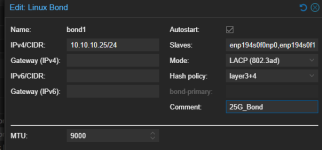
Hi,
here is my network configuration (storage network):

NIC: 2 x Intel Corporation Ethernet Controller 10-Gigabit X540-AT2
BOND Type: LACP (802.3ad)
MTU: 9000

Storage Network Bond details attached.
 

Attachments

I've got several PVE running 8.4.14

Not all backup went wrong, here some logs from one PVE with 6 VMs

failed backup:
INFO: Starting Backup of VM 502 (qemu)
INFO: Backup started at 2025-11-28 18:33:14
INFO: status = running
INFO: VM Name: SRVQUA
INFO: include disk 'ide0' 'local-lvm:vm-502-disk-0' 55G
INFO: backup mode: snapshot
INFO: ionice priority: 7
INFO: creating Proxmox Backup Server archive 'vm/502/2025-11-28T17:33:14Z'
INFO: issuing guest-agent 'fs-freeze' command
INFO: issuing guest-agent 'fs-thaw' command
INFO: started backup task '0a99e398-36eb-4987-afa3-475a20c920ae'
INFO: resuming VM again
INFO: ide0: dirty-bitmap status: OK (21.4 GiB of 55.0 GiB dirty)
INFO: using fast incremental mode (dirty-bitmap), 21.4 GiB dirty of 55.0 GiB total
INFO: 2% (604.0 MiB of 21.4 GiB) in 3s, read: 201.3 MiB/s, write: 196.0 MiB/s
INFO: 6% (1.4 GiB of 21.4 GiB) in 6s, read: 280.0 MiB/s, write: 174.7 MiB/s
INFO: 10% (2.2 GiB of 21.4 GiB) in 9s, read: 268.0 MiB/s, write: 105.3 MiB/s
INFO: 14% (3.1 GiB of 21.4 GiB) in 12s, read: 313.3 MiB/s, write: 105.3 MiB/s
ERROR: VM 502 qmp command 'query-backup' failed - got timeout
INFO: aborting backup job
INFO: resuming VM again
ERROR: Backup of VM 502 failed - VM 502 qmp command 'query-backup' failed - got timeout
INFO: Failed at 2025-11-28 18:51:40

then next two VMs backup (on same PVE node) go ok :

INFO: Starting Backup of VM 503 (qemu)
INFO: Backup started at 2025-11-28 18:51:40
INFO: status = running
INFO: VM Name: SRVSMI
INFO: include disk 'ide0' 'local-lvm:vm-503-disk-0' 75G
INFO: backup mode: snapshot
INFO: ionice priority: 7
INFO: creating Proxmox Backup Server archive 'vm/503/2025-11-28T17:51:40Z'
INFO: issuing guest-agent 'fs-freeze' command
INFO: issuing guest-agent 'fs-thaw' command
INFO: started backup task '0083bbaf-2e75-401b-9ef0-b534a50bf0ba'
INFO: resuming VM again
INFO: ide0: dirty-bitmap status: OK (3.5 GiB of 75.0 GiB dirty)
INFO: using fast incremental mode (dirty-bitmap), 3.5 GiB dirty of 75.0 GiB total
INFO: 18% (648.0 MiB of 3.5 GiB) in 3s, read: 216.0 MiB/s, write: 212.0 MiB/s
INFO: 36% (1.3 GiB of 3.5 GiB) in 6s, read: 225.3 MiB/s, write: 222.7 MiB/s
INFO: 56% (2.0 GiB of 3.5 GiB) in 9s, read: 232.0 MiB/s, write: 232.0 MiB/s
INFO: 78% (2.8 GiB of 3.5 GiB) in 12s, read: 266.7 MiB/s, write: 266.7 MiB/s
INFO: 100% (3.5 GiB of 3.5 GiB) in 15s, read: 254.7 MiB/s, write: 254.7 MiB/s
INFO: backup was done incrementally, reused 71.52 GiB (95%)
INFO: transferred 3.50 GiB in 16 seconds (224.0 MiB/s)
INFO: adding notes to backup
INFO: Finished Backup of VM 503 (00:00:17)
INFO: Backup finished at 2025-11-28 18:51:57
INFO: Starting Backup of VM 504 (qemu)
INFO: Backup started at 2025-11-28 18:51:57
INFO: status = running
INFO: VM Name: Pandaserver
INFO: include disk 'scsi0' 'local-lvm:vm-504-disk-0' 70G
INFO: backup mode: snapshot
INFO: ionice priority: 7
INFO: creating Proxmox Backup Server archive 'vm/504/2025-11-28T17:51:57Z'
INFO: issuing guest-agent 'fs-freeze' command
INFO: issuing guest-agent 'fs-thaw' command
INFO: started backup task '16622f06-901a-4328-8b62-0b49317ed902'
INFO: resuming VM again
INFO: scsi0: dirty-bitmap status: OK (304.0 MiB of 70.0 GiB dirty)
INFO: using fast incremental mode (dirty-bitmap), 304.0 MiB dirty of 70.0 GiB total
INFO: 100% (304.0 MiB of 304.0 MiB) in 2s, read: 152.0 MiB/s, write: 150.0 MiB/s
INFO: backup was done incrementally, reused 69.71 GiB (99%)
INFO: transferred 304.00 MiB in 2 seconds (152.0 MiB/s)
INFO: adding notes to backup
INFO: Finished Backup of VM 504 (00:00:03)
INFO: Backup finished at 2025-11-28 18:52:00

last VM backup gone wrong:

INFO: Starting Backup of VM 505 (qemu)
INFO: Backup started at 2025-11-28 18:52:00
INFO: status = running
INFO: VM Name: Opera2022
INFO: include disk 'ide0' 'local-lvm:vm-505-disk-1' 400G
INFO: include disk 'efidisk0' 'local-lvm:vm-505-disk-0' 4M
INFO: include disk 'tpmstate0' 'local-lvm:vm-505-disk-2' 4M
INFO: backup mode: snapshot
INFO: ionice priority: 7
INFO: creating Proxmox Backup Server archive 'vm/505/2025-11-28T17:52:00Z'
INFO: attaching TPM drive to QEMU for backup
INFO: issuing guest-agent 'fs-freeze' command
INFO: issuing guest-agent 'fs-thaw' command
INFO: started backup task '3a695932-e858-49ce-b604-f5b2eae7ba3d'
INFO: resuming VM again
INFO: efidisk0: dirty-bitmap status: OK (drive clean)
INFO: ide0: dirty-bitmap status: OK (94.1 GiB of 400.0 GiB dirty)
INFO: tpmstate0-backup: dirty-bitmap status: created new
INFO: using fast incremental mode (dirty-bitmap), 94.1 GiB dirty of 400.0 GiB total
INFO: 2% (2.7 GiB of 94.1 GiB) in 3s, read: 908.0 MiB/s, write: 892.0 MiB/s
INFO: 3% (3.4 GiB of 94.1 GiB) in 6s, read: 262.7 MiB/s, write: 260.0 MiB/s
INFO: 4% (4.1 GiB of 94.1 GiB) in 9s, read: 240.0 MiB/s, write: 238.7 MiB/s
INFO: 5% (4.7 GiB of 94.1 GiB) in 12s, read: 209.3 MiB/s, write: 205.3 MiB/s
INFO: 6% (5.9 GiB of 94.1 GiB) in 17s, read: 232.8 MiB/s, write: 231.2 MiB/s
INFO: 7% (6.6 GiB of 94.1 GiB) in 20s, read: 248.0 MiB/s, write: 241.3 MiB/s
INFO: 8% (7.6 GiB of 94.1 GiB) in 24s, read: 256.0 MiB/s, write: 255.0 MiB/s
INFO: 9% (8.6 GiB of 94.1 GiB) in 29s, read: 196.0 MiB/s, write: 196.0 MiB/s
ERROR: VM 505 qmp command 'query-backup' failed - got timeout
INFO: aborting backup job
ERROR: VM 505 qmp command 'backup-cancel' failed - unable to connect to VM 505 qmp socket - timeout after 5982 retries
INFO: resuming VM again
ERROR: Backup of VM 505 failed - VM 505 qmp command 'cont' failed - unable to connect to VM 505 qmp socket - timeout after 450 retries
INFO: Failed at 2025-11-28 19:24:00
INFO: Backup job finished with errors
INFO: notified via target `mail-to-root`
TASK ERROR: job errors


on PBS side this is the log for the very first VM backup gone wrong:

2025-11-28T18:33:14+01:00: starting new backup on datastore 'datastore1' from ::ffff:192.168.100.5: "vm/502/2025-11-28T17:33:14Z"
2025-11-28T18:33:14+01:00: download 'index.json.blob' from previous backup 'vm/502/2025-11-27T17:32:16Z'.
2025-11-28T18:33:14+01:00: register chunks in 'drive-ide0.img.fidx' from previous backup 'vm/502/2025-11-27T17:32:16Z'.
2025-11-28T18:33:15+01:00: download 'drive-ide0.img.fidx' from previous backup 'vm/502/2025-11-27T17:32:16Z'.
2025-11-28T18:33:15+01:00: created new fixed index 1 ("vm/502/2025-11-28T17:33:14Z/drive-ide0.img.fidx")
2025-11-28T18:33:15+01:00: add blob "/mnt/datastore1/vm/502/2025-11-28T17:33:14Z/qemu-server.conf.blob" (353 bytes, comp: 353)
2025-11-28T18:52:13+01:00: POST /fixed_chunk: 400 Bad Request: error reading a body from connection
2025-11-28T18:52:13+01:00: backup failed: connection error
2025-11-28T18:52:13+01:00: removing failed backup
2025-11-28T18:52:13+01:00: POST /fixed_chunk: 400 Bad Request: error reading a body from connection
2025-11-28T18:52:13+01:00: removing backup snapshot "/mnt/datastore1/vm/502/2025-11-28T17:33:14Z"
2025-11-28T18:52:13+01:00: POST /fixed_chunk: 400 Bad Request: error reading a body from connection
2025-11-28T18:52:13+01:00: TASK ERROR: connection error: bytes remaining on stream

hope this helps

NB: no bond at all on PVE nodes or PBE
 
Last edited:
see the same problems now here after stopping:


2025-12-01T14:53:35+01:00: starting new backup on datastore 'PBS1' from ::ffff:10.10.10.78: "vm/111/2025-12-01T13:53:24Z"
2025-12-01T14:53:35+01:00: download 'index.json.blob' from previous backup 'vm/111/2025-12-01T11:51:24Z'.
2025-12-01T14:53:35+01:00: register chunks in 'drive-efidisk0.img.fidx' from previous backup 'vm/111/2025-12-01T11:51:24Z'.
2025-12-01T14:53:35+01:00: download 'drive-efidisk0.img.fidx' from previous backup 'vm/111/2025-12-01T11:51:24Z'.
2025-12-01T14:53:35+01:00: created new fixed index 1 ("vm/111/2025-12-01T13:53:24Z/drive-efidisk0.img.fidx")
2025-12-01T14:53:35+01:00: register chunks in 'drive-virtio0.img.fidx' from previous backup 'vm/111/2025-12-01T11:51:24Z'.
2025-12-01T14:53:35+01:00: download 'drive-virtio0.img.fidx' from previous backup 'vm/111/2025-12-01T11:51:24Z'.
2025-12-01T14:53:35+01:00: created new fixed index 2 ("vm/111/2025-12-01T13:53:24Z/drive-virtio0.img.fidx")
2025-12-01T14:53:35+01:00: add blob "/mnt/datastore/PBS1/vm/111/2025-12-01T13:53:24Z/qemu-server.conf.blob" (675 bytes, comp: 675)
2025-12-01T14:58:52+01:00: backup failed: task aborted
2025-12-01T14:58:52+01:00: removing failed backup
2025-12-01T14:58:52+01:00: removing backup snapshot "/mnt/datastore/PBS1/vm/111/2025-12-01T13:53:24Z"
2025-12-01T14:58:52+01:00: POST /fixed_chunk: 400 Bad Request: error reading a body from connection
2025-12-01T14:58:52+01:00: TASK ERROR: task aborted
2025-12-01T14:58:52+01:00: POST /fixed_chunk: 400 Bad Request: error reading a body from connection

using a 25G Bond into vitastor:
1764597666788.png
 
Last edited:
Same problem here; backups very sloooow and frozen, vm disk corrupted (more windows vms) with PVE 8.4 and PBS 4.1.
So I have upgraded the cluster (6 nodes /ceph) to 9.1.1 and now i will wait, but:
- I am in the middle of an upgrade, so 4 nodes are 9.1.1 and the other 2 nodes still last 8.4
- if i restore from a 9.1 node, is really slow (2 hours for 1% of a 700Gbyte drive with 25% full).
- if i restore from a 8.4 node, the full restore goes in less than 1 hour

Now i need to suspend every backup because vms will be freezed or corrupted from it :(

PS: all is dell hardware, R730 xd with 12ssd + 12 sas drives, 4x10Gbit single bond with different vlans for ceph and management (and vms using sdn). PBS is with a 2x10Gbit, 12x8Tbyte sas drives for backup pool
 
Last edited:
Same problem here; backups very sloooow and frozen, vm disk corrupted (more windows vms) with PVE 8.4 and PBS 4.1.
So I have upgraded the cluster (6 nodes /ceph) to 9.1.1 and now i will wait, but:
- I am in the middle of an upgrade, so 4 nodes are 9.1.1 and the other 2 nodes still last 8.4
- if i restore from a 9.1 node, is really slow (2 hours for 1% of a 700Gbyte drive with 25% full).
- if i restore from a 8.4 node, the full restore goes in less than 1 hour

Now i need to suspend every backup because vms will be freezed or corrupted from it :(

PS: all is dell hardware, R730 xd with 12ssd + 12 sas drives, 4x10Gbit single bond with different vlans for ceph and management (and vms using sdn). PBS is with a 2x10Gbit, 12x8Tbyte sas drives for backup pool

revert to previous kernel on PBS
 
Same problem here; backups very sloooow and frozen, vm disk corrupted (more windows vms) with PVE 8.4 and PBS 4.1.
Welcome to the party
So I have upgraded the cluster (6 nodes /ceph) to 9.1.1 and now i will wait.
Do not wait finishing upgrading your PVE cluster. PBS is the problem here so either do not upgrade PBS, or 'downgrade' PBS to the 6.14 kernel. The PVE machines are not an issue here and seem to be safe to upgrade to 9.

For right now in our env I have:
- Disabled all automated backups, and will manually start them tonight.
- Downgraded the PBS kernel to 6.14 and PBS version to 4.0.19, see comments on page 3 of this treat.
 
Welcome to the party

Do not wait finishing upgrading your PVE cluster. PBS is the problem here so either do not upgrade PBS, or 'downgrade' PBS to the 6.14 kernel. The PVE machines are not an issue here and seem to be safe to upgrade to 9.

For right now in our env I have:
- Disabled all automated backups, and will manually start them tonight.
- Downgraded the PBS kernel to 6.14 and PBS version to 4.0.19, see comments on page 3 of this treat.

I have a slowness problem in restore too, and I can confirm that with a 8.4 host the problem disappear.
Restoring with a 9.1.1 host, after a couple of minutes, i can see only one chunk per minute (or less), and now, for example, I have the restore process frozen at 35% (128Gbyte drive).
PBS is started with 6.14.11-4 kernel.
 
I have a slowness problem in restore too, and I can confirm that with a 8.4 host the problem disappear.
Restoring with a 9.1.1 host, after a couple of minutes, i can see only one chunk per minute (or less), and now, for example, I have the restore process frozen at 35% (128Gbyte drive).
PBS is started with 6.14.11-4 kernel.
very strange...

- 8 PVEs 8.4.14 no issues restoring from PBS 4.1.0 with 6.14.11 kernel
- 1 test PVE 9.1.1 no issues restoring from PBS 4.1.0 with 6.14.11 kernel

maybe something not related to PBS kernel issue on backup ?
 
very strange...

- 8 PVEs 8.4.14 no issues restoring from PBS 4.1.0 with 6.14.11 kernel
- 1 test PVE 9.1.1 no issues restoring from PBS 4.1.0 with 6.14.11 kernel

maybe something not related to PBS kernel issue on backup ?
On a 9.1.1 node:
uname -a
Linux nodo4-cluster1 6.17.2-2-pve #1 SMP PREEMPT_DYNAMIC PMX 6.17.2-2 (2025-11-26T12:33Z) x86_64 GNU/Linux
I use the same hardware for PBS and PVE (dell R730) and both with bond of 10Gbit ethernet on board (2 or 4), broadcom nextreme II. If the kernel's problem is related to this chipset, also on PVE i need to downgrade the kernel ?
--- update: on on PBS I am using Emulex OneConnect 10Gbit nic... i could try if the last kernel works or less, but before I need to understand if PVE with that kernel should work.
 
Last edited:
On a 9.1.1 node:
uname -a
Linux nodo4-cluster1 6.17.2-2-pve #1 SMP PREEMPT_DYNAMIC PMX 6.17.2-2 (2025-11-26T12:33Z) x86_64 GNU/Linux
I use the same hardware for PBS and PVE (dell R730) and both with bond of 10Gbit ethernet on board (2 or 4), broadcom nextreme II. If the kernel's problem is related to this chipset, also on PVE i need to downgrade the kernel ?

you could try to downgrade kernel also on PVE host and report it, maybe help, but its not related to specific manufacter driver.

Actually Im running Intel Corporation Ethernet Controller X710 for 10GbE SFP+ on 8.4.14 hosts
and
BCM5719 on 9.1.1 test host

but no issues on both scenario restoring VMs.

On the other hand Im on Intel Corporation 82599ES 10-Gigabit SFI/SFP+ Network Connection (rev 01) on PBS 4.1 , and every backup was a nightmare before I reverted to good old 6.14
 
Hi,
now I don't have time to test it but I think that could be something related to LACP...

Does everyone who has the problem have LACP aggregation?
 
  • Like
Reactions: Heracleos