

I kinda was wondering now why does modesetting have a priority over actual nvidia drivers especially during boot via gpu pass thru, so therefore did s a quick search turns out that it might be driver issues and modesetting is currently disabled by default, so i enabled it
disabled xorg conf (the one that i manually created for 2 screens) in lightdm.conf seats
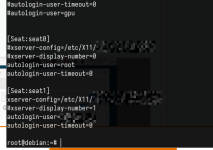
rebooted the vm, it didnt work (
it did load, but resolution was ass, then i remembered that in order for it to work we'd have to fake EDID (Extended Display Identification Data, passed by monitor to videocard/videocard to driver) (since we usually don't really have actual monitors connected to video card in pass through mode),
so i downloaded random edid.bin (you can use generators or ready files, https://github.com/linuxhw/EDID, https://github.com/akatrevorjay/edid-generator), keep in mind you might need
and then changed the config to:
then another reboot, and on the seat with gpu i was having actual monitor, so i changed it to:
reboot (for some reason restarting lightdm doesn't really help, i was still getting logged in wrong session via *desk software even though it was detecting right seat with nvidia gpu
then we have 2 screens with minimal configuration and without weird slimy 100 lines long xorg.configs:
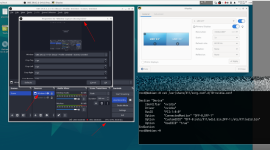
the only issue is that novnc now turned into unusable piece of trash
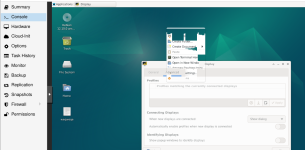
i will try to edit this post once i find solution, maybe due to modesetting 1 forced thru nvidia it tries to force itself thru that gpu as well
well, okay yes, it was trying to use nvidia driver, so i moved global config out and set it back as a seat config:
and now we got:
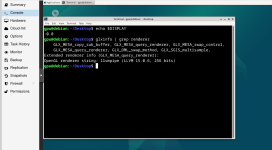
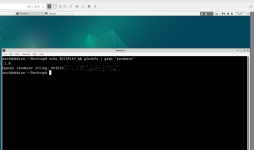
keep in mind, you probably dont need either this (gpu) or that (virtual gpu/software renderer), i decided to describe both just because Giggling3999 has mentioned that novnc gets broken, in case of display set as none it does get "broken" (and in case of multiple screens) as in black blinking console, therefore this was just in case if you wanted to have both, i am not going to use software renderer at all and utilize it fully on gpu mode to reduce usage of my cpu, but in case if you're in cloud hosting and do not have gpu passed thru and only got redhat one, ask them to add max_outputs and use this config (+ echo "on" described above) (or edid, i haven't tested on software mode yet, but it uses different names Virtual-*/RedHat-13/Redhat15 so edid files might not work out unless patched)
for gpu + using novnc together with gpu pass thru:
(can be simplified to:
for pure software mode: just use echo "on"... from above and utilize xfce settings display and configure it there, i am not sure if there's any alternative to enabling it thru echo "on"
but just keep in mind there's an issue with lightdm and its seats so even if u have everything configured correctly its still going to randomly swap seats numbers/display numbers (or maybe some *desk remote software exclusively somehow in their source code ignores DISPLAY, cookie and XDG env flags and runs only on display 0 or tries to run on wrong seat for some weird ass reason, but systemctl restart display-manager helps sometimes)
even tho they look stable for some reason each
screenrecording of the bug:
https://jmp.sh/share/SUivUsem46O0pPvwVqv0
but yet again if you're in a single seat mode it wont be affecting you, even tho the software has gotten strings and somewhat works with /proc, somehow got bugs:
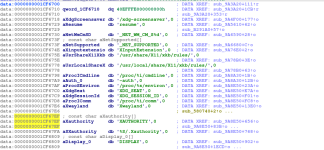
havent tested it well but probably a bug/race condition in anydesk
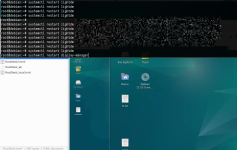
(https://www.reddit.com/r/AnyDesk/comments/1t8wn3m/anydesk_display_race_condition_when_running_as/ made a report as well)
Code:
cat /sys/module/nvidia_drm/parameters/modeset # Should show N

echo "options nvidia_drm modeset=1" > /etc/modprobe.d/nvidia-drm.conf
update-initramfs -u
rebootrebooted the vm, it didnt work (
cat /var/log/lightdm/x-0.log, cat /var/log/lightdm/x-1.log), so i was forced to create minimal xorg.conf for nvidia driver to load:
Code:
# /usr/share/X11/xorg.conf.d/5-nvidia.conf

Section "Device"
    Identifier "nvidia"
    Driver     "nvidia"
    BusID      "PCI:1:0:0" # your gpu ig, lspci | grep -i vga
EndSection
it did load, but resolution was ass, then i remembered that in order for it to work we'd have to fake EDID (Extended Display Identification Data, passed by monitor to videocard/videocard to driver) (since we usually don't really have actual monitors connected to video card in pass through mode),
so i downloaded random edid.bin (you can use generators or ready files, https://github.com/linuxhw/EDID, https://github.com/akatrevorjay/edid-generator), keep in mind you might need
apt install edid-decode, wget -O /etc/X11/edid.bin https://raw.githubusercontent.com/akatrevorjay/edid-generator/master/1920x1080.bin,and then changed the config to:
Code:
# /usr/share/X11/xorg.conf.d/5-nvidia.conf

Section "Device"
    Identifier  "nvidia"
    Driver      "nvidia"
    BusID       "PCI:1:0:0"
#    Option      "ConnectedMonitor" "DFP-0,DFP-1" #uncomment for the second screen
#    Option      "CustomEDID" "DFP-0:/etc/X11/edid.bin;DFP-1:/etc/X11/edid.bin" # uncomment for second scree
    Option      "ConnectedMonitor" "DFP-0"
    Option      "CustomEDID" "DFP-0:/etc/X11/edid.bin"
    Option      "UseEDID" "true"
EndSection
then another reboot, and on the seat with gpu i was having actual monitor, so i changed it to:
Code:
# /usr/share/X11/xorg.conf.d/5-nvidia.conf

Section "Device"
    Identifier  "nvidia"
    Driver      "nvidia"
    BusID       "PCI:1:0:0"
    Option      "ConnectedMonitor" "DFP-0,DFP-1" #uncomment for the second screen
    Option      "CustomEDID" "DFP-0:/etc/X11/edid.bin;DFP-1:/etc/X11/edid.bin"
    Option      "UseEDID" "true"
EndSection
reboot (for some reason restarting lightdm doesn't really help, i was still getting logged in wrong session via *desk software even though it was detecting right seat with nvidia gpu
then we have 2 screens with minimal configuration and without weird slimy 100 lines long xorg.configs:
the only issue is that novnc now turned into unusable piece of trash
i will try to edit this post once i find solution, maybe due to modesetting 1 forced thru nvidia it tries to force itself thru that gpu as well
well, okay yes, it was trying to use nvidia driver, so i moved global config out and set it back as a seat config:
Code:
mv /usr/share/X11/xorg.conf.d/5-nvidia.conf /etc/X11/xorg-nvidia2.conf

# /etc/lightdm/lightdm.conf
[Seat:seat0]
xserver-config=/etc/X11/xorg-nvidia2.conf
# make sure you patch that one file that doesn't allow autologin as root if you're going to use this user otherwise it will silently fail and create different seats
autologin-user=root
autologin-user-timeout=0

[Seat:seat1]
xserver-config=/etc/X11/xorg-virtual.conf
autologin-user=gpu
autologin-user-timeout=0
and now we got:
keep in mind, you probably dont need either this (gpu) or that (virtual gpu/software renderer), i decided to describe both just because Giggling3999 has mentioned that novnc gets broken, in case of display set as none it does get "broken" (and in case of multiple screens) as in black blinking console, therefore this was just in case if you wanted to have both, i am not going to use software renderer at all and utilize it fully on gpu mode to reduce usage of my cpu, but in case if you're in cloud hosting and do not have gpu passed thru and only got redhat one, ask them to add max_outputs and use this config (+ echo "on" described above) (or edid, i haven't tested on software mode yet, but it uses different names Virtual-*/RedHat-13/Redhat15 so edid files might not work out unless patched)
for gpu + using novnc together with gpu pass thru:
Code:
#/etc/X11/xorg-virtual.conf
Section "Monitor"
    Identifier  "VirtMonitor"
    HorizSync   30.0-100.0
    VertRefresh 50-75
    Modeline    "1920x1080_60.00" 173.00 1920 2048 2248 2576 1080 1083 1088 1120
EndSection

Section "Device"
    Identifier  "VirtioGPU"
    Driver      "modesetting"
    BusID       "PCI:0:1:0"
EndSection

Section "Screen"
    Identifier   "VirtScreen"
    Device       "VirtioGPU"
    Monitor      "VirtMonitor"
    DefaultDepth 24
    SubSection "Display"
        Depth  24
        Modes  "1920x1080"
    EndSubSection
EndSection

Section "ServerLayout"
    Identifier "VirtLayout"
    Screen 0   "VirtScreen"
EndSection
(can be simplified to:
Code:
# cat /etc/X11/xorg-virtual.conf
Section "Device"
    Identifier  "VirtioGPU"
    Driver      "modesetting"
    BusID       "PCI:0:1:0"
EndSection
for pure software mode: just use echo "on"... from above and utilize xfce settings display and configure it there, i am not sure if there's any alternative to enabling it thru echo "on"
but just keep in mind there's an issue with lightdm and its seats so even if u have everything configured correctly its still going to randomly swap seats numbers/display numbers (or maybe some *desk remote software exclusively somehow in their source code ignores DISPLAY, cookie and XDG env flags and runs only on display 0 or tries to run on wrong seat for some weird ass reason, but systemctl restart display-manager helps sometimes)
even tho they look stable for some reason each
systemctl restart display-manager, will produce certain *desk solutions connect to different seats
Code:
[Seat:seat1]
xserver-config=/etc/X11/xorg-virtual.conf
vs

root@debian:~# cat /var/log/lightdm/x-0.log | grep -i "config"
Markers: (--) probed, (**) from config file, (==) default setting,
(++) Using config file: "/etc/X11/xorg-virtual.conf"
(==) Using system config directory "/usr/share/X11/xorg.conf.d"


[Seat:seat0]
xserver-config=/etc/X11/xorg-nvidia2.conf
vs

root@debian:~# cat /var/log/lightdm/x-1.log | grep -i "config"
Markers: (--) probed, (**) from config file, (==) default setting,
(++) Using config file: "/etc/X11/xorg-nvidia2.conf"
(==) Using system config directory "/usr/share/X11/xorg.conf.d"
root@debian:~#
screenrecording of the bug:
https://jmp.sh/share/SUivUsem46O0pPvwVqv0
but yet again if you're in a single seat mode it wont be affecting you, even tho the software has gotten strings and somewhat works with /proc, somehow got bugs:
havent tested it well but probably a bug/race condition in anydesk
(https://www.reddit.com/r/AnyDesk/comments/1t8wn3m/anydesk_display_race_condition_when_running_as/ made a report as well)
Last edited: