Hi,
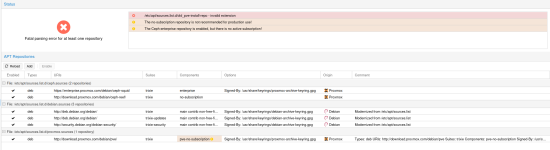
I managed to upgrade to 9.17, I skipped the 'Update the Ceph Package Repository' section (just the homelab setup, not hyper-converged). Reboots, initial checks, LXC's seem to be running fine.
I think I did the step 'Then remove the previous Proxmox VE 8 no-subscription repository from either the /etc/apt/sources.list, /etc/apt/sources.list.d/pve-install-repo.list or any other .list file you may have added it to' but I can't be 100% sure. When I apt modernize-sources at the end, there was an issue with Ceph.
However, I can't update now. Would appreciate any help. A apt update, =
Hit:1 http://deb.debian.org/debian trixie InRelease
Hit:2 http://security.debian.org/debian-security trixie-security InRelease
Hit:3 http://deb.debian.org/debian trixie-updates InRelease
Ign:4 http://download.proxmox.com/debian/ceph-reef trixie InRelease
Hit:5 http://download.proxmox.com/debian/pve trixie InRelease
Err:6 http://download.proxmox.com/debian/ceph-reef trixie Release
404 Not Found [IP: 51.91.38.34 80]
Err:7 https://enterprise.proxmox.com/debian/ceph-squid trixie InRelease
401 Unauthorized [IP: 51.91.38.34 443]
Err:8 https://enterprise.proxmox.com/debian/pve trixie InRelease
401 Unauthorized [IP: 51.91.38.34 443]
Notice: Ignoring file 'old_pve-install-repo' in directory '/etc/apt/sources.list.d/' as it has no filename extension
Notice: See apt-secure(8) manpage for repository creation and user configuration details.
Notice: Updating from such a repository can't be done securely, and is therefore disabled by default.
Error: The repository 'http://download.proxmox.com/debian/ceph-reef trixie Release' does not have a Release file.
Warning: Target Translations (pve-no-subscription/i18n/Translation-en) is configured multiple times in /etc/apt/sources.list.d/proxmox.sources:1 and /etc/apt/sources.list.d/proxmox.sources:2
Warning: Target Translations (pve-no-subscription/i18n/Translation-en_US) is configured multiple times in /etc/apt/sources.list.d/proxmox.sources:1 and /etc/apt/sources.list.d/proxmox.sources:2
Warning: Target Packages (pve-no-subscription/binary-all/Packages) is configured multiple times in /etc/apt/sources.list.d/proxmox.sources:1 and /etc/apt/sources.list.d/proxmox.sources:2
Warning: Target Packages (pve-no-subscription/binary-amd64/Packages) is configured multiple times in /etc/apt/sources.list.d/proxmox.sources:1 and /etc/apt/sources.list.d/proxmox.sources:2
Error: Failed to fetch https://enterprise.proxmox.com/debian/ceph-squid/dists/trixie/InRelease 401 Unauthorized [IP: 51.91.38.34 443]
Error: The repository 'https://enterprise.proxmox.com/debian/ceph-squid trixie InRelease' is not signed.
Notice: Updating from such a repository can't be done securely, and is therefore disabled by default.
Notice: See apt-secure(8) manpage for repository creation and user configuration details.
Error: Failed to fetch https://enterprise.proxmox.com/debian/pve/dists/trixie/InRelease 401 Unauthorized [IP: 51.91.38.34 443]
Error: The repository 'https://enterprise.proxmox.com/debian/pve trixie InRelease' is not signed.
Notice: Updating from such a repository can't be done securely, and is therefore disabled by default.
Notice: See apt-secure(8) manpage for repository creation and user configuration details.
Warning: Target Packages (pve-no-subscription/binary-amd64/Packages) is configured multiple times in /etc/apt/sources.list.d/proxmox.sources:1 and /etc/apt/sources.list.d/proxmox.sources:2
Warning: Target Packages (pve-no-subscription/binary-all/Packages) is configured multiple times in /etc/apt/sources.list.d/proxmox.sources:1 and /etc/apt/sources.list.d/proxmox.sources:2
Warning: Target Translations (pve-no-subscription/i18n/Translation-en_US) is configured multiple times in /etc/apt/sources.list.d/proxmox.sources:1 and /etc/apt/sources.list.d/proxmox.sources:2
Warning: Target Translations (pve-no-subscription/i18n/Translation-en) is configured multiple times in /etc/apt/sources.list.d/proxmox.sources:1 and /etc/apt/sources.list.d/proxmox.sources:2
Notice: Missing Signed-By in the sources.list(5) entry for 'http://download.proxmox.com/debian/ceph-reef'
Here are my sources
/etc/apt/sources.list.d
ceph.sources
Types: deb
URIs: http://download.proxmox.com/debian/ceph-reef/
Suites: trixie
Components: no-subscription
Signed-By:
debian.sources
Types: deb
URIs: http://security.debian.org/debian-security/
Suites: trixie-security
Components: main contrib non-free-firmware
Signed-By: /usr/share/keyrings/debian-archive-keyring.gpg
proxmox.sources
Types: deb
URIs: http://download.proxmox.com/debian/pve
Suites: trixie
Components: pve-no-subscription
Signed-By: /usr/share/keyrings/proxmox-archive-keyring.gpg
# Modernized from /etc/apt/sources.list
Types: deb
URIs: http://download.proxmox.com/debian/pve/
Suites: trixie
Components: pve-no-subscription
Signed-By: /usr/share/keyrings/proxmox-archive-keyring.gpg
pve-enterprise.sources
Types: deb
URIs: https://enterprise.proxmox.com/debian/pve
Suites: trixie
Components: pve-enterprise
Signed-By: /usr/share/keyrings/proxmox-archive-keyring.gpg
root@pve1:/etc/apt/sources.list.d#
& ceph version 19.2.3 (ad1eecf4042e0ce72f382f60c97b709fd6f16a51) squid (stable)
ceph.list.bak
# deb https://enterprise.proxmox.com/debian/ceph-quincy trixie enterprise
# deb http://download.proxmox.com/debian/ceph-quincy trixie no-subscription
# deb https://enterprise.proxmox.com/debian/ceph-reef trixie enterprise
deb http://download.proxmox.com/debian/ceph-reef trixie no-subscription
I managed to upgrade to 9.17, I skipped the 'Update the Ceph Package Repository' section (just the homelab setup, not hyper-converged). Reboots, initial checks, LXC's seem to be running fine.
I think I did the step 'Then remove the previous Proxmox VE 8 no-subscription repository from either the /etc/apt/sources.list, /etc/apt/sources.list.d/pve-install-repo.list or any other .list file you may have added it to' but I can't be 100% sure. When I apt modernize-sources at the end, there was an issue with Ceph.
However, I can't update now. Would appreciate any help. A apt update, =
Hit:1 http://deb.debian.org/debian trixie InRelease
Hit:2 http://security.debian.org/debian-security trixie-security InRelease
Hit:3 http://deb.debian.org/debian trixie-updates InRelease
Ign:4 http://download.proxmox.com/debian/ceph-reef trixie InRelease
Hit:5 http://download.proxmox.com/debian/pve trixie InRelease
Err:6 http://download.proxmox.com/debian/ceph-reef trixie Release
404 Not Found [IP: 51.91.38.34 80]
Err:7 https://enterprise.proxmox.com/debian/ceph-squid trixie InRelease
401 Unauthorized [IP: 51.91.38.34 443]
Err:8 https://enterprise.proxmox.com/debian/pve trixie InRelease
401 Unauthorized [IP: 51.91.38.34 443]
Notice: Ignoring file 'old_pve-install-repo' in directory '/etc/apt/sources.list.d/' as it has no filename extension
Notice: See apt-secure(8) manpage for repository creation and user configuration details.
Notice: Updating from such a repository can't be done securely, and is therefore disabled by default.
Error: The repository 'http://download.proxmox.com/debian/ceph-reef trixie Release' does not have a Release file.
Warning: Target Translations (pve-no-subscription/i18n/Translation-en) is configured multiple times in /etc/apt/sources.list.d/proxmox.sources:1 and /etc/apt/sources.list.d/proxmox.sources:2
Warning: Target Translations (pve-no-subscription/i18n/Translation-en_US) is configured multiple times in /etc/apt/sources.list.d/proxmox.sources:1 and /etc/apt/sources.list.d/proxmox.sources:2
Warning: Target Packages (pve-no-subscription/binary-all/Packages) is configured multiple times in /etc/apt/sources.list.d/proxmox.sources:1 and /etc/apt/sources.list.d/proxmox.sources:2
Warning: Target Packages (pve-no-subscription/binary-amd64/Packages) is configured multiple times in /etc/apt/sources.list.d/proxmox.sources:1 and /etc/apt/sources.list.d/proxmox.sources:2
Error: Failed to fetch https://enterprise.proxmox.com/debian/ceph-squid/dists/trixie/InRelease 401 Unauthorized [IP: 51.91.38.34 443]
Error: The repository 'https://enterprise.proxmox.com/debian/ceph-squid trixie InRelease' is not signed.
Notice: Updating from such a repository can't be done securely, and is therefore disabled by default.
Notice: See apt-secure(8) manpage for repository creation and user configuration details.
Error: Failed to fetch https://enterprise.proxmox.com/debian/pve/dists/trixie/InRelease 401 Unauthorized [IP: 51.91.38.34 443]
Error: The repository 'https://enterprise.proxmox.com/debian/pve trixie InRelease' is not signed.
Notice: Updating from such a repository can't be done securely, and is therefore disabled by default.
Notice: See apt-secure(8) manpage for repository creation and user configuration details.
Warning: Target Packages (pve-no-subscription/binary-amd64/Packages) is configured multiple times in /etc/apt/sources.list.d/proxmox.sources:1 and /etc/apt/sources.list.d/proxmox.sources:2
Warning: Target Packages (pve-no-subscription/binary-all/Packages) is configured multiple times in /etc/apt/sources.list.d/proxmox.sources:1 and /etc/apt/sources.list.d/proxmox.sources:2
Warning: Target Translations (pve-no-subscription/i18n/Translation-en_US) is configured multiple times in /etc/apt/sources.list.d/proxmox.sources:1 and /etc/apt/sources.list.d/proxmox.sources:2
Warning: Target Translations (pve-no-subscription/i18n/Translation-en) is configured multiple times in /etc/apt/sources.list.d/proxmox.sources:1 and /etc/apt/sources.list.d/proxmox.sources:2
Notice: Missing Signed-By in the sources.list(5) entry for 'http://download.proxmox.com/debian/ceph-reef'
Here are my sources
/etc/apt/sources.list.d
ceph.sources
Types: deb
URIs: http://download.proxmox.com/debian/ceph-reef/
Suites: trixie
Components: no-subscription
Signed-By:
debian.sources
Types: deb
URIs: http://security.debian.org/debian-security/
Suites: trixie-security
Components: main contrib non-free-firmware
Signed-By: /usr/share/keyrings/debian-archive-keyring.gpg
proxmox.sources
Types: deb
URIs: http://download.proxmox.com/debian/pve
Suites: trixie
Components: pve-no-subscription
Signed-By: /usr/share/keyrings/proxmox-archive-keyring.gpg
# Modernized from /etc/apt/sources.list
Types: deb
URIs: http://download.proxmox.com/debian/pve/
Suites: trixie
Components: pve-no-subscription
Signed-By: /usr/share/keyrings/proxmox-archive-keyring.gpg
pve-enterprise.sources
Types: deb
URIs: https://enterprise.proxmox.com/debian/pve
Suites: trixie
Components: pve-enterprise
Signed-By: /usr/share/keyrings/proxmox-archive-keyring.gpg
root@pve1:/etc/apt/sources.list.d#
& ceph version 19.2.3 (ad1eecf4042e0ce72f382f60c97b709fd6f16a51) squid (stable)
ceph.list.bak
# deb https://enterprise.proxmox.com/debian/ceph-quincy trixie enterprise
# deb http://download.proxmox.com/debian/ceph-quincy trixie no-subscription
# deb https://enterprise.proxmox.com/debian/ceph-reef trixie enterprise
deb http://download.proxmox.com/debian/ceph-reef trixie no-subscription