

Hi all,
The last few days I've been trying to passthrough the iGPU of my intel N150 mini pc (gmktec g3 plus) to my ubuntu vm on proxmox for hardware acceleration in jellyfin. However, after following all the steps, the vm keeps getting stuck during boot. Do you guys perhaps know what the problem is?
I ran the following steps on Proxmox 9.1.2 with ubuntu 25.10:
name: ubuntu
cores: 3
sockets: 1
memory: 12288
cpu: host
numa: 0
ostype: l26
machine: q35
efidisk0: local-lvm:vm-101-disk-0,efitype=4m,size=4M
scsi0: local-lvm:vm-101-disk-1,cache=writeback,discard=on,iothread=1,size=380G,ssd=1
scsihw: virtio-scsi-single
hostpci0: 0000:00:02,pcie=1
onboot: 1
However, when I boot up the VM, it keeps getting stuck around these times:
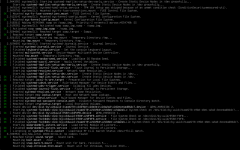
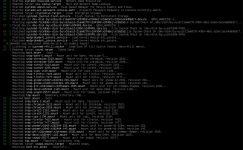
I have already tried removing the gpu and installing the intel-media-va-driver-non-free AND/OR intel-media-va-driver and then reenabling the GPU, however the boot issue remains. Also tried to disable "all function", " ROM-Bar", etc in the vm config. Please help me if possible, thank you!
The last few days I've been trying to passthrough the iGPU of my intel N150 mini pc (gmktec g3 plus) to my ubuntu vm on proxmox for hardware acceleration in jellyfin. However, after following all the steps, the vm keeps getting stuck during boot. Do you guys perhaps know what the problem is?
I ran the following steps on Proxmox 9.1.2 with ubuntu 25.10:
- Edited grub in proxmox to enable IOMMU ->
GRUB_CMDLINE_LINUX_DEFAULT="quiet intel_iommu=on iommu=pt" - Added VFIO modules to load on boot ->
echo -e "vfio\nvfio_iommu_type1\nvfio_pci\nvfio_virqfd" > /etc/modules-load.d/vfio.conf - Bound GPU to VFIO in /etc/modprobe.d/vfio-pci.conf by adding
options vfio-pci ids=8086:46d4 - Blacklisted intel drivers in proxmox and updated initramfs->
echo -e "blacklist i915\nblacklist snd_hda_intel" > /etc/modprobe.d/blacklist.conf
name: ubuntu
cores: 3
sockets: 1
memory: 12288
cpu: host
numa: 0
ostype: l26
machine: q35
efidisk0: local-lvm:vm-101-disk-0,efitype=4m,size=4M
scsi0: local-lvm:vm-101-disk-1,cache=writeback,discard=on,iothread=1,size=380G,ssd=1
scsihw: virtio-scsi-single
hostpci0: 0000:00:02,pcie=1
onboot: 1
However, when I boot up the VM, it keeps getting stuck around these times:
I have already tried removing the gpu and installing the intel-media-va-driver-non-free AND/OR intel-media-va-driver and then reenabling the GPU, however the boot issue remains. Also tried to disable "all function", " ROM-Bar", etc in the vm config. Please help me if possible, thank you!
Last edited:
