

Hello everyone,
I have a small 3-node PVE cluster at home that I mess with and learn on. Each node has 1 onboard NIC (eno1), Mellanox 10GB NIC (CEPH) and 2 USB3 NICs, one for Corosync and the other for Proxmox Backup Server.
Initially, all of my ports are all "untagged-access" ports but I've wanted to explore changing that, starting with my management interface.
Reviewing the Proxmox Network Configuration document Proxmox VLAN for Guest Networks, I've been able to test before with relative ease the VLAN awareness on the Linux Bridge solution.
My objective is this:
For eno1, I want 2 VLANs to utilize this network interface. VLAN 201 (Proxmox Mangement - 192.168.201.11/24) and VLAN 203 (Proxmox VM_NET).
What I'm struggling with is the "traditional" VLAN on the Linux bridge portion.
I've got VLAN 201 with tagged interface on my switch working but I'm stuck on why I can't get VLAN 203 created.

To my understanding, for each vlan, I need to create 1 Linux Bridge and 1 Linux VLAN.
The issue I'm encountering is creating the vmbr in the format I want and attaching it to eno1.
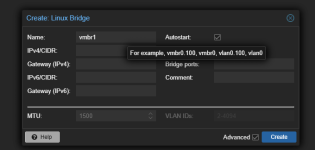
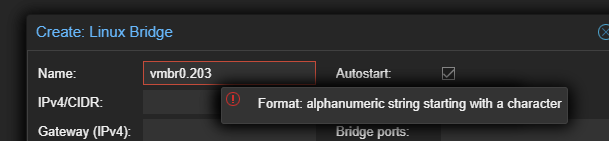
The message below shows that I should be able to set vmbr0.203 but that does not work. Unless it is because once vmbr0 is used, it cannot be reused with any other variations?
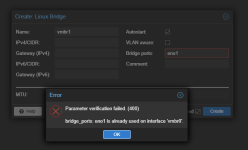
So I created vmbr1 linux bridge with bridge port eno1.203.
Then I created a Linux VLAN with vmbr1.203 pointing back to vmbr1.

For some reason this still does not work for my VM in vlan 203. The port on my switch (1/1/7 - for both vlan 201 and vlan 203 is tagged).
I know I can make my life easier by using the easier vlan awareness on the Linux bridge but I want to figure this out as a challenge to myself.
Any suggestions on were I am going wrong?
Here is my output from the CLI:
Thank you
I have a small 3-node PVE cluster at home that I mess with and learn on. Each node has 1 onboard NIC (eno1), Mellanox 10GB NIC (CEPH) and 2 USB3 NICs, one for Corosync and the other for Proxmox Backup Server.
Initially, all of my ports are all "untagged-access" ports but I've wanted to explore changing that, starting with my management interface.
Reviewing the Proxmox Network Configuration document Proxmox VLAN for Guest Networks, I've been able to test before with relative ease the VLAN awareness on the Linux Bridge solution.
My objective is this:
For eno1, I want 2 VLANs to utilize this network interface. VLAN 201 (Proxmox Mangement - 192.168.201.11/24) and VLAN 203 (Proxmox VM_NET).
What I'm struggling with is the "traditional" VLAN on the Linux bridge portion.
I've got VLAN 201 with tagged interface on my switch working but I'm stuck on why I can't get VLAN 203 created.
To my understanding, for each vlan, I need to create 1 Linux Bridge and 1 Linux VLAN.
The issue I'm encountering is creating the vmbr in the format I want and attaching it to eno1.
The message below shows that I should be able to set vmbr0.203 but that does not work. Unless it is because once vmbr0 is used, it cannot be reused with any other variations?
So I created vmbr1 linux bridge with bridge port eno1.203.
Then I created a Linux VLAN with vmbr1.203 pointing back to vmbr1.
For some reason this still does not work for my VM in vlan 203. The port on my switch (1/1/7 - for both vlan 201 and vlan 203 is tagged).
I know I can make my life easier by using the easier vlan awareness on the Linux bridge but I want to figure this out as a challenge to myself.
Any suggestions on were I am going wrong?
Here is my output from the CLI:
Code:
auto lo
iface lo inet loopback

iface eno1 inet manual

auto enp1s0f0
iface enp1s0f0 inet static
        address 192.168.204.11/24
#PVE_CEPH_STORAGE

iface enp1s0f1 inet manual
#10GB-Not Used

auto enx000ec65fa14c
iface enx000ec65fa14c inet static
        address 192.168.202.11/24
#PVE_COROSYNC

auto enx9c69d32c79c8
iface enx9c69d32c79c8 inet static
        address 192.168.222.11/24
#PBS_BU_NET

auto vmbr0
iface vmbr0 inet manual
        bridge-ports eno1
        bridge-stp off
        bridge-fd 0
        bridge-vlan-aware yes
        bridge-vids 2-4094

auto vmbr0.201
iface vmbr0.201 inet static
        address 192.168.201.11/24
        gateway 192.168.201.1
#PVE_MGMT

auto vmbr1
iface vmbr1 inet manual
        bridge-ports eno1.203
        bridge-stp off
        bridge-fd 0
        bridge-vlan-aware yes
        bridge-vids 2-4094

auto vmbr1.203
iface vmbr1.203 inet manual

source /etc/network/interfaces.d/*
Thank you

