

Hey all, I'm hoping someone can explain some of the IO performance issues I'm encountering.
The Build
I've just built a new home server, the hardware is:
GByte X570 Aorus Elite
Ryzen9 3900X
2x Samsung 32GB 3200MHz ECC DDR4 UDIMM
LSI SAS SATA 9201-8I
2x WD Blue SN550 1TB M.2
2x WD RED wd10jfcx-68n6gn0 1TB
4x huh721010AL5200 10TB
The 10TB drives are the only ones connected to the LSI controller, leaving 4 ports for expansion. All others are connected to the onboard sata controller. I installed Proxmox 7.0-8.
ZFS Pools
rpool: mirror array of the 2x WD RED wd10jfcx-68n6gn0 1TB. (proxmox OS install, created during setup)
NVMe: mirror array of the 2x WD Blue SN550 1TB M.2
PLEX: RAIDZ1 array of the 4x huh721010AL5200 10TB. Compression=on (which I think means lz4, can someone confirm?), ashift=12.
Issues
Very slow write speeds to PLEX pool
High IO activity on a single ZFS pool (PLEX) seems to be effecting all of them.
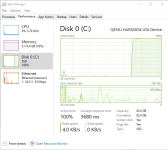
When rsyncing all of the data from my old plex server to my new VM on the PLEX pool. I'm able to achieve full gigabit wire speed for about 2 - 3 mins, after which the speed drops down to about 20MBps - 40MBps and as soon as this happens the IO response time across all storage pools shoots up to insane amounts. Here is a screenshot of taskmgr from a VM running on the NVMe pool while the rsync is running. As soon as I stop the rsync, disk response time returns to normal.
So for my first question, why would activity on one ZFS pool effect the IO response time on another?
My current theory is that maybe they're all sharing the same cache within RAM and this is what is filling in about 2 - 3 mins and then none of the other pools have a cache but I'm not really sure how to validate or fix. I also might be entirely wrong as I'm a bit of a ZFS noob!
My second question is why can't the PLEX RAIDZ1 pool support writing data at full Gigabit line speed?
I did a bit of digging into this myself but couldn't figure it out. Here are my steps:
I first destroied the pool so I could do a write performance test to all four disks indepentantly. I did this by writing 10G to each disk using dd, my results were:
To me, the above shows that the system can write to all four disks perfectly fine as thats roughly the speed I'd expect from a 7200rpm disk and that none of the disks, cables, HBA card are causing the issue, right?
I then recreated the PLEX pool with the same defaults as before (comp=on, ashift=12), recreated the plex vm disk on the pool and restarted my rsync while paying attention to the output of
This then confused me even more!
Just like before the rsync initially started copying at full line speed and rsync was reportedly writing at around 110MBps, it continued to do this for around 3 mins before dropping to about 30MBps and nuking all of the IO response times across all the pools just like before.
The bit that confused me tho was the output of zpool iostat -v PLEX:
For some reason ZFS is only writing to each disk at around 10MBps, and we know that these disks are capable of around 20x that from the previous test.
So to summarize;
1. How can I prevent high IO activity on one pool effecting the response time of others.
2. Why does the RAIDZ1 (PLEX) pool not write to disk faster?
Looking forward to your replies!
Many thanks in advance!
The Build
I've just built a new home server, the hardware is:
GByte X570 Aorus Elite
Ryzen9 3900X
2x Samsung 32GB 3200MHz ECC DDR4 UDIMM
LSI SAS SATA 9201-8I
2x WD Blue SN550 1TB M.2
2x WD RED wd10jfcx-68n6gn0 1TB
4x huh721010AL5200 10TB
The 10TB drives are the only ones connected to the LSI controller, leaving 4 ports for expansion. All others are connected to the onboard sata controller. I installed Proxmox 7.0-8.
ZFS Pools
rpool: mirror array of the 2x WD RED wd10jfcx-68n6gn0 1TB. (proxmox OS install, created during setup)
NVMe: mirror array of the 2x WD Blue SN550 1TB M.2
PLEX: RAIDZ1 array of the 4x huh721010AL5200 10TB. Compression=on (which I think means lz4, can someone confirm?), ashift=12.
Issues
Very slow write speeds to PLEX pool
High IO activity on a single ZFS pool (PLEX) seems to be effecting all of them.
When rsyncing all of the data from my old plex server to my new VM on the PLEX pool. I'm able to achieve full gigabit wire speed for about 2 - 3 mins, after which the speed drops down to about 20MBps - 40MBps and as soon as this happens the IO response time across all storage pools shoots up to insane amounts. Here is a screenshot of taskmgr from a VM running on the NVMe pool while the rsync is running. As soon as I stop the rsync, disk response time returns to normal.
So for my first question, why would activity on one ZFS pool effect the IO response time on another?
My current theory is that maybe they're all sharing the same cache within RAM and this is what is filling in about 2 - 3 mins and then none of the other pools have a cache but I'm not really sure how to validate or fix. I also might be entirely wrong as I'm a bit of a ZFS noob!
My second question is why can't the PLEX RAIDZ1 pool support writing data at full Gigabit line speed?
I did a bit of digging into this myself but couldn't figure it out. Here are my steps:
I first destroied the pool so I could do a write performance test to all four disks indepentantly. I did this by writing 10G to each disk using dd, my results were:
Code:
root@themox:~# for d in 'a' 'b' 'c' 'd'; do dd if=/dev/zero of=/dev/sd$d count=1024 bs=10M; done
1024+0 records in
1024+0 records out
10737418240 bytes (11 GB, 10 GiB) copied, 50.7757 s, 211 MB/s
1024+0 records in
1024+0 records out
10737418240 bytes (11 GB, 10 GiB) copied, 52.193 s, 206 MB/s
1024+0 records in
1024+0 records out
10737418240 bytes (11 GB, 10 GiB) copied, 50.7544 s, 212 MB/s
1024+0 records in
1024+0 records out
10737418240 bytes (11 GB, 10 GiB) copied, 52.5369 s, 204 MB/s
To me, the above shows that the system can write to all four disks perfectly fine as thats roughly the speed I'd expect from a 7200rpm disk and that none of the disks, cables, HBA card are causing the issue, right?
I then recreated the PLEX pool with the same defaults as before (comp=on, ashift=12), recreated the plex vm disk on the pool and restarted my rsync while paying attention to the output of
Code:
watch zpool iostat -v PLEXJust like before the rsync initially started copying at full line speed and rsync was reportedly writing at around 110MBps, it continued to do this for around 3 mins before dropping to about 30MBps and nuking all of the IO response times across all the pools just like before.
The bit that confused me tho was the output of zpool iostat -v PLEX:
Code:
root@themox:~# zpool iostat -v PLEX
                              capacity     operations     bandwidth
pool                        alloc   free   read  write   read  write
--------------------------  -----  -----  -----  -----  -----  -----
PLEX                        4.01T  31.6T      1    670  10.7K  34.0M
  raidz1                    4.01T  31.6T      1    670  10.7K  34.0M
    scsi-35000cca2739b1074      -      -      0    217  3.26K  10.4M
    scsi-35000cca26ab9aad4      -      -      0    126  2.09K  6.82M
    scsi-35000cca2739b1640      -      -      0    218  3.45K  10.4M
    scsi-35000cca2739b14ec      -      -      0    108  1.85K  6.45M
--------------------------  -----  -----  -----  -----  -----  -----
For some reason ZFS is only writing to each disk at around 10MBps, and we know that these disks are capable of around 20x that from the previous test.
So to summarize;
1. How can I prevent high IO activity on one pool effecting the response time of others.
2. Why does the RAIDZ1 (PLEX) pool not write to disk faster?
Looking forward to your replies!
Many thanks in advance!
Last edited:
