Still unable to migrate from shared storage to local on another node?

tillin9

New Member
Nov 16, 2026
3
0
0
Have a test cluster with 3 nodes. 2 of the 3 have shared storage off an old SAS (IBM StorWiz) array. Running into an odd issue when trying to migrate a VM from then shared storage (which migrates fine between the 2 nodes with the shared storage) to the 3rd that has separate local.

Basically in the UI, there is no option to select the local storage. It seems Proxmox assumes the storage is shared to all the nodes in the cluster and doesn't give the option.
Migration fails on the CLI as well when trying to use the -with-local-disks option, erroring out saying the shared storage is not available on the node.

I'm not 100% sure, but maybe this is the same bug found here: https://bugzilla.proxmox.com/show_bug.cgi?id=3229#c4

Is this still an issue or is this user error? Still relatively new to Proxmox so my knee jerk is I'm just missing something.

If this is still a bug, any potential ETA?

Thanks in advance.
 
Hi @tillin9 , welcome to the forum.

It would be great if you could:
a) add your storage configuration (cat /etc/pve/storage.cfg) as text encoded with CODE tags
b) add output of "pvesm status" from source and destination nodes
c) present exact commands you ran with the exact error messages you received
d) add pveversion from the nodes in question

Cheers


Blockbridge : Ultra low latency all-NVME shared storage for Proxmox - https://www.blockbridge.com/proxmox
 
  • Like
Reactions: UdoB
When I migrate a running VM ("live") I can select the destination datastore.
 
Everything is running latest - pve-manager/9.2.28/310cfbc506c4490f (running kernel: 7.0.14-29-pve)
root@Adnyvh05:~# cat /etc/pve/storage.cfg
dir: local
path /var/lib/vz
content images,rootdir,iso,backup,snippets,vztmpl
prune-backups keep-all=1

lvm: Goshen-V3700
vgname vg1
content rootdir,images
nodes Adnyvh04,Adnyvh05
saferemove 0
shared 1
snapshot-as-volume-chain 1

lvm: Adnyvh12-Local
vgname vg0
content images,rootdir
nodes Adnyvh12
saferemove 0
shared 0
root@Adnyvh05:~# pvesm status
Name Type Status Total (KiB) Used (KiB) Available (KiB) %
Adnyvh12-Local lvm disabled 0 0 0 N/A
Goshen-V3700 lvm active 10737414144 4462612480 6274801664 41.56%
local dir active 7434240 1611080 5823160 21.67%
root@Adnyvh12:~# cat /etc/pve/storage.cfg
dir: local
path /var/lib/vz
content images,rootdir,iso,backup,snippets,vztmpl
prune-backups keep-all=1

lvm: Goshen-V3700
vgname vg1
content rootdir,images
nodes Adnyvh04,Adnyvh05
saferemove 0
shared 1
snapshot-as-volume-chain 1

lvm: Adnyvh12-Local
vgname vg0
content images,rootdir
nodes Adnyvh12
saferemove 0
shared 0
root@Adnyvh12:~# pvesm status
Name Type Status Total (KiB) Used (KiB) Available (KiB) %
Adnyvh12-Local lvm active 12498407424 65490944 12432916480 0.52%
Goshen-V3700 lvm disabled 0 0 0 N/A
local dir active 7088832 1570896 5517936 22.16%
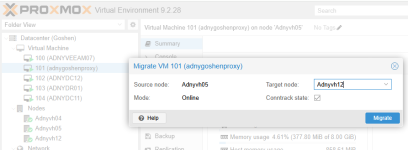
When I try to migrate via GUI: (No option to change storage)
1794924117350.png

When I try to migrate via CLI trying to specify different storage. Tried various syntaxes, same result.
root@Adnyvh05:~# qm migrate 101 Adnyvh12 -targetstorage Adnyvh12-Local -with-local-disks --online
2026-11-17 14:00:41 conntrack state migration not supported or disabled, active connections might get dropped
2026-11-17 14:00:41 ERROR: migration aborted (duration 00:00:00): storage 'Goshen-V3700' is not available on node 'Adnyvh12'
migration aborted
root@Adnyvh05:~# qm migrate 101 Adnyvh12 --online --with-local-disks --targetstorage Adnyvh12-Local
2026-11-17 14:03:40 conntrack state migration not supported or disabled, active connections might get dropped
2026-11-17 14:03:40 ERROR: migration aborted (duration 00:00:00): storage 'Goshen-V3700' is not available on node 'Adnyvh12'
migration aborted
 
Not quite following - I don't believe I can move-disk between nodes but am open that I'm just missing the proper syntax. Sadly the 2 servers with the shared storage do not have any local storage large enough to hold the VM.

Any suggestions or am I stuck due to this bug?