

Hello,
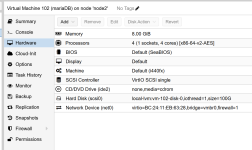
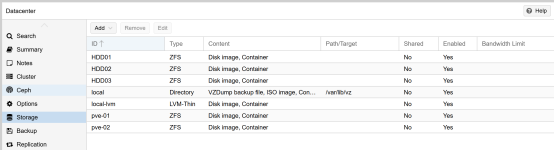
pls, help to how to start vm with error : Starting VM 102 failed: no such logical volume pve/vm-102-disk-0
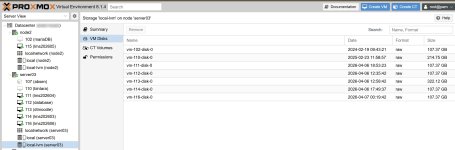
before restart VM 102 running normal, but after restart VM 102 can't start, when i saw at datacenter harddisk show at another node.
syslog :
Apr 12 08:16:53 node2 pve-ha-lrm[1213]: starting server
Apr 12 08:16:53 node2 pve-ha-lrm[1213]: status change startup => wait_for_agent_lock
Apr 12 08:16:53 node2 systemd[1]: Started pve-ha-lrm.service - PVE Local HA Resource Manager Daemon.
Apr 12 08:16:53 node2 systemd[1]: Starting pve-guests.service - PVE guests...
Apr 12 08:16:53 node2 pve-guests[1215]: <root@pam> starting task UPID:node2:000004C0:00000C0C:69DAF285:startall::root@pam:
Apr 12 08:16:53 node2 pve-guests[1216]: <root@pam> starting task UPID:node2:000004C1:00000C0E:69DAF285:qmstart:102:root@pam:
Apr 12 08:16:53 node2 pve-guests[1217]: start VM 102: UPID:node2:000004C1:00000C0E:69DAF285:qmstart:102:root@pam:
Apr 12 08:16:53 node2 pvesh[1215]: Starting VM 102
Apr 12 08:16:53 node2 pvesh[1215]: trying to acquire lock...
Apr 12 08:16:53 node2 pvesh[1215]: OK
Apr 12 08:16:55 node2 pve-guests[1217]: no such logical volume pve/vm-102-disk-0
Apr 12 08:16:55 node2 pvesh[1215]: Starting VM 102 failed: no such logical volume pve/vm-102-disk-0
Apr 12 08:16:55 node2 pvesh[1215]: Starting VM 115
Apr 12 08:16:56 node2 pve-guests[1216]: <root@pam> starting task UPID:node2:000004CA:00000CD7:69DAF287:qmstart:115:root@pam:
Apr 12 08:16:56 node2 pve-guests[1226]: start VM 115: UPID:node2:000004CA:00000CD7:69DAF287:qmstart:115:root@pam:
Apr 12 08:16:56 node2 systemd[1]: Created slice qemu.slice - Slice /qemu.
Apr 12 08:16:56 node2 systemd[1]: Started 115.scope.
Apr 12 08:16:56 node2 kernel: tap115i0: entered promiscuous mode
---------
regards,
sopyak
pls, help to how to start vm with error : Starting VM 102 failed: no such logical volume pve/vm-102-disk-0
before restart VM 102 running normal, but after restart VM 102 can't start, when i saw at datacenter harddisk show at another node.
syslog :
Apr 12 08:16:53 node2 pve-ha-lrm[1213]: starting server
Apr 12 08:16:53 node2 pve-ha-lrm[1213]: status change startup => wait_for_agent_lock
Apr 12 08:16:53 node2 systemd[1]: Started pve-ha-lrm.service - PVE Local HA Resource Manager Daemon.
Apr 12 08:16:53 node2 systemd[1]: Starting pve-guests.service - PVE guests...
Apr 12 08:16:53 node2 pve-guests[1215]: <root@pam> starting task UPID:node2:000004C0:00000C0C:69DAF285:startall::root@pam:
Apr 12 08:16:53 node2 pve-guests[1216]: <root@pam> starting task UPID:node2:000004C1:00000C0E:69DAF285:qmstart:102:root@pam:
Apr 12 08:16:53 node2 pve-guests[1217]: start VM 102: UPID:node2:000004C1:00000C0E:69DAF285:qmstart:102:root@pam:
Apr 12 08:16:53 node2 pvesh[1215]: Starting VM 102
Apr 12 08:16:53 node2 pvesh[1215]: trying to acquire lock...
Apr 12 08:16:53 node2 pvesh[1215]: OK
Apr 12 08:16:55 node2 pve-guests[1217]: no such logical volume pve/vm-102-disk-0
Apr 12 08:16:55 node2 pvesh[1215]: Starting VM 102 failed: no such logical volume pve/vm-102-disk-0
Apr 12 08:16:55 node2 pvesh[1215]: Starting VM 115
Apr 12 08:16:56 node2 pve-guests[1216]: <root@pam> starting task UPID:node2:000004CA:00000CD7:69DAF287:qmstart:115:root@pam:
Apr 12 08:16:56 node2 pve-guests[1226]: start VM 115: UPID:node2:000004CA:00000CD7:69DAF287:qmstart:115:root@pam:
Apr 12 08:16:56 node2 systemd[1]: Created slice qemu.slice - Slice /qemu.
Apr 12 08:16:56 node2 systemd[1]: Started 115.scope.
Apr 12 08:16:56 node2 kernel: tap115i0: entered promiscuous mode
---------
regards,
sopyak

