SSD failure.. how to rebuild

vMo

Member
Jun 16, 2022
5
0
6
France
Hi,

My Proxmox main ssd just crashed suddenly. No warning... :(
I replaced this ssd by a new one and I have installed the last PVE version (was using a previous version)
Works fine, but now I want to get all my VMs back (they are all located on different disks which are safe).

How can I do that (mybe you can point me to some documentation) ?

I have done a zpool import -f <zpoolname>
It worked with some errors but the zpool is listed on the PVE now

thanks
Best Regards
Vincent
 
You have to restore the VM Configs either from a backup or manually. The storage pool is of course also something that you have to mount again.
 
You have to restore the VM Configs either from a backup or manually. The storage pool is of course also something that you have to mount again.
THanks for answering...
I have old backups from a PBS.. I guess I can grab the config from there.

I guess I can get the config from the old pbs and get the virtual disks from the current physical disks
I need to figure out where are the files located and how to switch them with the new ones

Thanks
 
Last edited:
Ok... I'm a kind of stuck in and my knowledge of proxmox isn't sufficient :confused:

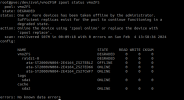
My zpool is there, degraded because one of the 3 disks is experiencing SMART issues, but my data are here.

1707066026771.png

Status is ok :

1707066332631.png

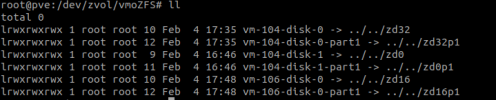
My zpool content is like this :

1707066419138.png


Now I would like to mount those in the pve host or in a new vm... but I don't know how to do.

And to make it "simple", vm-104 disks are using lvm (ubuntu VM) and vm-106 is using a LUKS crypted filesystem !

I really should have install my pve host on RAID1 disk ! :(

It's geting me crazy, my data are there and I don't know how to access them !

Thanks in advance for the ones who can help me !

Vincent
 
Let's answer to myself... could help someone... somedy :)

Use kpartx tool to manage the lvm partitions
Use cryptsetup to manage the luks encrypted partitions

with that... it's almost straight forward... you can mount with mount command !