I'm trying to get SPICE working.
this is what I did:
installed the SPICE viewer on the client vm
installed spice viewer on my pc
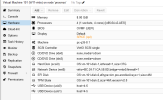
set the display to SPICE in the hardware of the VM
and did this in cli:
qm set <vmid> -spice_enhancements foldersharing=1,videostreaming=all
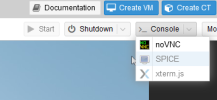
But it stays greyed out.
What do I do wrong.
running the lastest proxmox and running a clean install fresh out of the box.
Thank you.
this is what I did:
installed the SPICE viewer on the client vm
installed spice viewer on my pc
set the display to SPICE in the hardware of the VM
and did this in cli:
qm set <vmid> -spice_enhancements foldersharing=1,videostreaming=all
But it stays greyed out.
What do I do wrong.
running the lastest proxmox and running a clean install fresh out of the box.
Thank you.