[solved] pve 8 to 9 fail

pavlos

Renowned Member
Dec 17, 2017
27
1
68
66
Today, I upgraded my pve from 8 to 9. This is a basic pve (36 cores, 64GB ram) that runs 4 pct.
Ran the pve8to9 test, all good. All containers stopped. Changed bookworm to trixie on sources and pve-no-sub.
apt update, then apt dist-upgrade. Accepted defaults (N). It did the upgrade. Checked again with pve8to9, it suggested remove systemd-boot, I did.
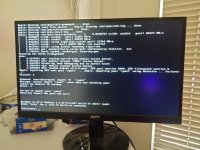
Now, pve does not reboot, plugged a monitor, it drops to a (initramfs) prompt. The proxmox menu on screen shows boot to 6 or 7. I selecte proxmox 7.0.2 here's a screen shot, failed the zpool. Any way to fix it or do a fresh install?

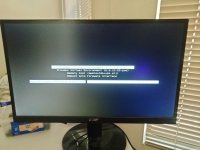
added the boot screen, selected the first, pressed e, it shows the command. How do I get into rescue mode?

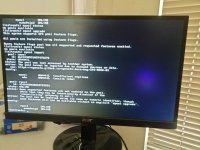
at the initramfs prompt lsblk is not found. zpool import gave me something. there is only one pool, disk is nvme 512 GB.
 

Attachments

  • IMG20260521125040.resized.jpg
    IMG20260521125040.resized.jpg
    530.7 KB · Views: 9
  • IMG20260521130142.resized.jpg
    IMG20260521130142.resized.jpg
    378.2 KB · Views: 6
  • IMG20260521130914.resized.jpg
    IMG20260521130914.resized.jpg
    471.1 KB · Views: 4
Last edited:
Can you record the boot? Also try to boot with the debug arg and try the installer's rescue mode.
 
That picture you added helps. Can you check this?
Bash:
lsblk -o+FSTYPE,LABEL,MODEL
zpool import
Got any explanation why you have two rpools?
 
The proxmox menu on screen shows boot to 6 or 7. I selecte proxmox 7.0.2 here's a screen shot, failed the zpool. Any way to fix it or do a fresh install?
These are Linux kernel versions, not Proxmox versions. So you are booting your updated Proxmox 9 with Linux kernel 7.0.2-6-pve.

added the boot screen, selected the first, pressed e, it shows the command. How do I get into rescue mode?
At the end of the existing kernel command line, append systemd.unit=rescue.target or systemd.unit=emergency.target and press enter to boot with these parameters. But you don't really need to boot that now.

There should be no need to do a fresh install.

In the 3rd image you posted you see two pools called rpool: a broken rpool on /dev/sda and a good rpool on /dev/nvme0n1p3.
Because both are named rpool, you have to tell proxmox which to load by using the pool ID: zpool import -N 4340405032010729591.
Then exit the initramfs to continue the boot process.

If you don't remove the broken sda pool from your system you will have the same next time you reboot.

To avoid that you can for example:
- physically remove the /dev/sda disk from your computer.
- rename the pool on /dev/sda using zpool import -d /dev/sda rpool old_rpool
- clear all the zfs/zpool info on /dev/sda (i.e. format the disk). Obviously first double check if there is still any valuable data on it.
 
Last edited:
  • Like
Reactions: Impact
Thank you all for your help.
I am the one who failed. The migration from 8 to 9 works fine, I messed up.
there was another disk attached to the server, I removed it and pve booted up nicely.

pveversion says: pve-manager/9.2.2/b9984c6d90a4bd80 (running kernel: 7.0.2-6-pve)
 
Last edited: