

[SOLVED] user error - permissions for group(s) for /
Hello,
I have a fresh installation of pve 8.1.3 using pam auth, ceph reef 18.2.0, using cephfs as the iso datastore. If I'm logged in as root, create vm, OS tab, the ISOs there are listed.
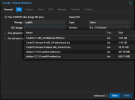
I then create a user with permissions:
root@vhost:~# pveum user permissions matt@pam
┌────────────┬────────────────────────────────┐
│ ACL path │ Permissions │
╞════════════╪════════════════════════════════╡
│ /pool/home │ Datastore.Allocate (*) │
│ │ Datastore.AllocateSpace (*) │
│ │ Datastore.AllocateTemplate (*) │
│ │ Datastore.Audit (*) │
│ │ Group.Allocate (*) │
│ │ Mapping.Audit (*) │
│ │ Mapping.Modify (*) │
│ │ Mapping.Use (*) │
│ │ Permissions.Modify (*) │
│ │ Pool.Allocate (*) │
│ │ Pool.Audit (*) │
│ │ Realm.Allocate (*) │
│ │ Realm.AllocateUser (*) │
│ │ SDN.Allocate (*) │
│ │ SDN.Audit (*) │
│ │ SDN.Use (*) │
│ │ Sys.Audit (*) │
│ │ Sys.Console (*) │
│ │ Sys.Incoming (*) │
│ │ Sys.Modify (*) │
│ │ Sys.PowerMgmt (*) │
│ │ Sys.Syslog (*) │
│ │ User.Modify (*) │
│ │ VM.Allocate (*) │
│ │ VM.Audit (*) │
│ │ VM.Backup (*) │
│ │ VM.Clone (*) │
│ │ VM.Config.CDROM (*) │
│ │ VM.Config.CPU (*) │
│ │ VM.Config.Cloudinit (*) │
│ │ VM.Config.Disk (*) │
│ │ VM.Config.HWType (*) │
│ │ VM.Config.Memory (*) │
│ │ VM.Config.Network (*) │
│ │ VM.Config.Options (*) │
│ │ VM.Console (*) │
│ │ VM.Migrate (*) │
│ │ VM.Monitor (*) │
│ │ VM.PowerMgmt (*) │
│ │ VM.Snapshot (*) │
│ │ VM.Snapshot.Rollback (*) │
└────────────┴────────────────────────────────┘
Permissions marked with '(*)' have the 'propagate' flag set.
root@vhost:~#
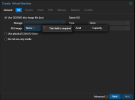
Login as this user, navigate to the same spot, and I'm unable to see the ISOs or select cephfs.
I checked the documentation here: https://pve.proxmox.com/wiki/User_Management
Which pointed me to the API reference here: https://pve.proxmox.com/pve-docs/api-viewer/#/storage
Which indicates 'Datastore.Audit' or 'Datastore.AllocateSpace' permissions should be required, which I think I've set correctly (see above). What am I missing?
Thanks,
Matt
Hello,
I have a fresh installation of pve 8.1.3 using pam auth, ceph reef 18.2.0, using cephfs as the iso datastore. If I'm logged in as root, create vm, OS tab, the ISOs there are listed.
I then create a user with permissions:
root@vhost:~# pveum user permissions matt@pam
┌────────────┬────────────────────────────────┐
│ ACL path │ Permissions │
╞════════════╪════════════════════════════════╡
│ /pool/home │ Datastore.Allocate (*) │
│ │ Datastore.AllocateSpace (*) │
│ │ Datastore.AllocateTemplate (*) │
│ │ Datastore.Audit (*) │
│ │ Group.Allocate (*) │
│ │ Mapping.Audit (*) │
│ │ Mapping.Modify (*) │
│ │ Mapping.Use (*) │
│ │ Permissions.Modify (*) │
│ │ Pool.Allocate (*) │
│ │ Pool.Audit (*) │
│ │ Realm.Allocate (*) │
│ │ Realm.AllocateUser (*) │
│ │ SDN.Allocate (*) │
│ │ SDN.Audit (*) │
│ │ SDN.Use (*) │
│ │ Sys.Audit (*) │
│ │ Sys.Console (*) │
│ │ Sys.Incoming (*) │
│ │ Sys.Modify (*) │
│ │ Sys.PowerMgmt (*) │
│ │ Sys.Syslog (*) │
│ │ User.Modify (*) │
│ │ VM.Allocate (*) │
│ │ VM.Audit (*) │
│ │ VM.Backup (*) │
│ │ VM.Clone (*) │
│ │ VM.Config.CDROM (*) │
│ │ VM.Config.CPU (*) │
│ │ VM.Config.Cloudinit (*) │
│ │ VM.Config.Disk (*) │
│ │ VM.Config.HWType (*) │
│ │ VM.Config.Memory (*) │
│ │ VM.Config.Network (*) │
│ │ VM.Config.Options (*) │
│ │ VM.Console (*) │
│ │ VM.Migrate (*) │
│ │ VM.Monitor (*) │
│ │ VM.PowerMgmt (*) │
│ │ VM.Snapshot (*) │
│ │ VM.Snapshot.Rollback (*) │
└────────────┴────────────────────────────────┘
Permissions marked with '(*)' have the 'propagate' flag set.
root@vhost:~#
Login as this user, navigate to the same spot, and I'm unable to see the ISOs or select cephfs.
I checked the documentation here: https://pve.proxmox.com/wiki/User_Management
Which pointed me to the API reference here: https://pve.proxmox.com/pve-docs/api-viewer/#/storage
Which indicates 'Datastore.Audit' or 'Datastore.AllocateSpace' permissions should be required, which I think I've set correctly (see above). What am I missing?
Thanks,
Matt
Last edited: