Hello
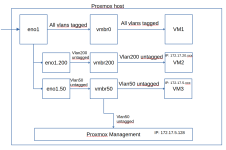
I have a proxmox server with a specific interface configuration. Here is the relevant part:
The eno1 interface gets all traffic trunked. The proxmox server has a static IP on VLAN 50. For all clients (VMs or LXCs) I can assign the two bridges vmbr50 and vmbr200, so that the clients get access to the specific vlans only. That works nicely.
Now my problem is that I want to add a VM with a proxmox test server, which should get the same network config. So, I am attaching it to vmbr0. Then the network config of the vm is pretty similar:
Unfortunately, the guest does not have network connectivity. In the console, everything looks ok to me. It has the IP address and the correct routing table. As I cannot ssh in, it is difficult to copy the output. I can only post screenshots:
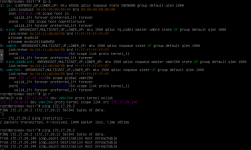
Is there anything obviously incorrect?
When I do a tcpdump on the host proxmox on the physical interface eno1, I get a huge amount of traffic shown. But the same on the vmbr0 bridge gives nearly no traffic at all (except some stp traffic and some traffic from VLAN1). So, I have the feeling that the bridge vmrb0 is not really vlan-aware. Or am I misunderstanding something?
Thanks for any help.
I have a proxmox server with a specific interface configuration. Here is the relevant part:
Code:
iface eno1 inet manual

auto vmbr0
iface vmbr0 inet manual
        bridge-ports eno1
        bridge-stp off
        bridge-fd 0
        bridge-vlan-aware yes
        bridge-vids 2-4094

auto vmbr50
iface vmbr50 inet static
        address 172.17.5.128/24
        gateway 172.17.5.1
        bridge-ports eno1.50
        bridge-stp off
        bridge-fd 0
        network 172.17.5.0

auto vmbr200
iface vmbr200 inet manual
        bridge-ports eno1.200
        bridge-stp off
        bridge-fd 0
The eno1 interface gets all traffic trunked. The proxmox server has a static IP on VLAN 50. For all clients (VMs or LXCs) I can assign the two bridges vmbr50 and vmbr200, so that the clients get access to the specific vlans only. That works nicely.
Now my problem is that I want to add a VM with a proxmox test server, which should get the same network config. So, I am attaching it to vmbr0. Then the network config of the vm is pretty similar:
Code:
iface nic0 inet manual

auto vmbr0
iface vmbr0 inet manual
        bridge-ports nic0
        bridge-stp off
        bridge-fd 0

auto vmbr50
iface vmbr50 inet static
        bridge-ports nic0.50
        bridge-stp off
        bridge-fd 0
        network 10.0.20.0

auto vmbr200
iface vmbr200 inet manual
        address 172.17.20.129/24
        gateway 172.17.20.1
        bridge-ports nic0.200
        bridge-stp off
        bridge-fd 0
Unfortunately, the guest does not have network connectivity. In the console, everything looks ok to me. It has the IP address and the correct routing table. As I cannot ssh in, it is difficult to copy the output. I can only post screenshots:
Is there anything obviously incorrect?
When I do a tcpdump on the host proxmox on the physical interface eno1, I get a huge amount of traffic shown. But the same on the vmbr0 bridge gives nearly no traffic at all (except some stp traffic and some traffic from VLAN1). So, I have the feeling that the bridge vmrb0 is not really vlan-aware. Or am I misunderstanding something?
Thanks for any help.