

Dear All,
I am facing his bizzare problem, that is likely my lack of understanding of how things are supposed to work. I just can't figure it out and was hoping more experienced colleagues here can assist.
I create a SMB/CIFS Storage:

eveyrything works fine, and I can see the storage visible across my hosts:
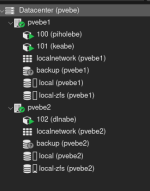
however, when I go to the storage and attempt to access Backups, I get following error:
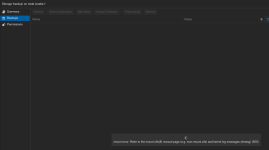
I can't figure this out. I can see the the share is already mounted on the host, so no wonder it fails to mount it again.
I cannot do any backups to this storage either as the backup jobs fail with the same error, attempting to mount the SMB/CIFS target that is already mounted on the host.
what am I doing wrong?
I am facing his bizzare problem, that is likely my lack of understanding of how things are supposed to work. I just can't figure it out and was hoping more experienced colleagues here can assist.
I create a SMB/CIFS Storage:
eveyrything works fine, and I can see the storage visible across my hosts:
however, when I go to the storage and attempt to access Backups, I get following error:
I can't figure this out. I can see the the share is already mounted on the host, so no wonder it fails to mount it again.
I cannot do any backups to this storage either as the backup jobs fail with the same error, attempting to mount the SMB/CIFS target that is already mounted on the host.
what am I doing wrong?
