

Hello everyone,
I wanted a lightweight UI accessible from anywhere to start/stop resources from my phone without exposing the Proxmox UI on the internet. I couldn’t find anything that already existed for this use case, so I built my own.
In my setup, access security is handled with Cloudflare Zero Trust and mTLS, so there is no authentication on the frontend or backend itself. I then created a pool containing all my non-critical VMs/LXCs, along with a user that only has access to this pool with the following permissions:
- VM.PowerMgmt
- VM.Audit
- Pool.Audit
A token for this user is then used by the backend to interact with the Proxmox API.
The security model is intentionally simple and infra-driven.
The app itself is not publicly exposed: access is enforced via mTLS and Cloudflare Zero Trust at the reverse-proxy level. On the Proxmox side, the backend uses an API token scoped to a single pool with only VM.PowerMgmt, VM.Audit, and Pool.Audit permissions, so it cannot affect critical infrastructure.
The goal isn’t to be "more secure than the Proxmox UI", but to reduce blast radius and avoid exposing the full UI when only basic power actions are needed.
This is not meant to replace the Proxmox UI in any way, only to safely handle start / shutdown / stop actions through a lightweight web application.
For people wondering "Why not just use a VPN": this reduces the exposed surface and blast radius by never exposing the full Proxmox UI and by strictly limiting what the API token is allowed to do.
I’m sharing it in case it’s useful to others who don’t want to expose the full Proxmox UI externally.
Repository:
https://git.jubnl.ch/jubnl/proxmox-restarter
Desktop:
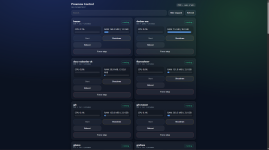
And on the phone:
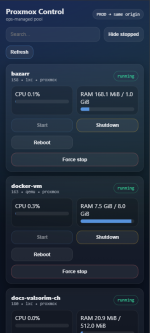
Feedback and suggestions are welcome!
I wanted a lightweight UI accessible from anywhere to start/stop resources from my phone without exposing the Proxmox UI on the internet. I couldn’t find anything that already existed for this use case, so I built my own.
In my setup, access security is handled with Cloudflare Zero Trust and mTLS, so there is no authentication on the frontend or backend itself. I then created a pool containing all my non-critical VMs/LXCs, along with a user that only has access to this pool with the following permissions:
- VM.PowerMgmt
- VM.Audit
- Pool.Audit
A token for this user is then used by the backend to interact with the Proxmox API.
The security model is intentionally simple and infra-driven.
The app itself is not publicly exposed: access is enforced via mTLS and Cloudflare Zero Trust at the reverse-proxy level. On the Proxmox side, the backend uses an API token scoped to a single pool with only VM.PowerMgmt, VM.Audit, and Pool.Audit permissions, so it cannot affect critical infrastructure.
The goal isn’t to be "more secure than the Proxmox UI", but to reduce blast radius and avoid exposing the full UI when only basic power actions are needed.
This is not meant to replace the Proxmox UI in any way, only to safely handle start / shutdown / stop actions through a lightweight web application.
For people wondering "Why not just use a VPN": this reduces the exposed surface and blast radius by never exposing the full Proxmox UI and by strictly limiting what the API token is allowed to do.
I’m sharing it in case it’s useful to others who don’t want to expose the full Proxmox UI externally.
Repository:
https://git.jubnl.ch/jubnl/proxmox-restarter
Desktop:
And on the phone:
Feedback and suggestions are welcome!
