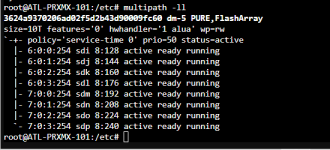
I'm setting up a test proxmox lab. It's been a minute but what was new this time was I'm using block level LUNs from a Pure Flash Array. My UCS blades do not have local storage so my service profile was setup properly to access the Pure Array. All configurations were done on the Pure and booting and installing to SAN was successful. Once I made it to creating the Shared LUN I was met with multipathing and what needs to successfully configure each node to get them set to see the LUN.
Most articles were for iSCSI whereas I'm using FC. Finding and understanding the /etc/multipath.conf file is a challenge and I got both from Pure's doc (i think ) When I thought I had completed the steps I ran #multipath -ll and got nothing. I then edited the file with my first find from Pure- restarted multipathd and i got my output. Next was to try 'pvecreate /dev/mapper/mpatha - it failed. I then found the other multipath.conf from Pure and replaced my file with this one. Now my output shows both the SAN Boot LUN and the Shared LUN. Same results trying to run the pvcreate.
reading more and trying to see what this is doing I realized the second multipath file created an exception for the pure array whereas the other didn't. I think this is why I'm seeing both LUNS on each node. I replaced the multipath.conf file with the original and rebooted all 4 nodes (BTW if I didn't state it the cluster was created and all 4 nodes added prior to starting this configuration). I also found on Pure's site to run pvcreate with the Pure's device ID. I did this and successfully created the LUN then refreshed each node and all 4 successfully see the 10T shared LUN.
My issue - well when I run multipath - ll, on each node I see the nodes boot lun and the shared lun. I don't know if it's normal as all output I've seen assumes local boot and a shared iscisi or fc LUN.
screenshots of outputs below
File from Pure to create /etc/multipath.conf Here, I missed the BOLD TOP instructions to use the device ID when doing the pvcreate (rookie mistake)
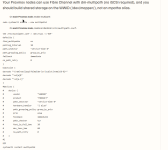
First output of the above multipath.conf configuration...
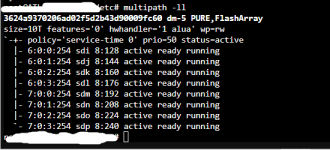
Second try at the /etc/multipath.conf (again from PURE)
I can't find the file now but I know it created a blacklist exception for the VENDOR PURE. after reloading multipathd i get this...
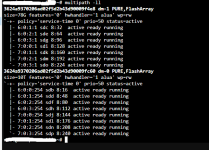
Keep in mind the multipath.conf was restored to the original and I still see both LUNs
The ultimate question (where the answer isn't '42') is this normal or should that boot LUN not be seen?
Thanks, in advance
Most articles were for iSCSI whereas I'm using FC. Finding and understanding the /etc/multipath.conf file is a challenge and I got both from Pure's doc (i think
) When I thought I had completed the steps I ran #multipath -ll and got nothing. I then edited the file with my first find from Pure- restarted multipathd and i got my output. Next was to try 'pvecreate /dev/mapper/mpatha - it failed. I then found the other multipath.conf from Pure and replaced my file with this one. Now my output shows both the SAN Boot LUN and the Shared LUN. Same results trying to run the pvcreate. reading more and trying to see what this is doing I realized the second multipath file created an exception for the pure array whereas the other didn't. I think this is why I'm seeing both LUNS on each node. I replaced the multipath.conf file with the original and rebooted all 4 nodes (BTW if I didn't state it the cluster was created and all 4 nodes added prior to starting this configuration). I also found on Pure's site to run pvcreate with the Pure's device ID. I did this and successfully created the LUN then refreshed each node and all 4 successfully see the 10T shared LUN.
My issue - well when I run multipath - ll, on each node I see the nodes boot lun and the shared lun. I don't know if it's normal as all output I've seen assumes local boot and a shared iscisi or fc LUN.
screenshots of outputs below
File from Pure to create /etc/multipath.conf Here, I missed the BOLD TOP instructions to use the device ID when doing the pvcreate (rookie mistake)
First output of the above multipath.conf configuration...
Second try at the /etc/multipath.conf (again from PURE)
I can't find the file now but I know it created a blacklist exception for the VENDOR PURE. after reloading multipathd i get this...
Keep in mind the multipath.conf was restored to the original and I still see both LUNs
The ultimate question (where the answer isn't '42') is this normal or should that boot LUN not be seen?
Thanks, in advance