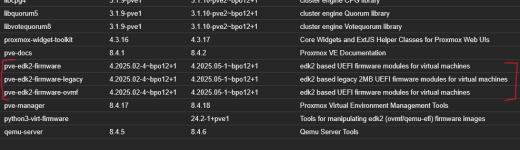
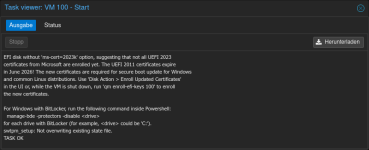
When creating a new virtual machine (including ms-cert=2023w) and executing the following command, KEK is displayed. Is this something else...?
*KEK was displayed even when not connected to the network, so it was determined that this was not a patch on the guest OS.
[System.Text.Encoding]::ASCII.GetString((Get-SecureBootUEFI kek).bytes)
Editing: The virtual machine created using the following steps will display the results below. KEK is not manually registered. However, it exists in the results. (It already exists.)
1. Disable BitLocker on the guest OS
manage-bde -protectors -disable <drive>
*I suppose getting a recovery key is fine, but I can't guarantee it.
manage-bde -protectors -get <drive>
2. Shut down the virtual machine
3. Delete the EFI partition
4. Create the EFI partition
The KEK for ms-cert=2023w appears to include Microsoft Corporation KEK 2K CA 2023.
Code:
PS C:\Windows\system32> [System.Text.Encoding]::ASCII.GetString((Get-SecureBootUEFI kek).bytes)
U0n10?H??+?r???????H???m=0??0???E?9>R)x6??B??{???K70
U05234249Z0n10devel@lists.debian.org0(PK/KEK key)1,0*    *?H??
?0???bian-devel@lists.debian.org0?"0K/KEK key)1,0*    *?H??
???I????T*q?y????Yb?q??l?P????????<I??Q??????Q:?[8S??hR?>????^?0??s??V?J(?3?Ra{??@??x[?mj??D???{-???
g?S???e???Xe?Y?W?3H?l'?????c???R4(????{?w??N?j??+???B?2?4??o???_? ?3??]?ixN.???S0Q0U?       ??*?H????s0U#0?? ???}-]?0g???????s0U?0?0
j??|???m3s???M???Tt??(?oX1?A?%?@?(?69s????>BZ{ x?Mi????????B?w??;??y\]q??h?i-???Q?9?Rp?<?????b?kaK?{???:???y??~E??l?1?
8'?<?D"Nz?r/v\??&??qR_[????S??
??%?Y?????J???\+?r????wY2M?`(???xK0??0???
a
0??10H??   UUS10U
Washington10URedmond10U
260624205129Z0??10tion1UUS10Uft Corporation Third Party Marketplace Root0
Washington10URedmond10U
?0???orporation1*0(U!Microsoft Corporation KEK CA 20110?"0 ★
?J?t*???m????Zc2|O??8?????????,?????     ?????0?H?P?d?Q??O? ???/??????????Sjb:C??%???????#??p??M????????????/???$???????J?C~?G?l?????3?*q???<?%       /hvF??O???q*X???y=??e;?)*??rY??????5????_??v??c???y@?y??R???{i???O0?K0     +?70Ub?C??>??g?[?U?{???_0 +?7
SubCA0U?0U?0?0U#0?EfRC?~X??N?#;:"j?0\UU0S0Q?O?M?Khttp://crl.microsoft.com/pki/crl/products/MicCorThiParMarRoo_2010-10-05.crl0`+T0R0P+0?Dhttp://www.microsoft.com/pki/certs/MicCorThiParMarRoo_20???????*<?*??????Rf????uz??-?vZ?y??7jQ{d??d?g???????Xd?W??_????i?HK2??]?0?????x?+???4V?????A%p?k???????<??????C??-???j+Z|D?R???-??R???=?`??3????e^V????B??w?qV???#?????X~?ig?~???
???O?u;??$?PA@y?-O??B?)??FA;???CYe?
5|?4r??`;?y???]???????%o8?????y??i?? ????????uk4??`?\??WN6?2????Y?????J???\+?r?????wY2M?`(???xK0??0???0Z10?H??   UUS10U
380302203135Z0\10ation1UUS10Uft RSA Devices Root CA 20210
?0???orporation1-0+U$Microsoft Corporation KEK 2K CA 20230?"0 ★
??^??s,?
?????-??&57?ISq?[?R?????9??LeuS??
?)?R&?+????????4?c?t?r?)~?2!Y?w?*?L??7??????H!?a??Q???$c.??????^i?Q
?+???4N??9??1?=??v??????/(?H??????h[?n?z???I??S?M/?{???????pw?EI?????f??}6?
,???!-????\T???m0?i0U??0    +?70U??r??>??f?}ZC>\BT?_0 +?7
SubCA0U?0?0U#0??D???,??????.???    0eU^0\0Z?X?V?Thttp://www.microsoft.com/pkiops/crl/Microsoft%20RSA%20Devices%20Root%20CA%202021.crl0r+f0d0b+0?Vhttp://www.microsoft.com/pkiops/certs/Microsoft%20RSA%20???g?O9??4?]*x{8????<=2
^?X?o???????D&?,?_n#%?[L&.v1C.n??1?J?????u??????xD?3v?+M????;?M)????????F?]??????v?+?????k?>????6/??(?@?&???5??
???!'??B1V.????4?N?p0i????dFo?!???2???E8]N?????s?5O???k>?T4I??z???Y?+*??&??l?????A?o???n????@?8mp????VH????P?nm??k??rdP??U?n?K??2??mez?RW0\?(f?z?qN?a`zmV?[      >??????????xxk??*?xg>?*??]???50???Ek????????
PS C:\Windows\system32>
Of course, the `qm enroll-efi-keys` command does not include the process to register the KEK, so the KEK will not be registered. If you want to register it using the `qm enroll-efi-keys` command, I believe you'll just have to wait for a fix.
If I am mistaken, I am truly sorry.
...
Please refrain from displaying the annoying log prompting for an update to ms-cert=2023k when booting virtual machines with the certificate ms-cert=2023w present on the EFI disk. All virtual machines running on PVE have already completed Microsoft's CVE fixes...
It's ridiculous that such logs persist unless re-run, despite the issue being resolved.




 roxmox distribution of EDK II;FirmwareVersion:4.2025.02-3;OEMModelNumber:Standard PC (Q35 + ICH9, 2009);OEMModelBaseBoard:;OEMModelSystemFamily:;OEMManufacturerName:QEMU;OEMModelSKU:;OSArchitecture:amd64;