S3 Bucket Appears to not reflect Deleted/Pruned Backups

ccolotti

Member
Feb 22, 2025
30
7
8
Hey all. I have been testing an S3 (Backblaze B2) bucket on PBS 4.x for an archive.

I've setup a sync to it with basic retentions of only about 14 days. The odd thing is the local size is showing about 1TB of use, but the bucket shows 7x that.

I am thinking files are not being deleted properly on the prune cycle, and being in tech preview wasn't sure if I should log this more as a bug officially? It grabbed my attention when the storage cost jumped. Happy to log in bugzilla but I need to see how to get the bucket use back down a bit and more in alignment in the meantime.

For the record I've seen a similar issue with other backup products on their initial use of S3 before GA, so it's not uncommon.
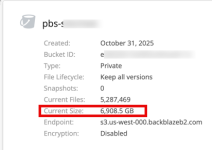
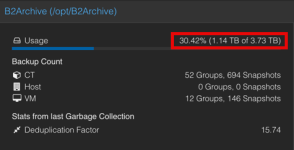
1769434607587.png1769434614991.png
 
Last edited:
are you running garbage collection as well (regularly?)?
 
are you running garbage collection as well (regularly?)?
yes I checked that it runs once a day and even ran it manually..only shows 80GB or so each run...which is why I am thinking locally it's fine it's the S3 side that may not be getting cleaned out "correctly" in the process, and maybe this could actually be a possible bug which I can happily file too..Not sure if there are any specific logs I can grab for this process but happy to get them to provide more data. Kind of the point of Tech Preview right? To help by using it :)1769435308378.png
 
Last edited:
the last couple lines stand out but correlate the 7TB on S3 it seems. So there does seem to be a bit of a disconnect on the S3 usage side possibly. The local PBS server only has about 4TB total space available locally on disk.


Code:
2026-01-26T08:31:31-05:00: Original data usage: 7.001 TiB
2026-01-26T08:31:31-05:00: On-Disk usage: 455.45 GiB (6.35%)
 
Last edited:
no, the 7TB is referring to the logical data before deduplication.. your file count is also a lot higher compared to your GC log, so something is very much fishy.. could you check your lifecycle rules to ensure that objects are not moved to some trash that still counts as deleted instead of being fully deleted?
 
  • Like
Reactions: Chris and ccolotti
no, the 7TB is referring to the logical data before deduplication.. your file count is also a lot higher compared to your GC log, so something is very much fishy.. could you check your lifecycle rules to ensure that objects are not moved to some trash that still counts as deleted instead of being fully deleted?
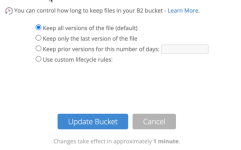
On Backblaze, initially the setup was recommended to be set this way: It was an older post back when S3 first appeared but this is how it was set and has been set. I would have assumed to allow the PBS to delete. I guess now the question may be is backblaze putting it all in trash, but I have another backup system using a bucket and it is set the same way and deletions from it are happening real time. It has never grown over 1TB.

1769436077421.png
 
this is also interesting...

so I am going to try uploadtohide = 1 and hidetodelete=30. I mean this is all for testing the S3 aspect and these copies are the "3rd" copy of backups. However this could produce some data on using B2, but I suspect since it was set to keep forever based on bow PBS is uploading files it's hiding but maybe not deleting, but that's just a guess since I have another backup tool set the same way without a lifecycle and doesn't grow.

However, ultimately we don't want the local lifecyle rules to affect the ability to restore a file since one may not know about the other...

Delete Files Using Lifecycle Rules​

  1. Sign in to your Backblaze account.
  2. In the left navigation menu under B2 Cloud Storage, click Buckets.
  3. For the bucket in which you want to delete files, click Lifecycle Settings.
  4. Select Use custom lifecycle rules.
  5. To limit the files to a certain prefix, enter the prefix value in File Path. Otherwise leave the File Path field as the default value (if one exists).
  6. Set daysFromUploadingToHiding to 1, and set daysFromHidingToDeleting to 1.
  7. Click Update Bucket.
All of the designated files are hidden after 24-48 hours, and they are deleted 24 hours after they are hidden. All files are deleted within 72 hours.
 
Last edited:
Also an interesting note from the lifecycle pages on B2. I realize B2 is currently a "Generic" use of S3 with PBS. Not sure the long term plans for PBS and S3 providers but I do see many applications have specific selections for B2/AWS/Wasabi/etc probably to deal with this kind of thing. So in fact maybe if the plan is to provide specific S3 provider selections down the line that is the real solution? That would make it more of a product manager thing which isn't a but, but maybe a feature request to ensure proper integration by S3 provider

Integrations​

Application developers are encouraged to look at Lifecycle Rules to use in their applications that integrate into Backblaze B2. This is especially true for applications that perform "sync" or "backup" operations to Backblaze B2. For example, the user interface of the application can allow the user/admin to specify the number of days that older versions of files should be kept in support of data retention rules in an organization.
 
  • Like
Reactions: ccolotti
Hi,
it is currently not planned to integrate provider specific functionality. Lifecycle rules enforced by the provider configuration are not being handled and must be set up accordingly as you already found out.

For reference: https://forum.proxmox.com/threads/s3-backblaze-b2-not-deleting-gc-chunks.175793/post-815347
Ah I tried searching too, looks like the lifecyle settings were updated after the initial recommendations. I am going to remove the bucket, start over and see.