Hi,
I'm testing S3 backups. It's a real nice feature.
I have no problem running backups with enryption. But when I add encryption backup get stuck.
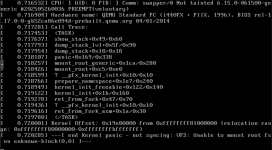
The PBS software stops working, complete hangs. No respons from web gui. I need to restart.
PBS server is up and running, can login with SSH.
Here is the log from when it happaned.
INFO: starting new backup job: vzdump 102 110 108 300 500 667 3001 107 --notes-template '{{guestname}}' --prune-backups 'keep-daily=7,keep-last=4,keep-monthly=12' --mode snapshot --notification-mode notification-system --node pve01 --storage pbs01-s3-pve01 --fleecing 0 --all 0
INFO: Starting Backup of VM 102 (qemu)
INFO: Backup started at 2025-12-02 16:17:22
INFO: status = running
INFO: VM Name: nginx-proxy-1
INFO: include disk 'virtio0' 'SSD1:vm-102-disk-0' 6G
INFO: backup mode: snapshot
INFO: ionice priority: 7
INFO: creating Proxmox Backup Server archive 'vm/102/2025-12-02T15:17:22Z'
INFO: issuing guest-agent 'fs-freeze' command
ERROR: unable to freeze guest fs - failed to freeze /: Input/output error
INFO: issuing guest-agent 'fs-thaw' command
INFO: started backup task 'c3f397ae-f389-41b8-956f-4c3b190934e8'
INFO: resuming VM again
INFO: virtio0: dirty-bitmap status: existing bitmap was invalid and has been cleared
INFO: 18% (1.1 GiB of 6.0 GiB) in 3s, read: 369.3 MiB/s, write: 206.7 MiB/s
INFO: 32% (2.0 GiB of 6.0 GiB) in 6s, read: 298.7 MiB/s, write: 298.7 MiB/s
INFO: 48% (2.9 GiB of 6.0 GiB) in 9s, read: 333.3 MiB/s, write: 326.7 MiB/s
INFO: 57% (3.5 GiB of 6.0 GiB) in 12s, read: 182.7 MiB/s, write: 176.0 MiB/s
INFO: 73% (4.4 GiB of 6.0 GiB) in 15s, read: 317.3 MiB/s, write: 277.3 MiB/s
INFO: 83% (5.0 GiB of 6.0 GiB) in 18s, read: 217.3 MiB/s, write: 190.7 MiB/s
INFO: 90% (5.4 GiB of 6.0 GiB) in 21s, read: 140.0 MiB/s, write: 130.7 MiB/s
INFO: 94% (5.7 GiB of 6.0 GiB) in 24s, read: 70.7 MiB/s, write: 69.3 MiB/s
INFO: 95% (5.7 GiB of 6.0 GiB) in 27s, read: 29.3 MiB/s, write: 29.3 MiB/s
INFO: 97% (5.8 GiB of 6.0 GiB) in 31s, read: 26.0 MiB/s, write: 26.0 MiB/s
INFO: 100% (6.0 GiB of 6.0 GiB) in 34s, read: 54.7 MiB/s, write: 45.3 MiB/s
INFO: backup is sparse: 564.00 MiB (9%) total zero data
INFO: backup was done incrementally, reused 788.00 MiB (12%)
INFO: transferred 6.00 GiB in 64 seconds (96.0 MiB/s)
INFO: adding notes to backup
INFO: prune older backups with retention: keep-daily=7, keep-last=4, keep-monthly=12
INFO: running 'proxmox-backup-client prune' for 'vm/102'
INFO: pruned 0 backup(s)
INFO: Finished Backup of VM 102 (00:01:05)
INFO: Backup finished at 2025-12-02 16:18:27
INFO: Starting Backup of VM 107 (qemu)
INFO: Backup started at 2025-12-02 16:18:27
INFO: status = running
INFO: VM Name: hogberg
INFO: include disk 'scsi0' 'SSD1:vm-107-disk-0' 600G
INFO: exclude disk 'scsi1' 'SATA2:vm-107-disk-1' (backup=no)
INFO: exclude disk 'scsi2' 'USB1:vm-107-disk-0' (backup=no)
INFO: backup mode: snapshot
INFO: ionice priority: 7
INFO: creating Proxmox Backup Server archive 'vm/107/2025-12-02T15:18:27Z'
INFO: issuing guest-agent 'fs-freeze' command
INFO: issuing guest-agent 'fs-thaw' command
INFO: started backup task 'b78b4093-b217-4ecf-8812-2bf95a2d94f8'
INFO: resuming VM again
INFO: scsi0: dirty-bitmap status: created new
INFO: 0% (464.0 MiB of 600.0 GiB) in 3s, read: 154.7 MiB/s, write: 116.0 MiB/s
ERROR: interrupted by signal
INFO: aborting backup job
INFO: resuming VM again
ERROR: Backup of VM 107 failed - interrupted by signal
INFO: Failed at 2025-12-02 16:19:10
ERROR: Backup job failed - interrupted by signal
INFO: notified via target `mail-to-root`
TASK ERROR: interrupted by signal
I'm testing S3 backups. It's a real nice feature.
I have no problem running backups with enryption. But when I add encryption backup get stuck.
The PBS software stops working, complete hangs. No respons from web gui. I need to restart.
PBS server is up and running, can login with SSH.
Here is the log from when it happaned.
INFO: starting new backup job: vzdump 102 110 108 300 500 667 3001 107 --notes-template '{{guestname}}' --prune-backups 'keep-daily=7,keep-last=4,keep-monthly=12' --mode snapshot --notification-mode notification-system --node pve01 --storage pbs01-s3-pve01 --fleecing 0 --all 0
INFO: Starting Backup of VM 102 (qemu)
INFO: Backup started at 2025-12-02 16:17:22
INFO: status = running
INFO: VM Name: nginx-proxy-1
INFO: include disk 'virtio0' 'SSD1:vm-102-disk-0' 6G
INFO: backup mode: snapshot
INFO: ionice priority: 7
INFO: creating Proxmox Backup Server archive 'vm/102/2025-12-02T15:17:22Z'
INFO: issuing guest-agent 'fs-freeze' command
ERROR: unable to freeze guest fs - failed to freeze /: Input/output error
INFO: issuing guest-agent 'fs-thaw' command
INFO: started backup task 'c3f397ae-f389-41b8-956f-4c3b190934e8'
INFO: resuming VM again
INFO: virtio0: dirty-bitmap status: existing bitmap was invalid and has been cleared
INFO: 18% (1.1 GiB of 6.0 GiB) in 3s, read: 369.3 MiB/s, write: 206.7 MiB/s
INFO: 32% (2.0 GiB of 6.0 GiB) in 6s, read: 298.7 MiB/s, write: 298.7 MiB/s
INFO: 48% (2.9 GiB of 6.0 GiB) in 9s, read: 333.3 MiB/s, write: 326.7 MiB/s
INFO: 57% (3.5 GiB of 6.0 GiB) in 12s, read: 182.7 MiB/s, write: 176.0 MiB/s
INFO: 73% (4.4 GiB of 6.0 GiB) in 15s, read: 317.3 MiB/s, write: 277.3 MiB/s
INFO: 83% (5.0 GiB of 6.0 GiB) in 18s, read: 217.3 MiB/s, write: 190.7 MiB/s
INFO: 90% (5.4 GiB of 6.0 GiB) in 21s, read: 140.0 MiB/s, write: 130.7 MiB/s
INFO: 94% (5.7 GiB of 6.0 GiB) in 24s, read: 70.7 MiB/s, write: 69.3 MiB/s
INFO: 95% (5.7 GiB of 6.0 GiB) in 27s, read: 29.3 MiB/s, write: 29.3 MiB/s
INFO: 97% (5.8 GiB of 6.0 GiB) in 31s, read: 26.0 MiB/s, write: 26.0 MiB/s
INFO: 100% (6.0 GiB of 6.0 GiB) in 34s, read: 54.7 MiB/s, write: 45.3 MiB/s
INFO: backup is sparse: 564.00 MiB (9%) total zero data
INFO: backup was done incrementally, reused 788.00 MiB (12%)
INFO: transferred 6.00 GiB in 64 seconds (96.0 MiB/s)
INFO: adding notes to backup
INFO: prune older backups with retention: keep-daily=7, keep-last=4, keep-monthly=12
INFO: running 'proxmox-backup-client prune' for 'vm/102'
INFO: pruned 0 backup(s)
INFO: Finished Backup of VM 102 (00:01:05)
INFO: Backup finished at 2025-12-02 16:18:27
INFO: Starting Backup of VM 107 (qemu)
INFO: Backup started at 2025-12-02 16:18:27
INFO: status = running
INFO: VM Name: hogberg
INFO: include disk 'scsi0' 'SSD1:vm-107-disk-0' 600G
INFO: exclude disk 'scsi1' 'SATA2:vm-107-disk-1' (backup=no)
INFO: exclude disk 'scsi2' 'USB1:vm-107-disk-0' (backup=no)
INFO: backup mode: snapshot
INFO: ionice priority: 7
INFO: creating Proxmox Backup Server archive 'vm/107/2025-12-02T15:18:27Z'
INFO: issuing guest-agent 'fs-freeze' command
INFO: issuing guest-agent 'fs-thaw' command
INFO: started backup task 'b78b4093-b217-4ecf-8812-2bf95a2d94f8'
INFO: resuming VM again
INFO: scsi0: dirty-bitmap status: created new
INFO: 0% (464.0 MiB of 600.0 GiB) in 3s, read: 154.7 MiB/s, write: 116.0 MiB/s
ERROR: interrupted by signal
INFO: aborting backup job
INFO: resuming VM again
ERROR: Backup of VM 107 failed - interrupted by signal
INFO: Failed at 2025-12-02 16:19:10
ERROR: Backup job failed - interrupted by signal
INFO: notified via target `mail-to-root`
TASK ERROR: interrupted by signal