

Introduction
Proxmox Mail Gateway has no built-in action to rewrite the mail body — it can block, quarantine or tag mails, but it cannot neutralise links in suspicious messages. This howto shows how to add a custom Defang action module that rewrites http:// and https:// URLs to hxxp:// / hxxps://, making links inert while still delivering the mail.
The action integrates natively into PMG's rule engine, so you can combine it with any "What" matcher — most usefully a SpamScore condition — to only defang mails above a certain threshold.
How it works
The module hooks into the same pipeline as PMG's built-in Disclaimer action, running after SpamAssassin has already calculated its score. It processes all text/plain and text/html MIME parts recursively and:
Installation
Configuration
Uninstall
Known limitations
License
The code is released into the public domain — no rights reserved. Feel free to use, modify and redistribute it without any restrictions.
The Proxmox team is explicitly welcome to incorporate this into a future version of PMG.
Edit:
By the way: Less than 2 hours beteween: Would be cool if the feature exist and feature implement, test and forum post written.
AI is the next thing. really.
Proxmox Mail Gateway has no built-in action to rewrite the mail body — it can block, quarantine or tag mails, but it cannot neutralise links in suspicious messages. This howto shows how to add a custom Defang action module that rewrites http:// and https:// URLs to hxxp:// / hxxps://, making links inert while still delivering the mail.
The action integrates natively into PMG's rule engine, so you can combine it with any "What" matcher — most usefully a SpamScore condition — to only defang mails above a certain threshold.
How it works
The module hooks into the same pipeline as PMG's built-in Disclaimer action, running after SpamAssassin has already calculated its score. It processes all text/plain and text/html MIME parts recursively and:
- Modes
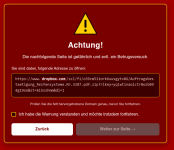
Inert Mode: Replaces http:// → hxxp:// and https:// → hxxps:// in plain-text bodies
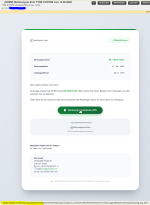
Redirect Mode: Redirects via warning page with a plain html page in multiple languages you can host on any plain web server
You are allowed to use the default page, but you should only do it for testing purpose.
https://goto-url.de/warning.html
The goto-url.de page is hosted by me and doesn't collect any data. It is plain HTML + Javascript, no server side rendering - Optionally also rewrites href= and src= attributes in HTML so that clickable links become inert
- Optionally prefixes the subject with a configurable tag (e.g. [DEFANGED]) if any URL was rewritten
Installation
- Download the files and remove .txt ending
- Host the html-page anywhere on your webserver (will read out the customers browser language and support 25 languages)
- Copy both files (Defang.pm and install-defang-pmg9.sh) to /root/
Code:
chmod +x install-defang-pmg9.sh && ./install-defang-pmg9.shConfiguration
- Clear browser cache (Ctrl+Shift+R in the PMG UI).
- Go to Configuration → Mail Filter → Action Objects → Add — "Defang URLs" should appear in the dropdown.
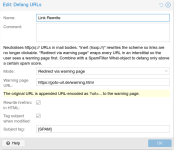
- Configure the action:
- Name: e.g. "Defang Spam Links"
- Choose if you want to make the links inert (hxxps://) or redirect via warning page
- If you choose redirect: Enter your redirect URL. I grant the permission to use the default page (hosted by me), but you should host the warning.html by yourself
- Rewrite href/src in HTML: recommended — enable this
- Tag subject when modified: optional — appends [DEFANGED] to the subject line
- Subject tag: customisable
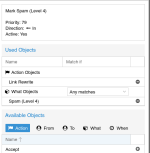
- Create a rule under Mail Filter → Rules → Add:
- Direction: In (or Both)
- Priority: e.g. 50
- What: Add → SpamFilter → Score >= 4 (or your preferred threshold)
- Action: Add → select the Defang action you just created
- Save and activate.
Uninstall
Code:
./install-defang-pmg9.sh --uninstallKnown limitations
- This modifies the mail body in transit. Inform your users if this behaviour is unexpected. It also destroys DKIM and triggers DMARC
- The module lives in /usr/share/perl5/PMG/RuleDB/ which is managed by the pmg-api package.
After a 'apt upgrade', mostly a reinstallation neccessary: just add the installer to your update-skript. - Tested on PMG 9.0.7
License
The code is released into the public domain — no rights reserved. Feel free to use, modify and redistribute it without any restrictions.
The Proxmox team is explicitly welcome to incorporate this into a future version of PMG.
Edit:
By the way: Less than 2 hours beteween: Would be cool if the feature exist and feature implement, test and forum post written.
AI is the next thing. really.
Attachments
Last edited: