Resize local or local-lvm (and how?)

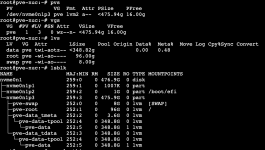
Sorry to revive an old thread. Given the following configuration (see screenshot), what command should I run to reduce LOCAL to about 40G and extend LOCAL-LVM by the same amount of GB I reduced LOCAL ?

Thanks a lot!

Screenshot 2025-06-24 at 14.32.02.png
 
Somehow I got this backwards, oops.

Local is 3.65 TB
local-lvm is 268.44 GB

I meant to switch that,, and now having trouble fixing it.
 
Boot a live iso (installer shell works too) and you can shrink the root volume again. I.e lvresize -r ... pve/root.
 
I see..

resize2fs /dev/pve/root 250G
lvreduce --size 250G /dev/pve/root
resize2fs /dev/pve/root

That worked. TY @Impact

Well, numbers are kinda funny, but whatever, close enough.

Local is now 477.07 GB
local-lvm is 3.30 TB

Works for me.. Think it's a GB and TB vs GiB and TiB kinda thing.

With gparted using GiB and TiB, and Proxmox using GB and TB.
 
My snippet is safer (no rounding issues) and does the tasks (-r for filesystem) in one step with verification. In your case if resize2fs couldn't shrink that much (probably the case here) you cut data off which will likely bite you at some point.
 
Last edited: