Resize cloned disk (Clonezilla)

Firro

New Member
Apr 12, 2025
4
1
3
I have upgraded the disk in my server from a 500GB disk to 1TB and used Clonezilla, seams to be working just fine.
But i want to make use of the bigger disk and i have tried lvextend, and installed parted and tried resize but not with any luck.

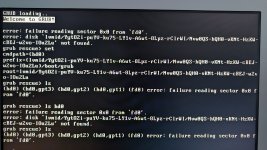
Screenshot 2025-04-12 134327.png
Any one that can help me out whit what commends i need to use to make the full disk size available.

 
This is how I expand disks in my debian VM, it should work in you PBS host:
  1. fdisk /dev/sda
    1. -> p (show partitions)
    2. -> d (delete the partition 3 (don't worry, it wont delete your data))
      1. -> 3
    3. -> n (create partition at the same start-block, default)
      1. 3
      2. default start block
      3. default end block (max size)
      4. if it asks you to delete the LVM label, select NO.
    4. -> t (change the partition type to Linux LVM)
      1. L (to show all the possible formats, find "Linux LVM"). "q" to exit the list and return to the menu.
      2. xx (enter the number you just found for the Linux LVM)
    5. -> p (show the final result)
    6. -> w (write)
  2. -> reboot now
  3. -> pvresize /dev/sda3
  4. -> lvextend -l +100%FREE /dev/pve/root
  5. -> resize2fs /dev/pve/root
  6. -> reboot now